ZvSync-NA User’s Manual
|
Page 7
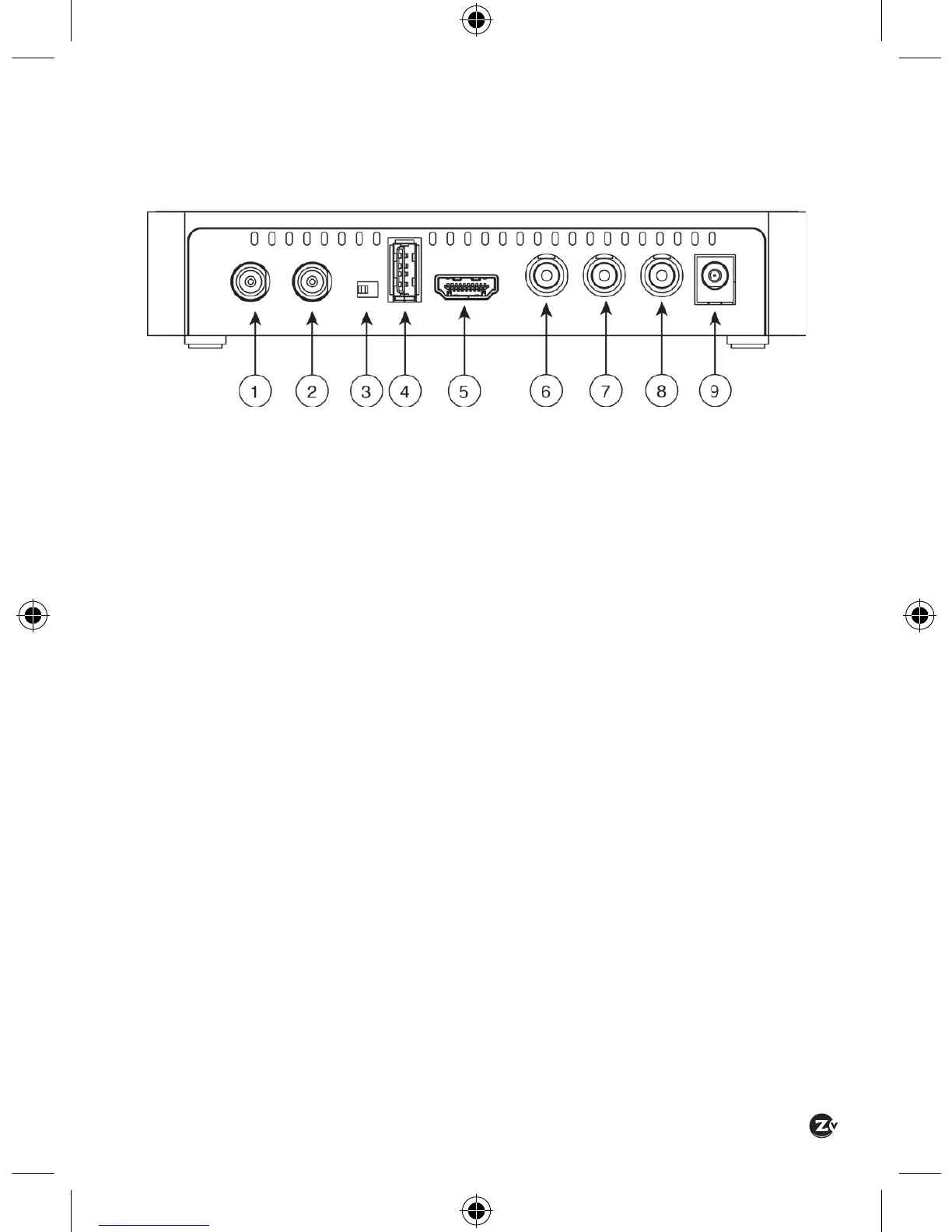
1.2 REAR PANEL
Aerial/Cable/RF Input – Connect to the antenna for over-the-air
reception or to a cable feed for Clear-QAM reception
RF Modulated Output – Connect to the antenna input of the television
if receiver/decoder output is to be displayed on an older analog
television. Output will be scaled to 480i NTSC type signal
Channel 3 or 4 Modulator Selection – If the RF Modulated Output
is utilized, the NTSC channel that is transmitted can be selected as
channel 3 or channel 4 in a North American over-the-air channel map.
USB Port – The USB port is used for software updates or media service.
HD Video Output – The video output most commonly used from the
receiver unit. Connect to the HDMI digital input of the display device
(typically a television). Both high de nition video and digital audio are
carried.
CVBS Video Output – For composite video output, connect the CVBS
Video output to the appropriate composite video input of the display
device (typically a television or monitor).
Left Audio Output – For analog audio, connect to the appropriate
‘Left’ analog audio input on the display device (typically a television or
ampli er).
Right Audio Output – For analog audio, connect to the appropriate
‘Right’ analog audio input on the display device (typically a television or
ampli er).
Power Connector – Connect to the plug on the supplied wall-mount
power supply.


 To Next Page