EasyManua.ls Logo

Zeiss Axioscope 7 - User Manual

Zeiss Axioscope 7
140 pages
Print Icon
To Next Page IconTo Next Page
Loading...
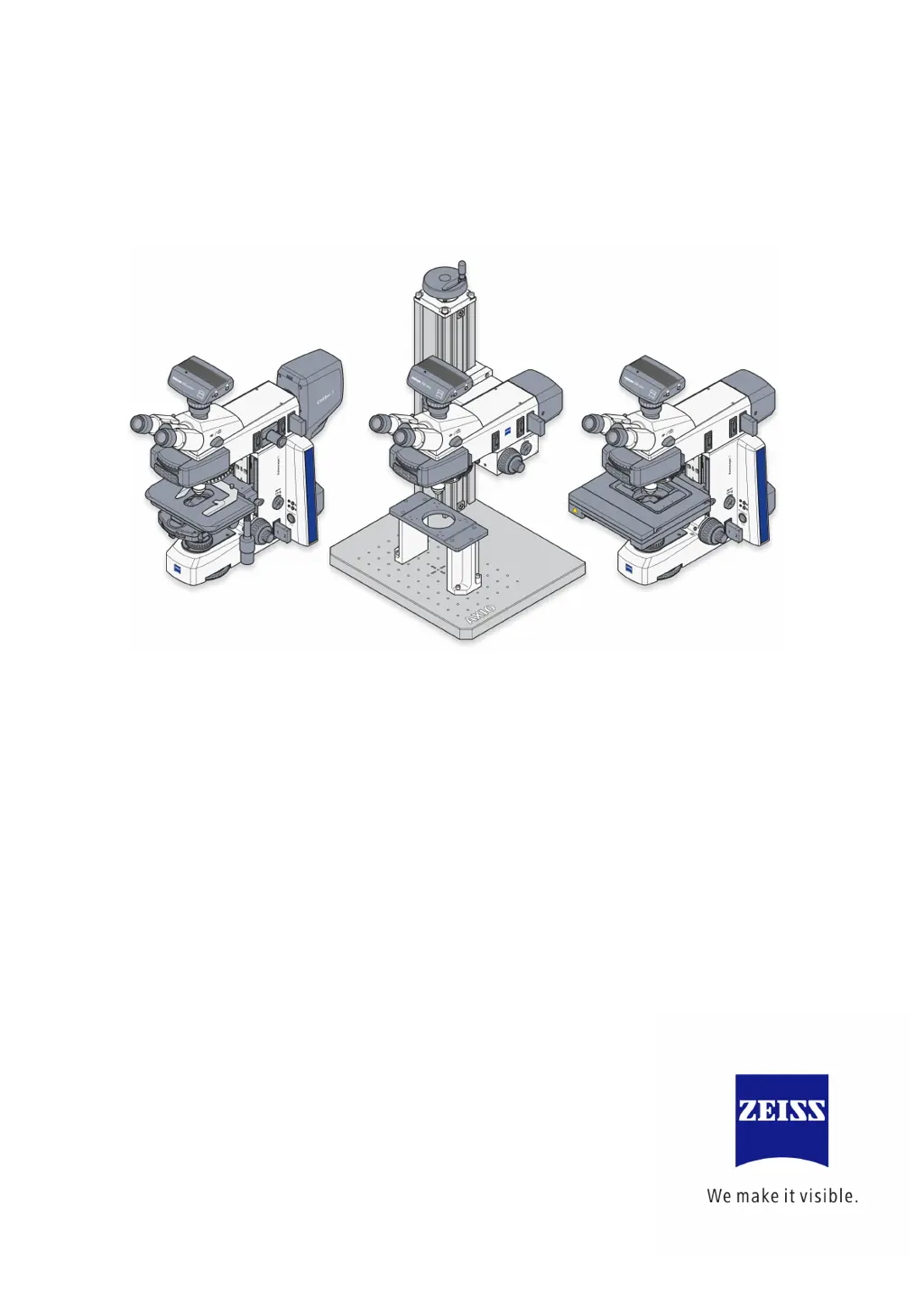
Operating Manual
Axioscope 5/7/Vario
Upright Microscope for Routine and Entry-level Research
Microscope for Routine and Entry-Level Research

Table of Contents

Questions and Answers

  • S
    Sarah DrakeAug 2, 2025
    Why is there shading in the field of view of my Zeiss Axioscope 7?
    • M
      Melissa CookAug 2, 2025
      Shading or brightness irregularities can occur in your Zeiss Microscope's field of view due to several reasons. It could be that the vis/phot push-pull rod/shift knob on the photo tube is not in the correct functional position, meaning it's in an in-between position. To resolve this, move the vis/phot push-pull rod/shift knob to the correct end position. Another cause could be that the nosepiece with the objective is not fully engaged in its locking position; ensure the nosepiece is fully engaged. Other potential causes include incorrect adjustment of the condenser, aperture diaphragm, or field diaphragm. Also, check that the filter is correctly inserted in its slot.
  • P
    Peter Jensen PhDNov 15, 2025
    What to do if my Zeiss Microscope has low resolution?
    • E
      Erika CherryNov 16, 2025
      If you are experiencing low resolution with your Zeiss Microscope, several factors could be responsible. First, ensure that the opening of the aperture diaphragm is correctly adjusted according to the 2/3-rule and the texture of your sample. Also, check that the condenser is correctly focused and the front lens is properly connected. If you're using a transmitted light objective, make sure you are using standardized frame glasses with a thickness of 0.17 mm. Verify that the specimen holder is correctly inserted with the sample side up. For immersion objectives, use the correct immersion oil (ZEISS immersion oil 518 N or 518 F) and ensure there are no air bubbles. Clean the lens if immersion oil is present on a dry objective. Adjust the correction setting to match the frame glass thickness ...

Summary

1 INTRODUCTION

1.1 Notes on instrument safety

Essential safety information and warnings for operating the microscope.

1.2 Warning labels on the microscopes

Explanation of safety labels and symbols used on the microscope.

1.3 Notes on the warranty

Details regarding the manufacturer's warranty and conditions.

2 DESCRIPTION OF THE INSTRUMENT

2.1 Intended use

Specifies the intended applications and fields for the Axioscope microscopes.

2.2 Technical data

Detailed technical specifications including dimensions, weight, and environmental conditions.

2.3 Interface diagram

Diagram illustrating the microscope's hardware interfaces and components.

2.4 Controls and functional elements on the microscope

Overview of the various stand models and their controls and functional elements.

2.5 Controls and functional elements on microscope components

Details on functional elements of microscope components like tubes and stages.

3 START-UP

3.1 Mounting standard components

Instructions for unpacking and setting up the standard microscope components.

3.2 Mounting optional components

Guidance on mounting various optional accessories and components to the microscope.

3.3 Connecting to the power supply and switching the microscope on;off

Steps for connecting the microscope to power and basic power on/off procedures.

3.4 Using the Light Manager function

Explains how to use and manage the microscope's Light Manager function.

3.5 Default factory settings of the microscope

Information on default factory settings and how to reset the microscope.

4 OPERATION

4.1 Default setting of the microscope

Procedures for setting the inter-pupillary distance and viewing height.

4.2 Illumination and contrast methods in transmitted light microscopy

Detailed guide on various illumination and contrast methods for transmitted light.

4.3 Illumination and contrast methods in reflected light microscopy

Detailed guide on various illumination and contrast methods for reflected light.

5 CARE, FUSE REPLACEMENT AND SERVICE

5.1 Instrument care

Guidelines for proper cleaning and maintenance of the microscope and its optics.

5.2 Instrument maintenance

Procedures for checking the instrument and replacing fuses in the stand and power supply.

5.3 Troubleshooting

A guide to common problems, their causes, and solutions for microscope issues.

5.4 Maintenance and repair work

Information on authorized maintenance and repair work performed by ZEISS service.

6 ANNEX

6.1 List of abbreviations

Alphabetical list of abbreviations used throughout the manual.

6.2 Index

Alphabetical index of topics covered in the manual for quick reference.

6.3 Industrial property rights

List of patents protecting the instruments, components, and methods.

6.4 System overview

Visual overview of microscope systems and compatible components.

Zeiss Axioscope 7 Specifications

General IconGeneral
Microscope TypeUpright Microscope
Optical SystemInfinity Optical System
IlluminationLED illumination
Objective LensesPlan-Apochromat
Objective Turret6-position
StageMotorized scanning stage
Camera IntegrationIntegrated camera port for digital cameras
SoftwareZEN software
Contrast MethodsBrightfield, Darkfield, Phase contrast, Fluorescence
Eyepieces10x
Focus DriveMotorized focus drive
Power Supply100-240 V AC, 50/60 Hz

Related product manuals