EasyManua.ls Logo

Zeiss Axioskop 40 - User Manual

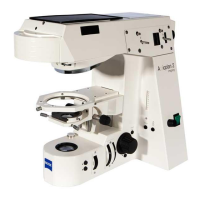
Zeiss Axioskop 40
146 pages
Print Icon
To Next Page IconTo Next Page
Loading...
Operating Manual
Axioskop 40 / Axioskop 40 FL
Routine microscope

Table of Contents

Questions and Answers

  • J
    Jennifer Gardner DVMAug 14, 2025
    How to remove dust from the view in my Zeiss Axioskop 40 Microscope?
    • F
      fisheralexaAug 14, 2025
      If you notice dirt or dust in the field of view of your Zeiss Microscope, it could be due to a few reasons. Check that the condenser is correctly focused and the front lens 0.9 is properly switched. Ensure the aperture diaphragm opening is appropriately sized according to the 2/3 rule or specimen characteristics. Also, inspect the optical surfaces of the objectives, eyepieces, condensers, filters, and specimens for any dirt or dust, and clean them as needed.
  • A
    Antonio DunnAug 18, 2025
    How to fix shadows or brightness issues in my Zeiss Microscope field of view?
    • S
      Stephanie MurphyAug 18, 2025
      Shadows or uneven brightness in your Zeiss Microscope's view could stem from several factors. First, ensure the vis/fot push rod on the camera tube is fully in position. Next, check that the nosepiece with the objective is correctly clicked into place. Also, verify that the condenser, aperture diaphragm, and luminous-field diaphragm are properly set. Lastly, confirm the filter is correctly inserted in its mount. Adjusting these components should improve image quality.
  • S
    Sarah LynchAug 21, 2025
    Why is my Zeiss Axioskop 40 image blurry with low contrast?
    • J
      Julie HernandezAug 21, 2025
      Poor resolution and contrast in your Zeiss Microscope images can result from several issues. Ensure the aperture diaphragm opening is correctly set according to the 2/3 rule or specimen features. Verify that the condenser is properly focused and that the front lens 0.9 is correctly switched. Use standardized 0.17 mm thickness cover slips. Make sure the carrier plate is correctly oriented with the specimen side up. Use immersion oil 518 N from Carl Zeiss with immersion objectives, ensuring no air bubbles are present. Clean any immersion oil from dry objective lenses. Set the corr. ring to match the cover slip thickness. Finally, clean any dirt or dust from optical surfaces of objectives, eyepieces, condensers, or filters.
  • T
    Tabitha MillerAug 25, 2025
    What to do if my Zeiss Axioskop 40 Microscope halogen lamp is not working?
    • C
      Cheryl HansenAug 25, 2025
      If the 12 V 35 W halogen lamp in your Zeiss Microscope isn't working, even when switched on, check these items: 1. Ensure the power plug is correctly connected to a functioning power outlet, verifying both instrument and line voltage. 2. Confirm that a 12 V 35 W halogen lamp is installed. 3. If installed, the lamp might be defective and needs replacement. 4. Verify you are using the specified 12 V 35 W halogen lamp. 5. Check the fuses and replace them if necessary. 6. Try a different power outlet to rule out voltage issues. If none of these steps work, the electronic module may be defective and require servicing.
  • T
    Tamara ClarkAug 27, 2025
    Why does my Zeiss Axioskop 40 cause eye strain?
    • M
      Melanie AndradeAug 27, 2025
      If you're experiencing eye fatigue while using your Zeiss Microscope, consider the following: * Ensure the interpupillary distance of the binocular tube is correctly set. * Verify that the focusing eyepieces are adjusted to your appropriate ametropia. * Adjust the lamp voltage or insert a conversion filter to achieve acceptable image brightness. If the problem persists, the binocular tube might be optically or mechanically misaligned, requiring professional service.
  • C
    Calvin PhelpsAug 31, 2025
    Why are my Zeiss Axioskop 40 images blurred on one side?
    • D
      David HendersonAug 31, 2025
      Asymmetrical blurring in your Zeiss Microscope images, where one side is in focus but the other isn't, can be due to a few reasons. First, ensure the condenser is correctly set. Next, verify that the nosepiece is properly clicked into place. Finally, confirm that the specimen is correctly inserted and clamped on the mechanical stage.
  • C
    catherinerochaSep 3, 2025
    Why does my Zeiss Axioskop 40 Microscope need refocusing after changing objectives?
    • C
      carrillosaraSep 3, 2025
      Significant focus differences after changing objectives on your Zeiss Microscope may arise from incorrectly set focusing eyepieces. Ensure they are adjusted to the appropriate ametropia. Also, check that each objective is fully screwed in to the stop position. Finally, confirm that the tube lens is either correctly inserted or not superfluously inserted.
  • B
    bpettySep 6, 2025
    Why can't I merge the view fields in my Zeiss Axioskop 40 Microscope?
    • J
      Jordan VasquezSep 6, 2025
      If you're unable to merge the left and right fields of view into a single image with your Zeiss Microscope, the interpupillary distance of the binocular tube may not be correctly set. Adjust it accordingly. Additionally, ensure that the focusing eyepieces are properly set to your individual ametropia.
  • J
    Jeffrey FarmerSep 10, 2025
    Why is the light flickering on my Zeiss Axioskop 40?
    • Z
      zmillerSep 10, 2025
      If the 12 V 35 W halogen lamp in your Zeiss Microscope flickers or the illumination intensity is unstable, it could be due to the lamp reaching the end of its service life, requiring replacement. Also, check the power cable for correct installation or breakage, replacing it if necessary. Finally, ensure the pins of the 12 V 35 W halogen lamp are correctly inserted into the receptacle.

Summary

INTRODUCTION

Instrument Safety Guidelines

Essential warnings and symbols for safe operation and handling of the microscope.

Warranty Information

Details on manufacturer guarantees, limitations, and claims for defects.

Axioskop 40 Overall View

Diagram and identification of key components of the Axioskop 40 microscope.

Axioskop 40 FL Overall View

Diagram and identification of key components of the Axioskop 40 FL microscope.

INSTRUMENT DESCRIPTION

Microscope Name and Application

Designation and intended use of the Axioskop 40/40 FL for biomedical applications.

Instrument Description and Main Features

Detailed overview of the microscope's design, ergonomics, and key features.

Axioskop 40 System Overview

Diagram illustrating system components and their interconnections for Axioskop 40/40 FL.

Microscope Objectives

Explanation of objective labeling, color codes, and magnification factors.

Technical Data and Specifications

Physical dimensions, weight, ambient conditions, and operating data.

START-UP PROCEDURES

Initial Microscope Start-Up

Steps for unpacking, setting up, and connecting the microscope.

Unpacking and Installing the Microscope

Procedure for unpacking the microscope and placing it on a worktable.

Attaching Binocular Tube or Phototube

Procedure for correctly mounting the binocular tube or phototube.

Mounting Objectives

Instructions for screwing objectives into the nosepiece correctly.

Connecting Power and Switching On;Off

Procedure for connecting power and operating the microscope's power switch.

Lamp Installation and Replacement

Instructions for inserting and replacing the 12V, 35W halogen lamp.

HBO 103 Illuminator Setup

Attaching and adjusting the HBO 103 illuminator for fluorescence.

HBO 50 Fluorescence Illuminator Setup

Attaching and adjusting the HBO 50 fluorescence illuminator.

Attachments and Conversions Overview

Overview of procedures for attaching and converting microscope components.

Changing the HBO 103 W;2 Mercury Vapor Lamp

Detailed steps for changing the HBO 103 W/2 mercury vapor short-arc lamp.

Mechanical Stage Adjustments

Setting travel range and torque for the mechanical stage drives.

Changing the Mechanical Stage

Procedure for removing and attaching fixed and rotary mechanical stages.

Installing and Removing Push&Click Modules

Guide for installing and removing modules on the reflector turret.

Changing Filter Sets and Beam Splitters

Steps for changing filter sets and beam splitters in the reflector module.

OPERATION GUIDELINES

Axioskop 40 Operation Controls

Identification and function of controls for the Axioskop 40 microscope.

Axioskop 40 FL Operation Controls

Identification and function of controls for the Axioskop 40 FL microscope.

Switching Microscope On and Off

Procedure for powering the microscope on and off correctly.

Illumination and Contrast Procedures

Methods for setting bright field, phase contrast, dark field, and polarization.

Setting Transmitted-Light Bright Field (Köhler)

Step-by-step guide to setting up Köhler illumination for bright field.

Setting Transmitted-Light Phase Contrast

Procedure for setting up phase contrast microscopy.

Setting Transmitted-Light Dark Field

Guide to setting up dark field microscopy for unstained specimens.

Setting Transmitted-Light Polarization

Techniques for polarization microscopy, including detecting birefringence.

Setting Epi-Fluorescence

Procedure for setting up and using the epi-fluorescence technique.

Attaching Photomicrography Equipment

Connecting cameras and accessories for capturing images.

Measuring Lengths with the Microscope

Methodology for accurate length measurements using micrometers.

CARE, MAINTENANCE, AND TROUBLESHOOTING

Instrument Care and Cleaning

Guidelines for proper cleaning, storage, and maintenance of the microscope.

Performing Maintenance Checks

Regular checks for voltage compliance, cables, and lamp usage.

Changing Microscope Fuses

Procedure for safely replacing blown fuses in the microscope.

Troubleshooting Common Issues

Solutions for problems like poor image brightness, focus, or dirt.

Spares, Consumables, and Tools

List of recommended spare parts, consumables, and necessary tools.

Requesting Service and Support

Information on authorized repairs and service agreements.

APPENDIX

List of Abbreviations

Glossary of technical terms and acronyms used in the manual.

Document Index

Alphabetical index to quickly locate specific topics within the manual.

Zeiss Axioskop 40 Specifications

General IconGeneral
BrandZeiss
ModelAxioskop 40
CategoryMicroscope
LanguageEnglish

Related product manuals