EasyManua.ls Logo

Zeiss Axioskop 2 plus - User Manual

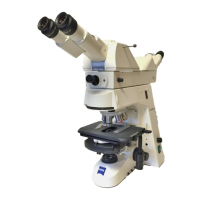
Zeiss Axioskop 2 plus
138 pages
Print Icon
To Next Page IconTo Next Page
Loading...
Operating Manual
Axioskop 2
plus
/ Axioskop 2
mot
plus
Routine Microscope

Table of Contents

Questions and Answers

  • M
    Mark StewartAug 14, 2025
    What to do if my Zeiss Axioskop 2 plus has dirt or dust in the field of view?
    • A
      adamsjulieAug 14, 2025
      If you notice dirt or dust in the field of view of your Zeiss Microscope, it could be due to a few reasons. First, ensure the condenser is correctly focused and the condenser lens 0.9 is switched correctly. Also, check that the aperture diaphragm opening isn't too small; adjust it according to the 2/3 rule or the specific features of your specimen. Finally, inspect and clean the optical surfaces of your objectives, eyepieces, condensers, filters, or the specimens themselves to remove any dirt or dust.
  • J
    Jeremy Harris MDAug 17, 2025
    Why is my Zeiss Axioskop 2 plus image brightness inhomogeneous and not entirely visible?
    • M
      Michael SmithAug 17, 2025
      Uneven brightness or incomplete visibility in your Zeiss Microscope's field of view can stem from several factors. The vis/fot pushrod on the camera tube might not be in the correct position; ensure it's fully in the end position. Check that the nosepiece with the objective is correctly clicked into place. Also, verify that the condenser, aperture diaphragm, and luminous-field diaphragm are properly set (adjusted, centered, and opened). Lastly, confirm the filter is correctly inserted in the filter mount.
  • E
    Eric LewisAug 20, 2025
    Why does my Zeiss Axioskop 2 plus have low resolving power and poor image contrast?
    • J
      John JonesAug 20, 2025
      Low resolving power and poor image contrast in your Zeiss Microscope can arise from several causes. Ensure the aperture diaphragm opening is correctly set according to the 2/3 rule or specimen features. Focus the condenser correctly and properly switch the condenser lens 0.9. Use standardized cover slips with a thickness of 0.17 mm. If using immersion objectives, apply immersion oil 518 N from Carl Zeiss. Remove any air bubbles in the immersion oil and clean the front lens of any dry objective if it has immersion oil on it. Also, set the corr. ring to the correct cover slip thickness. Finally, ensure all optical surfaces of objectives, eyepieces, condensers, or filters are free from dirt or dust.
  • H
    Hayley Ellis DDSAug 25, 2025
    Why does my Zeiss Axioskop 2 plus lamp flicker or have unstable brightness?
    • L
      Lauren MyersAug 25, 2025
      If the 12 V 100 W halogen lamp in your Zeiss Microscope flickers or has unstable brightness, it might be nearing the end of its average lifespan, so consider replacing it. Check the line cable for correct connection or breakage, and replace if necessary. Also, ensure the pins of the 12 V 100 W halogen lamp are correctly inserted into the receptacle.
  • A
    Anna WatersAug 27, 2025
    Why is my Zeiss Microscope image asymmetrically blurred?
    • R
      Robert FrenchAug 27, 2025
      Asymmetrically blurred images, where one side is in focus but the other isn't, on your Zeiss Microscope can be due to a few reasons. Check that the condenser is correctly set. Ensure the nosepiece is properly clicked into position. Also, make sure the specimen is correctly inserted and clamped in position on the mechanical stage.
  • S
    stefaniepruittAug 30, 2025
    What to do if my Zeiss Axioskop 2 plus Microscope has great focus differences after objective change?
    • M
      Mary FlynnAug 30, 2025
      If you experience significant focus differences after changing objectives on your Zeiss Microscope, it could be due to a few reasons. Ensure the focusing eyepieces are set to the appropriate ametropia. Verify that the objective is fully screwed in until it stops. Also, check if the tube lens is either not integrated or integrated superfluously; correct as needed.
  • E
    Elizabeth WarrenSep 2, 2025
    Why can't I combine left and right fields of view into an image in my Zeiss Axioskop 2 plus Microscope?
    • J
      Jeffrey TaylorSep 3, 2025
      If you're unable to combine the left and right fields of view into a single image with your Zeiss Microscope, the interpupillary distance of the binocular tube might not be set correctly, so adjust it accordingly. Also, ensure that the focusing eyepieces are set to the appropriate ametropia.
  • D
    Debra TaylorSep 6, 2025
    Why am I experiencing eye-fatiguing microscopy with my Zeiss Axioskop 2 plus Microscope?
    • E
      Eric BradleySep 6, 2025
      Eye fatigue during microscopy with your Zeiss Microscope can occur due to several reasons. Ensure the interpupillary distance of the binocular tube is correctly set. Also, verify that the focusing eyepieces are adjusted to the appropriate ametropia. Adjust the lamp voltage or insert a conversion filter to achieve acceptable image brightness. If the binocular tube is optically or mechanically misaligned, it may require professional service.
  • B
    Bethany MooreSep 9, 2025
    Why can't the lamp voltage of my Zeiss Axioskop 2 mot plus be regulated?
    • E
      elizabeth85Sep 9, 2025
      If the lamp voltage of your 12 V / 100 W halogen lamp cannot be regulated for the Axioskop 2 mot plus, it might be because the control for light intensity is in the stop position. This causes the light manager to regulate the intensity to the preset or stored value. To resolve this, move the control shortly out of the stop position, which should allow the light intensity to be set as usual again.

Summary

INTRODUCTION

Copyright Information

Legal notices and copyright details for the manual.

Instrument Safety Notes

Essential safety precautions and warnings for operating the microscope.

Warranty Information

Details the terms and conditions of the manufacturer's warranty.

INSTRUMENT DESCRIPTION

Name and Intended Application

Purpose and usage scenarios for the Axioskop microscopes.

Instrument Description and Main Features

Overview of the microscope's components and capabilities.

Key Configurations and Modules

Lists various setups, modules, and accessories for the Axioskop models.

Objectives and Technical Data

Details on available objectives and key technical specifications of the instruments.

START-UP

Initial Start-Up Procedures

Step-by-step guide for unpacking, installing, and initially setting up the microscope.

Component Attachments and Conversions

Instructions for adding, removing, or changing microscope modules and accessories.

OPERATION

Operation and Function Controls

Introduces the controls and functions for both manual and motorized versions.

Switching On and Basic Settings

Guide on powering up the microscope and initial configuration steps.

Illumination and Contrasting Techniques

Explains various methods for sample illumination and contrast enhancement.

Advanced Applications and Measurements

Instructions for cameras, multi-user setups, drawing, and quantitative measurements.

CARE, MAINTENANCE, TROUBLESHOOTING AND SERVICE

Instrument Care and Maintenance

Guidelines for proper cleaning, storage, and upkeep, including checks and fuse replacement.

Troubleshooting and Service

Common problems, remedies, parts, tools, and how to request professional maintenance.

ANNEX

Reference Information

Glossary, index, and patent details for quick reference.

Zeiss Axioskop 2 plus Specifications

General IconGeneral
TypeUpright microscope
StageMechanical stage with coaxial controls
FocusingCoarse and fine focusing knobs
Optical SystemInfinity-corrected optics
Objective LensesPlan-Neofluar, Plan-Apochromat
IlluminationHalogen or LED
CondenserAbbe condenser
Nosepiece5 or 6-position nosepiece
Eyepieces10x widefield eyepieces
Filter SlotsMultiple filter slots
Camera PortAvailable for photomicrography

Related product manuals