
 Need help?
Do you have a question about the Zeiss GOM Scan 1 and is the answer not in the manual?
Defines standard signal words used in the manual for danger, warning, caution, and notice.
Lists specific safety hazards like explosion, overvoltage, falling objects, and epileptic seizures.
Details sensor models, measuring volumes, distances, and calibration objects.
Provides guidelines on handling calibration objects with care to prevent damage and ensure accuracy.
Specifies when recalibration might be necessary.
Details requirements before calibration, including sensor warm-up and distance adjustment.
Describes the calibration process using the specific CPA calibration panel.
Emphasizes gentle handling and cleaning of the calibration panel to maintain its surface integrity.
Outlines the initial steps to prepare for sensor calibration within the software.
Guides through the step-by-step process of calibrating the sensor with the calibration panel.
Explains how to interpret the calibration result and what to do if it's insufficient.
Explains how to connect the sensor to a desktop PC using the GOM software.
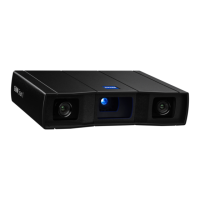
Illustrates the connection of the GOM Scan 1 sensor to a laptop via USB.
 General
| Type | 3D Scanner |
|---|---|
| Technology | Structured Light |
| Light Source | LED |
| Connectivity | USB 3.0 |
| Software | GOM Inspect |
| Calibration | Factory calibrated |
| Operating Temperature | 10°C to 40°C |
| Measurement Volume | Varies with lens |
| Point Distance | 0.1 mm |
| Sensor Resolution | 5 megapixels |
| Typical measurement time | Few seconds per scan |
| Data export formats | STL, PLY, ASCII |
| Mounting | Tripod or stand |
| Application | Quality control, reverse engineering |









 To Next Page