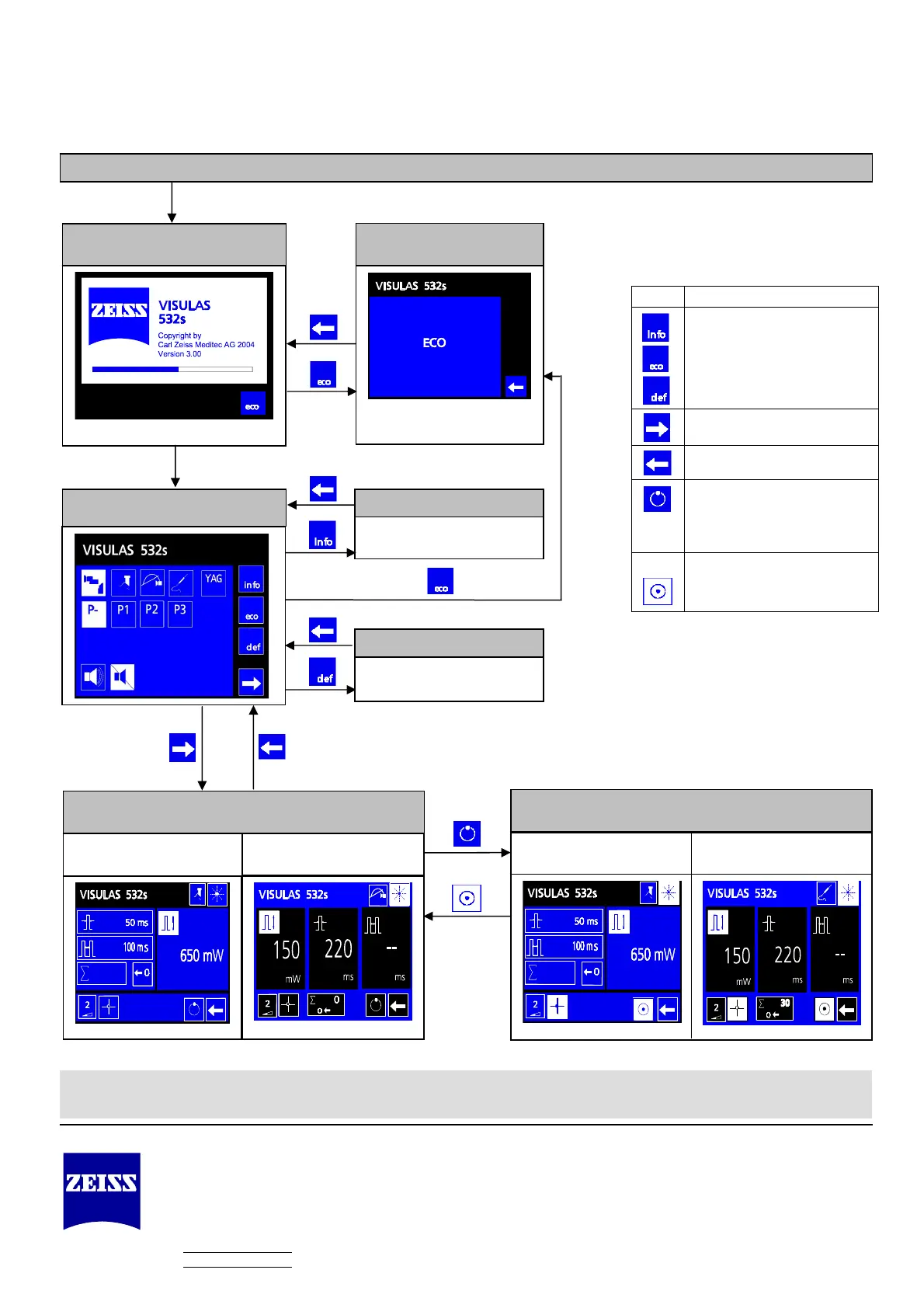
Switch on the instrument using the key switch.
Power-up mode
Main menu
Laser off, slit lamp operation
only
Diagnosis mode
Pro
ram definition mode
S
stem information mode
General settings
For generating user-specific
ro
rams
Treatment READY mode
for LSL and VISULINK for LIO and ENDO
Overview of icons and buttons
Button Function
Switch to system information,
diagnosis, program definition
modes
Switch from the main menu into
treatment mode
Switch back to the main menu
Switch from treatment STANDBY
mode to treatment READY mode
Switch from treatment READY
mode to treatment STANDBY mode
Caution! These quick instructions are intended as an overview. Instructions for the safe operation of this instrument are to be found in the
user manual
.
VISULAS 532s Quick Instructions
Carl Zeiss Meditec AG
Göschwitzer Str. 51-52
07745 Jena
Germany
Telephone: +49 (0) 36 41 / 2 20-3 33
Fax: +49 (0) 36 41 / 2 20-2 82
info@meditec.zeiss.com
www.meditec.zeiss.com
000000-1404-671
VISULAS 532s 29.05.2006
Specifications subject to change
Treatment STANDBY mode
for LSL and VISULINK
for LIO and ENDO












 To Previous Page