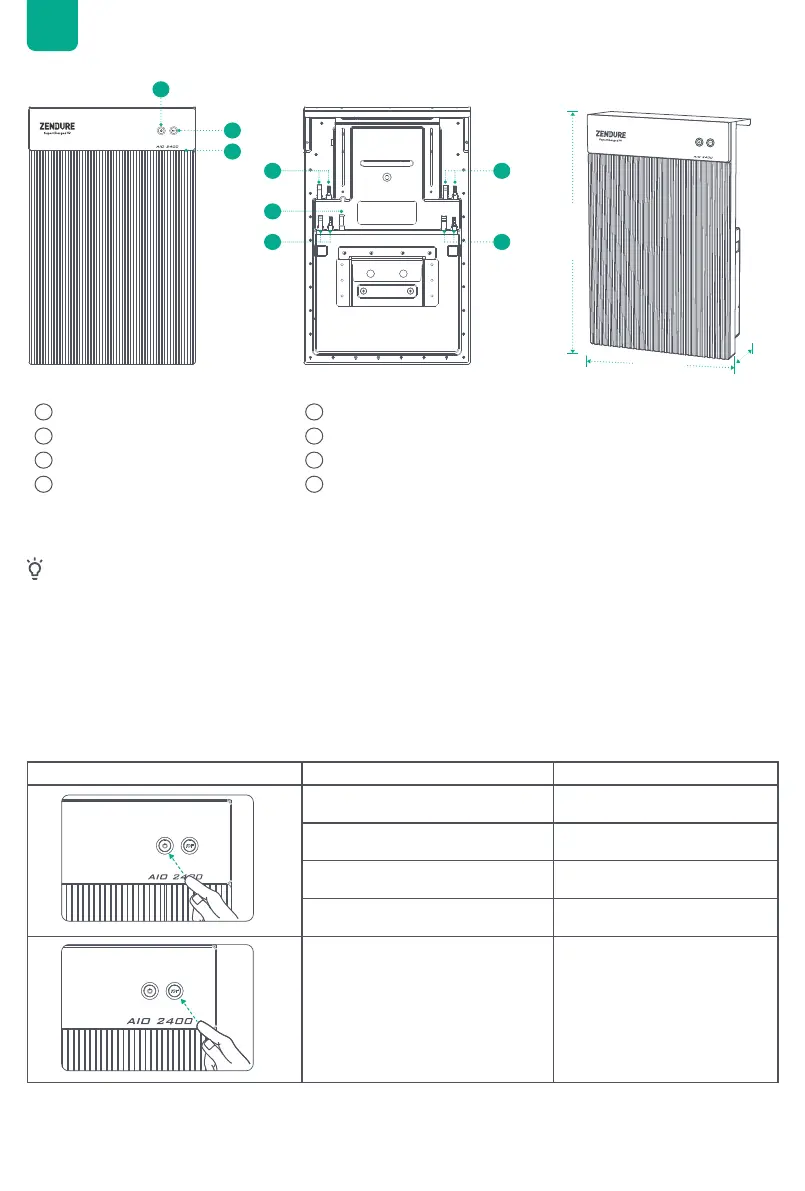
5.2 Product Overview
5.3 Button Controls
1
1
2
5 6
3 4
7 8
2
3
5 4
7
6
8
427mm
657mm
150mm
Power Button
LED Light Strip
MC4 PV Input 2
Microinverter Output 1
IoT Button
MC4 PV Input 1
Antenna
Microinverter Output 2
automatically initiate the IoT connection. Users can directly connect to IoT in the Zendure App.
• After the device is bound to the Zendure App, when AIO 2400 is turned on again, the LED Light Strip light
• If you want to re-bind the account and reset the IoT connection, please press and hold the IoT button for 3
seconds to start the IoT connection.
• Turn On AIO 2400 System: Press and hold the power button 2 second to turn on AIO 2400.
• Turn Off AIO 2400 System: Press and hold the power button 2 seconds to turn off AIO 2400.
• AIO 2400 Hardware Reset: Press and hold the power button 10 seconds to reset AIO 2400.
Tips:
Button Action Function
Press for 2 second Turn AIO 2400 on
Press for 2 seconds Turn AIO 2400 off
Press once when powered on Check current battery level
Press for 10 seconds Reset AIO 2400
Press for 3 seconds Reset Internet connection
EN

 To Next Page
 Loading...