26 Rev.C 27 Rev.C
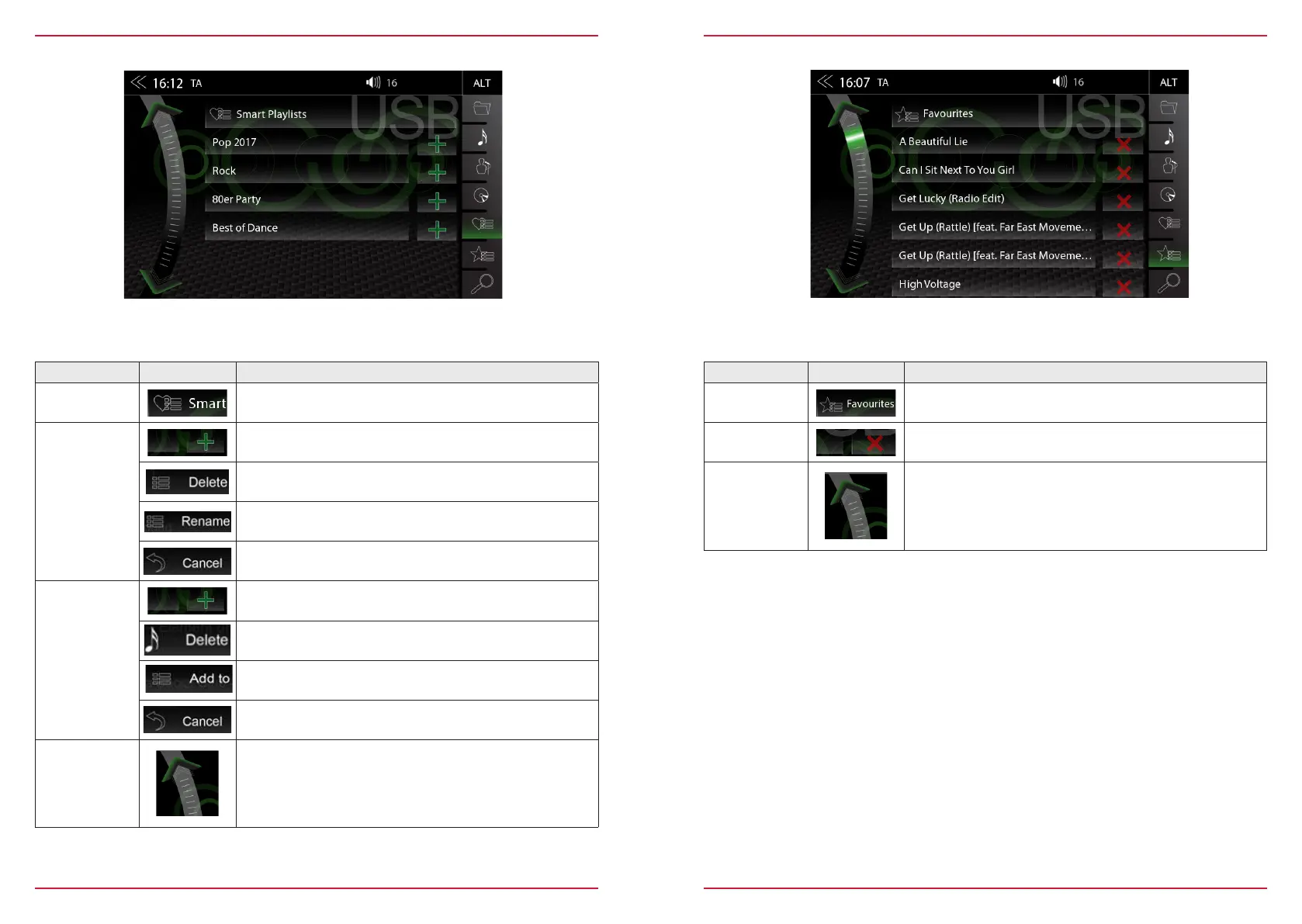
SMART PLAYLIST (AUDIO)
This function allows you to manage the playlists which created by the Smart Playlist function. The
playlists can be renamed.
Function Icon Operation
Playlist name
field
Tap to go to the next higher level
Playlist
editing mode
Tap to edit a playlist (editing mode)
Tap to delete a playlist
Tap to rename a playlist
Tap to cancel playlist edit mode
Song
editing mode
Tap to edit a song within a playlist (editing mode)
Tap to delete a playlist song
Tap to move a playlist song
(Add a song to another playlist)
Tap to cancel edit mode
Scroll
Scroll in the list:
Touch and hold to move the slider up or down
Tap and hold your finger on the list to move the list up or down.
FAV PLAYLIST (AUDIO)
This playlist feature allows you to add a song easily and quickly to a fixed favorite playlist.
Function Icon Operation
Playlist name
field
No function, text field only.
Note: The name of the FAV playlist can not be changed.
Delete
Tap to delete a FAV playlist song
Scroll
Scroll in the list:
Touch and hold to move the slider up or down
Tap and hold your finger on the list to move the list up or down.



 To Next Page