7
The following sections describes how the ITSV-2 is congured to work together with
the TCIV+ Video Intercoms TCIV-2+/TCIV-3+/TCIV-5+/TCIV-6+.
ICX-AlphaCom Conguration
● Log into the ITSV-2 by entering default username / password: /
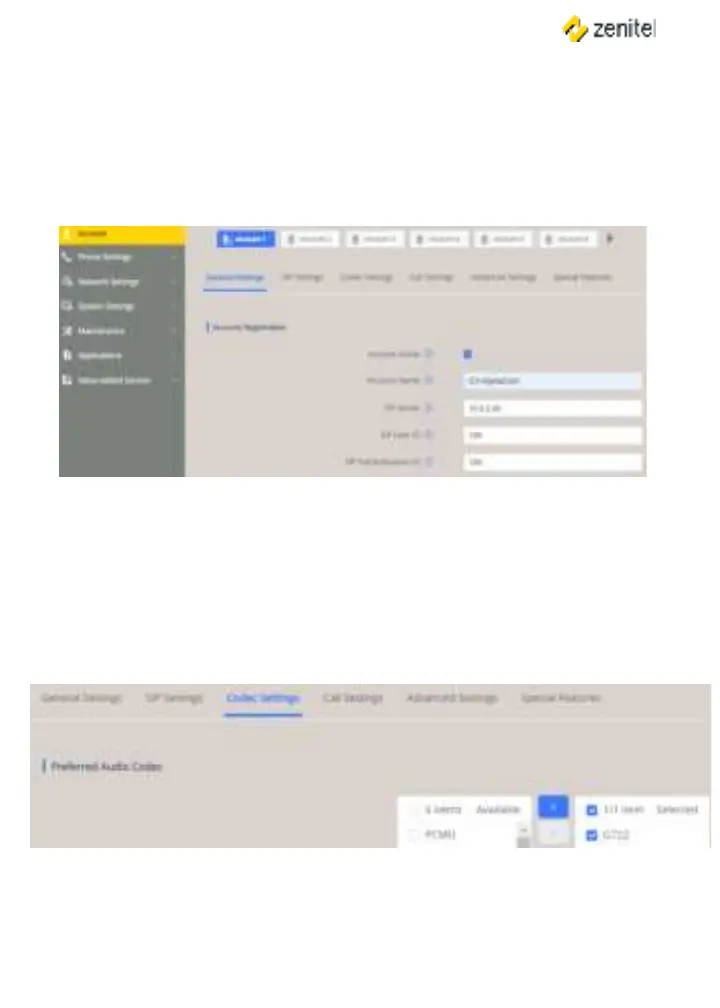
● Select >> General Settings
● Enter values the parameters
Check Yes box
SIP Server: IP address of (see Main Settings in TCIV+)
SIP User ID: Directory Number of ITSV-2
Same as SIP User ID
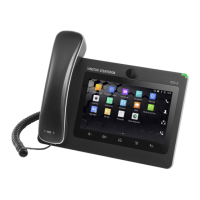
● Check in AlphaPro under Users & Stations the codec that has been selected for
SIP phones (normally G722)
● Select >
● Under remove all codecs from the list except the
one dened in AlphaPro, i.e. G722
● Under select




 To Next Page