8
The video is streamed in H.264 format over RTSP protocol from the TCIV+ camera to the
ITSV-2. The TCIV+ camera must have a static IP address.
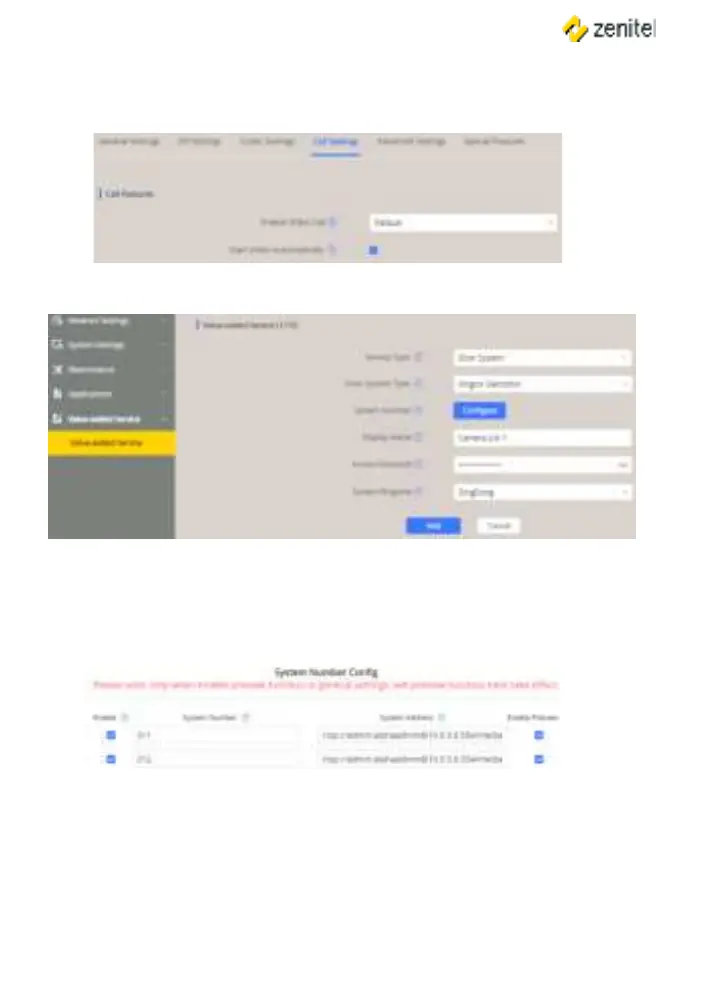
● Select > Call Settings
● Check the box for
● Select > Add
● : Selectfrom the dropdown box
● : Select Vingtor Stentofon from the dropdown box
● : Name of Camera List
● : This will be used for calls from any station in the camera list. It is
possible to add several camera lists and use a dierent ringtone for each list.
● Click for to open the camera list
● Enter the directory number and camera URL of the TCIV+ station
System Number: Directory Number of TCIV+ station
System Address: rtsp://<user:password>@<TCIV+ IP address>:<port no.>/media?encoder=H264
Example: rtsp://admin:alphaadmin@10.9.5.6:554/media?encoder=H264
Note: For TCIV units, System Address = rtsp://admin:alphaadmin@10.9.5.6:554/1/RTSP/video




 To Next Page