EasyManua.ls Logo

Zenith Allegro - Tape Recorder Controls; Tape Playback Controls

Zenith Allegro
24 pages
Print Icon
To Next Page IconTo Next Page
To Previous Page IconTo Previous Page
Loading...
12
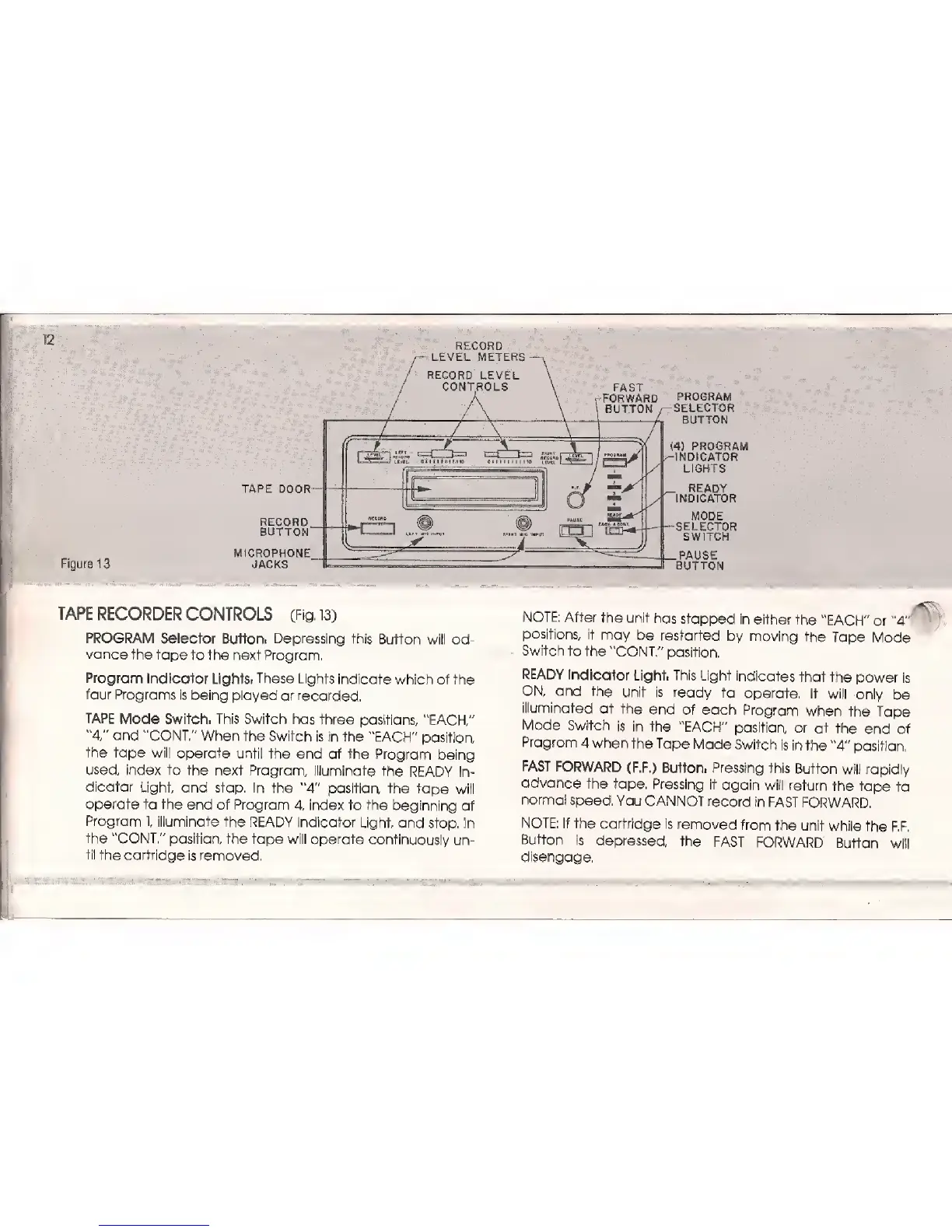
FAST
r
FORWARD
BUTTON
Figure 1
3
TAPE
DOOR-
RECORD
BUTTON"
MICROPHONE
JACKS
PROGRAM
SELECTOR
BUTTON
(4)
PROGRAM
INDICATOR
LIGHTS
READY
INDICATOR
MODE
SELECTOR
SWITCH
.PAUSE
BUTTON
TAPE RECORDER
CONTROLS
(Fig.
13)
PROGRAM
Selector Button.
Depressing
this
Button will
ad-
vance
the tape
to the next
Program.
Program
Indicator
Lights*
These
Lights
indicate
which
of the
four Programs is
being played
or
recorded.
TAPE
Mode
Switch.
This Switch
has three
positions,
"EACH"
"4,"
and
"CONT."
When the Switch
is in the
"EACH"
position
the
tape
will operate
until the
end of the
Program being
used, index
to
the next Program,
illuminate
the
READY
In-
dicator
Light, and stop.
In the
"4"
position the
tape will
operate
to the end of Program
4, index to the
beginning
of
Program
1,
illuminate
the READY Indicator
Light,
and
stop, In
the "CONT." position,
the tape will
operate continuously
un-
til
the cartridge
is removed.
NOTE:
After
the unit
has
stopped
in
either
the
"EACH"
or
"4"
positions, it
may
be
restarted
by moving
the
Tape
Mode
Switch to the
"CONT/'
position.
READY
Indicator
Light. This Light
indicates
that
the
power is
ON,
and the
unit is
ready
to
operate. It
will
only be
illuminated
at
the
end
of each
Program
when
the Tape
Mode
Switch
is
in
the "EACH"
position
or at
the
end
of
Program
4
when
the
Tape Mode
Switch
is
in
the
"4"
position,
FAST
FORWARD
(F.F.)
Button.
Pressing
this
Button
will rapidly
advance
the
tape. Pressing
it
again
will return
the tape
to
normal
speed.
You
CANNOT
record in
FAST FORWARD.
NOTE:
If
the cartridge
is removed
from
the
unit while
the
F.F.
Button
is
depressed,
the
FAST
FORWARD
Button
will
disengage.

Related product manuals