16
SWITCH
/<
SWABS
/e
•
CAPSTAN
MOTOR SWITCH:
POSITION
(CI
MOTOR SWiTCH POSITION (ID)
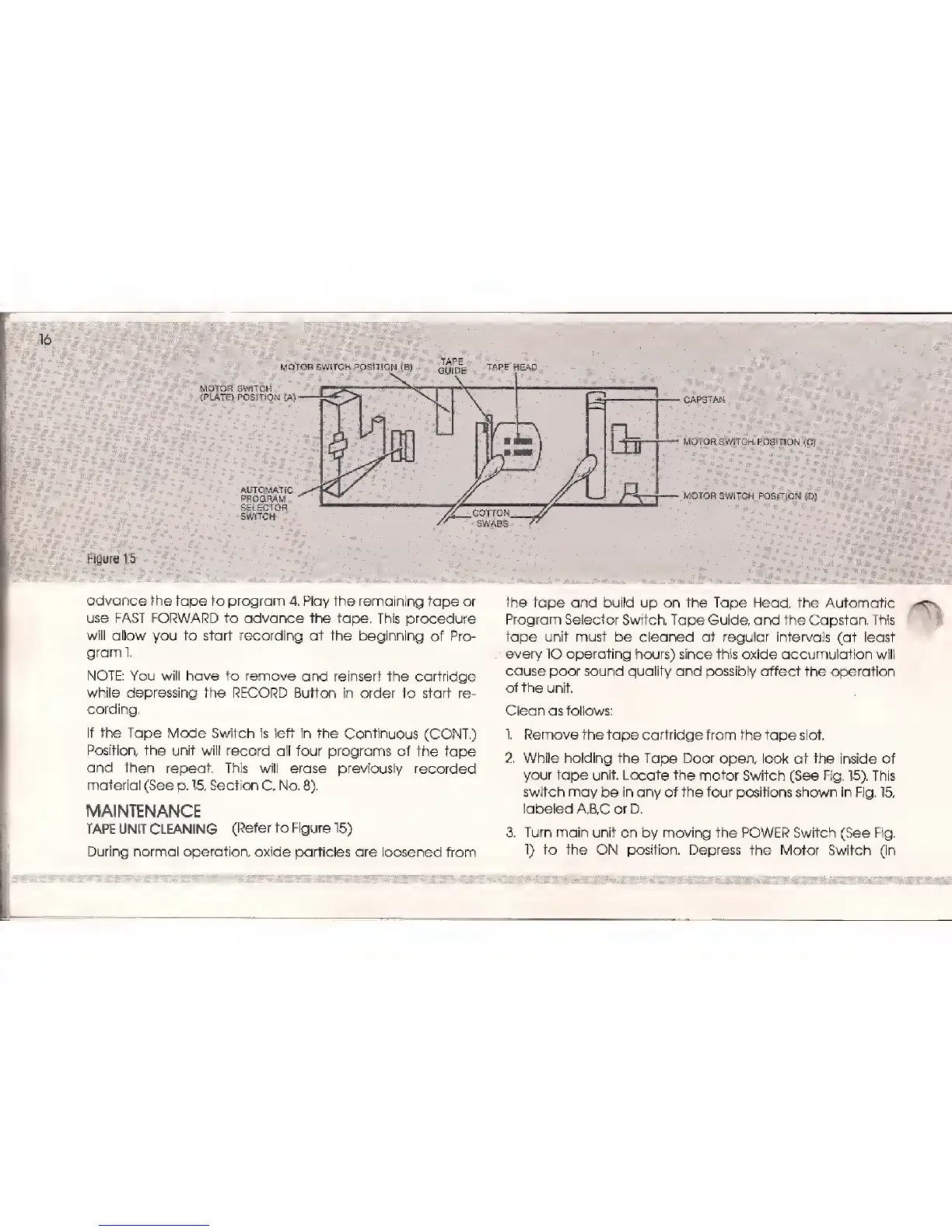
Figure 15
advance the tape to program
4. Play the remaining tape
or
use FAST FORWARD
to advance the tape. This procedure
will allow
you
to start recording
at the beginning ot
Pro-
gram 1.
NOTE: You will have to remove and reinsert
the cartridge
while depressing
the RECORD Button in order
to start re-
cording.
If the Tape Mode Switch is left in the
Continuous
(CONT.)
Position, the unit will
record
all four programs of the tape
and then repeat. This
will erase previously
recorded
material
(See
p.
15,
Section
C, No.
8).
MAINTENANCE
TAPE UNIT CLEANING
(Refer to
Figure
15)
During
normal
operation,
oxide particles are loosened
from
the tape and
build up on the Tape Head, the Automatic
Program Selector Switch, Tape Guide, and
the Capstan. This
tape unit must
be cleaned at regular intervals
(at
least
every lO
operating
hours) since
this oxide accumulation will
cause poor
sound quality and
possibly
affect the operation
of the unit.
Clean
as
follows:
I Remove the
tape cartridge from
the
tape
slot.
2. While holding
the Tape Door
open, look at the
inside of
your
tape
unit.
Locate
the
motor Switch (See Fig.
15).
This
switch
may
be
in any of the four positions shown in Fig.
15,
labeled
A,B,C or D.
3. Turn main unit on
by
moving the POWER Switch
(See
Fig.
1)
to
the ON
position.
Depress the Motor Switch (in



 To Next Page