EasyManua.ls Logo

Zenith Allegro - Accessory Jacks and Antennas; Audio Input;Output Jacks; Antenna Connections; Record Changer Operation

Zenith Allegro
24 pages
Print Icon
To Next Page IconTo Next Page
To Previous Page IconTo Previous Page
Loading...
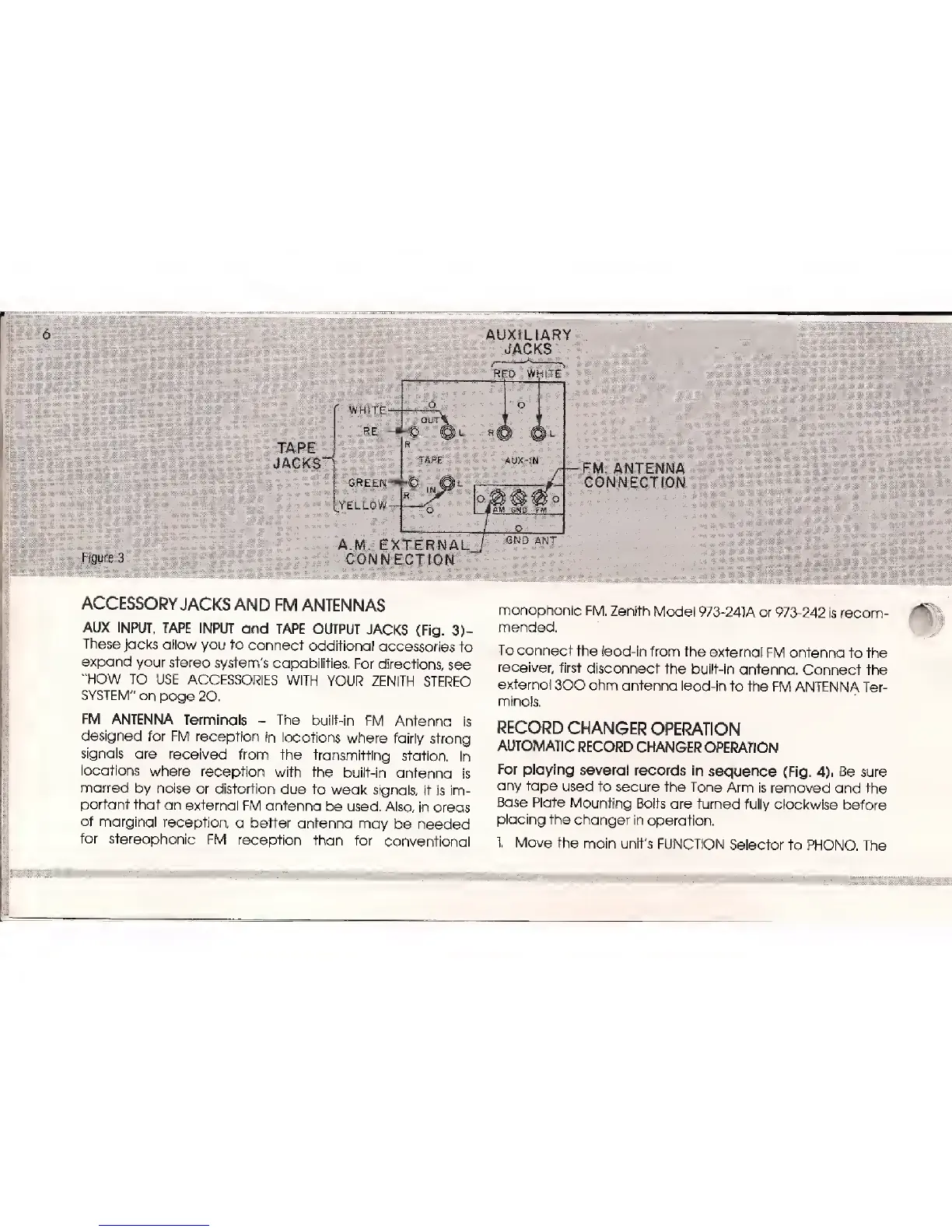
AUXILiAR
JACKS
RED WHITE
TAPE
JACKS""*
WHITE
.
..RED
o
(HIT
1
TAPE
O
AUX-fN
GREEN-*-©
|n
J|l
YELLOW-
Figure
3
*
» *
- :
B
'..:
1
.',.
I
'-.
Li
AM
SN0 FJV1
A.M. EXTERNAL
CONNECTION
:
.-.--
'.-...
v.".-.- .
.-.
'-
;:
'
'_
.
ACCESSORY
JACKS AND
FM
ANTENNAS
AUX
INPUT,
TAPE INPUT
and TAPE
OUTPUT
JACKS
(Fig. 3)-
These jacks
allow you to
connect additional
accessories
to
expand
your
stereo system's
capabilities,
For
directions,
see
"HOW
TO
USE ACCESSORIES
WITH
YOUR ZENITH
STEREO
SYSTEM"
on
page 20.
FM
ANTENNA
Terminals
-
The
built-in
FM
Antenna
is
designed
for
FM reception
in
locations
where
fairly
strong
signals
are
received
from the
transmitting
station.
In
locations
where
reception
with the
built-in
antenna
is
marred
by noise
or
distortion
due
to weak
signals,
it
is im-
portant
that
an
external
FM antenna
be used.
Also,
in areas
of marginal
reception,
a better
antenna
may
be
needed
for
stereophonic
FM reception
than
for
conventional
FM. ANTENNA
CONNECTION
monophonic
FM. Zenith
Model
973-241A or
973-242
is recom-
mended.
To connect
the
lead-in from
the
external
FM antenna
to the
receiver,
first disconnect
the
built-in
antenna.
Connect
the
external
300 ohm antenna
lead-in
to the
FM ANTENNA
Ter-
minals.
RECORD
CHANGER
OPERATION
AUTOMATIC
RECORD
CHANGER
OPERATION
For
playing several
records
in
sequence (Fig.
4).
Be
sure
any tape
used
to secure the
Tone Arm is
removed and
the
Base
Plate
Mounting
Bolts
are
turned fully
clockwise
before
placing
the
changer
in
operation.
1. Move
the
main
unit's FUNCTION
Selector to
PHONO.
The

Related product manuals