SYSTEM SETUP
17
VCR Operation Setup (Continued)
Setting the Clock
Manual Clock Set
11
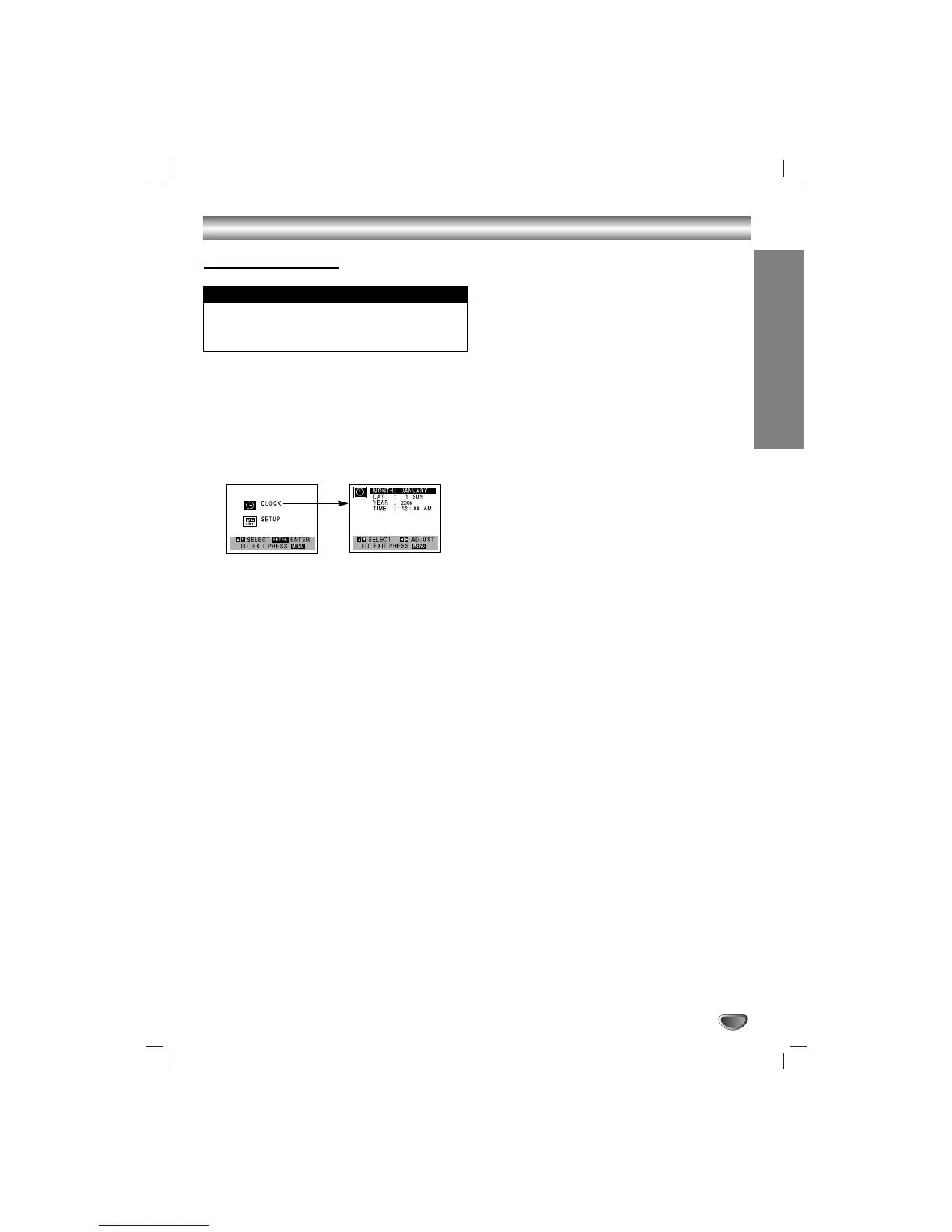
Press MENU and the MAIN menu will appear.
22
Use
vv
/
VV
to choose the CLOCK menu.
Press MEMORY/ENTER and the CLOCK menu
will appear.
33
Use
bb
/
BB
to choose the month.
44
Use
VV
to choose the DAY option.
Use
bb
/
BB
to choose the date.
The day of the week will display automatically.
55
Use
VV
to choose the YEAR option.
Use
bb
/
BB
to choose the year.
66
Use
VV
to choose the TIME option.
Use
bb
/
BB
to choose the time.
Press and hold b/B to advance clock
continuously.
77
Press MENU when finished.
• The clock uses the 12-hour system. (Be sure to set AM and
PM correctly.) (AM does not appear.)
• The initial Clock Setting is JANUARY 1, 2007, 12:00 AM.
Things to know before starting


 To Next Page