18
Milano Use, Care, and Installation Guide
MILANO
WALL
CORE
Features & Controls
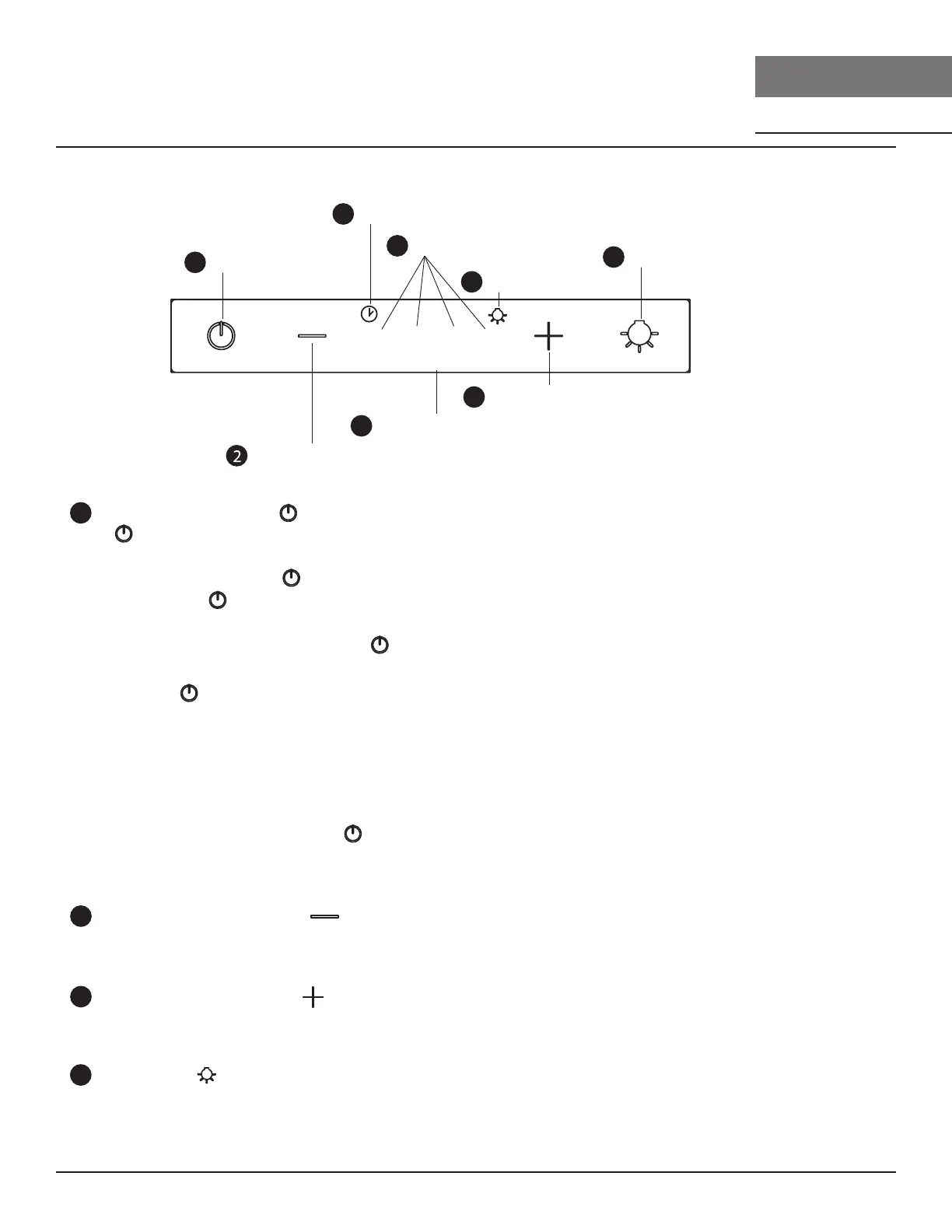
Touch Controls
Q 2 3 4
clean filters
1
Power / Delay O
4
Lights On/O
5
Delay O Timer Indicator
6 Speed Indicators
8
Lights Indicator
Fan Speed Decrease
Fan Speed Increase
Clean Filter Indicator
3
7
1
ħŰ
- Button will turn power on and o for entire hood (fan and lights.
- Hood will remember the last speed and light level it was last turned o at.
(Example: Press button to turn o hood when on fan speed 3 and high lights.
Press button again and the hood will turn back on at speed 3 and high lights.
Ű
- With the fan on, press and hold the button for two seconds. The fan will change to speed 1 and the 5
minute delay o timer will start.
- Pressing Button while delay o function is enabled will turn the hood o and cancel the delay o
function.
Ů
- Airflow Control Technology (ACT) allows the installer to set the maximum fan CFM to align with local codes
and regulations.
- To verify the maximum fan CFM:
- Wtih hood o, hold the Button for three seconds. If all speed four indicator illuminates = default
maximum CFM. If speed three indicator illuminates = 390 maximum CFM. If speed two indicator illuminates =
290 maximum CFM.
2
- Press this button to decrease fan speed. 4, 3, 2, Q (Quiet).
- If fan is o, press this button to turn on fan at last speed it was turned o at.
3
- Press this button to increase fan speed. Fan on, Q (Quiet), 2, 3, 4
- If fan is o, press this button to turn on fan at last speed it was turned o at.
4
- Lights are two levels, high and low.
- From o, press one time for high. Press again for low. Press again to power lights o.


 To Next Page
 Loading...