Controls and Components
3.13
Dash Settings
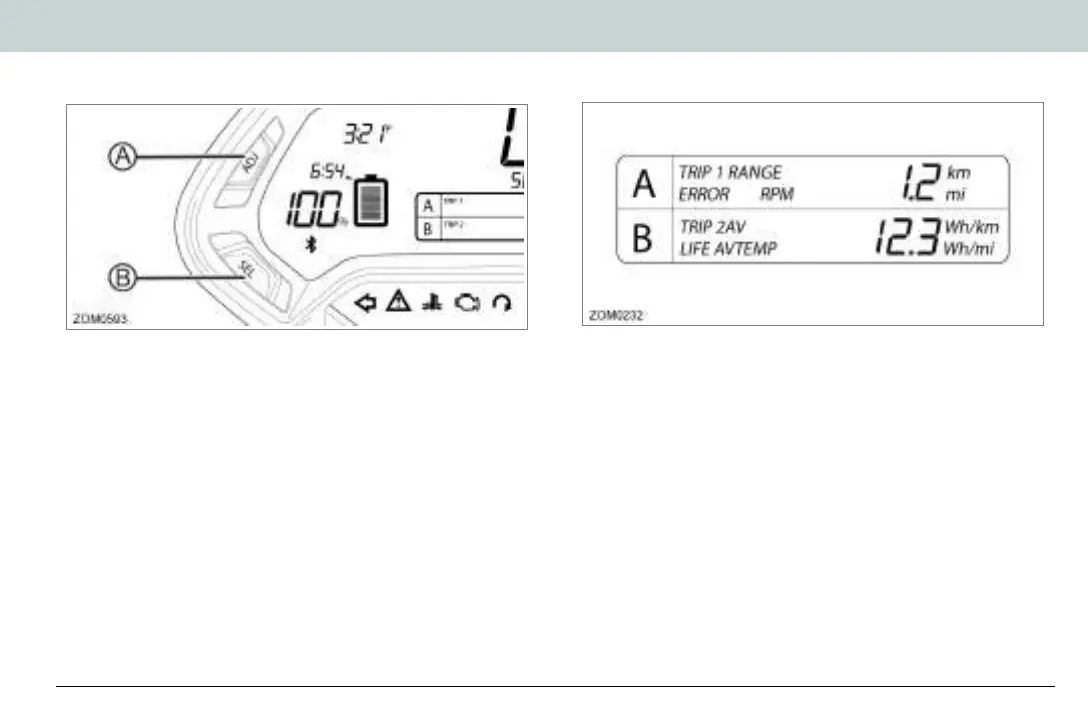
The displays on the dash can be customized to your personal
preferences by using the ADJ (Adjust) and SEL (Select) buttons.
A. Adjust Button (ADJ)
By momentarily pressing or holding the ADJ button you can
reset fields and toggle through the trip menus and display
options.
B. Select Button (SEL)
By momentarily pressing or holding the SEL button you can
reset or select fields in Display A and Display B, change the
time, and change the display units.
Note: Once a feature is selected, it will stop flashing after 15
seconds if no further button press is detected, and the dash will
return to its normal operating mode.
Displays A&B
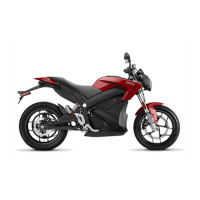
Display A
To select Display A with the dash in its normal operating mode,
momentarily press the SEL button once. Press the ADJ button
to toggle through the following fields:
• Trip 1 Odometer - Displays individual trip mileage and is reset
by pressing and holding the ADJ button for 2 seconds.
Note: Trip 1 is reset each time the battery is recharged to
100%.
• Range - Displays remaining battery power based on learned
riding style and usage.
• Error - Displays 2-digit error codes for dealer use. See “Dash
Error Codes”, on page 7.5.
• RPM - Displays motor RPM.
Zero Owner's Manual (S and DS).book Page 13 Monday, September 21, 2020 11:43 AM


 To Next Page