24 • Installation & Operation
INSTALLATION & OpERATION
UNDER CASE FLOOR CLEANING (NSF)
The oor under your Zero Zone display case can be cleaned by following these steps:
1. Remove the fasteners attaching the kickplate to the case. The fasteners are accessed from the front of the unit.
2. With the kickplates removed, remove debris from the oor.
3. Vacuum under the case to remove any dirt, debris, and dust build-up.
4. Mop under the unit using non-abrasive oor cleaner and warm water.
5. When nished mopping, squeegee any remaining water under the unit to the oor drains to speed up the drying process. Replace the
kickplates when the oor has dried.
Shelves & Stocking Product
Shelf location may be adjusted in 1" vertical increments in any position for best display advantage. Make sure the shelf brackets are securely
seated before placing any product on the shelf. The standard shelves may be tilted down at a 10° angle. Optional shelf assemblies are available
that may be tilted at 5°, 10°, or 15° angle.
The case may be stocked with product after it has operated at least 24 hours with correct case temperature and proper control operation. When
stocking the shelves, leave a gap between the product and the shelf above, which allows an air curtain on top of the product. Product should not
extend beyond the front of the shelves or bottom wire rack.
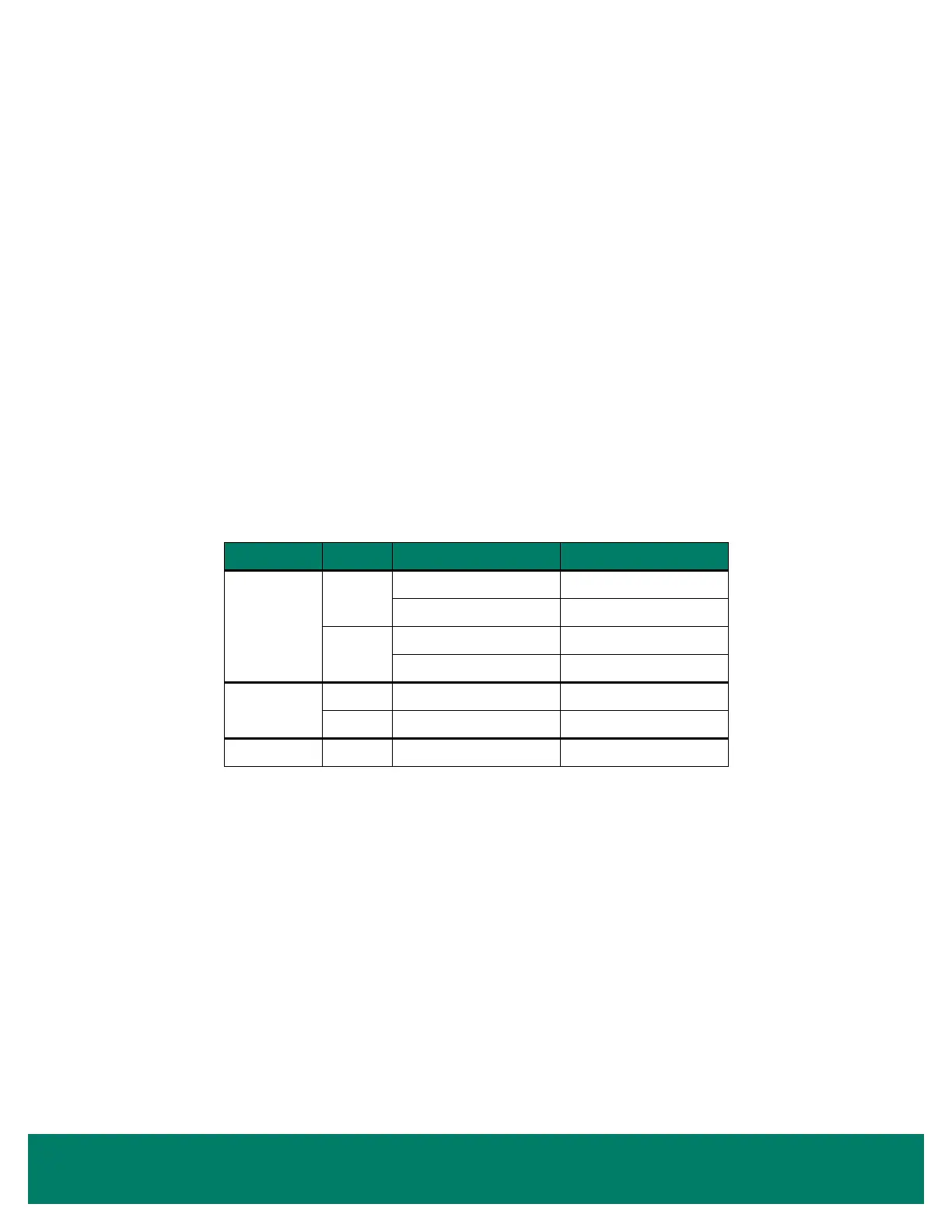
SHELF TYPE DEPTH BRACKET TYPE LOAD CAPACITY (LBS.)
Solid Shelf,
Standard Duty
22"
2-Position (0°/10°) 250/150
4-Position (0°/5°/10°/15°) 250/250/150/100
24"
2-Position (0°/10°) 250/150
4-Position (0°/5°/10°/15°) 250/250/150/100
Solid Shelf,
Heavy Duty
22" 2-Position (0°/10°) 350/275
24" 2-Position (0°/10°) 350/275
Wire Shelf 22" 2-Position (0°/10°) 250/150



 To Next Page