14
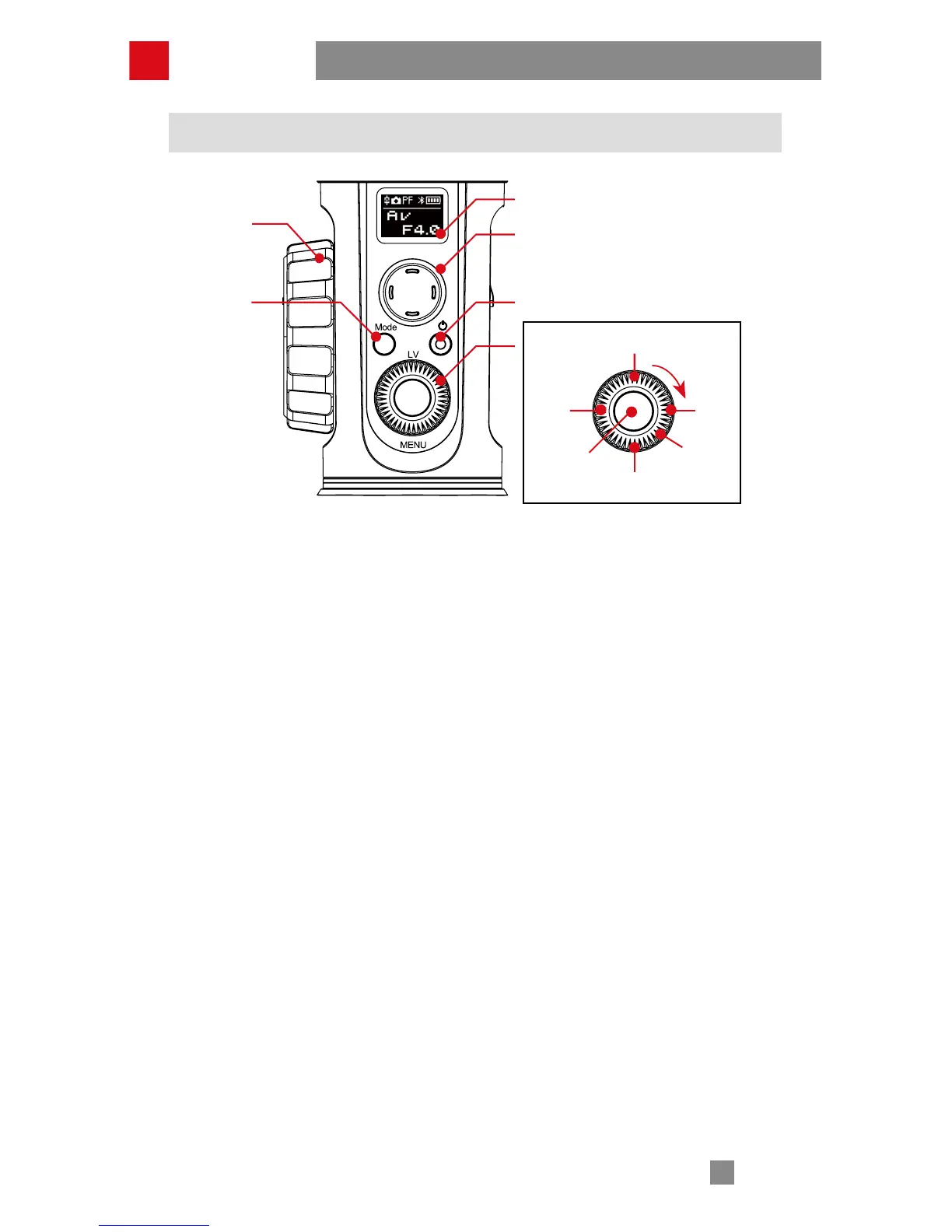
Control Panel Description
❶
OLED Display
Stabilizer status and camera parameters display (see more on page 16).
❷
Joystick
Four-way direction control of the camera/lens.
❸
ON/OFF&Video*
• Long press for 3 seconds to power on/off.
• Single press to start/end video recording.
❹
Real-time Preview*
Single press the button to enter the real-time preview mode.
❺
Left*
• In main screen, single press to return to revious option.
• In menu screen, single press to return to previous screen.
❻
Right*
• In main screen, single press to move to next option.
• In menu screen, single press to confirm selection.
❼
Shutter Release*
• Halfway press the button to activate auto focus.
Full press the button to take single shots.
❽
Dial*
• In main screen, rotate the dial to adjust camera parameters.
• In menu screen, rotate the dial to switch between options.
❾
Menu
Single press to enter or exit the menu.
❿
Follow Focus Controller*
Rotate the controller to adjust the focal length in real time and realize follow focus
control.
How to Use
❶
❷
❿
⓫
❸
❹
❻
❽
❾
❺
❼



 To Next Page
 Loading...