COMPUTER MANUAL
Remove the safety film from the display before use.
COMPUTER (MODEL)
EBIC02PRO-BLK
TURNING ON
The computer turns on after power is
connected.
It will display all elements on the screen within
two seconds.
AUTO ON/OFF
The computer is switched on when the flywheel
moves or any button is pressed. The computer
is switched off after four minutes of inactivity.
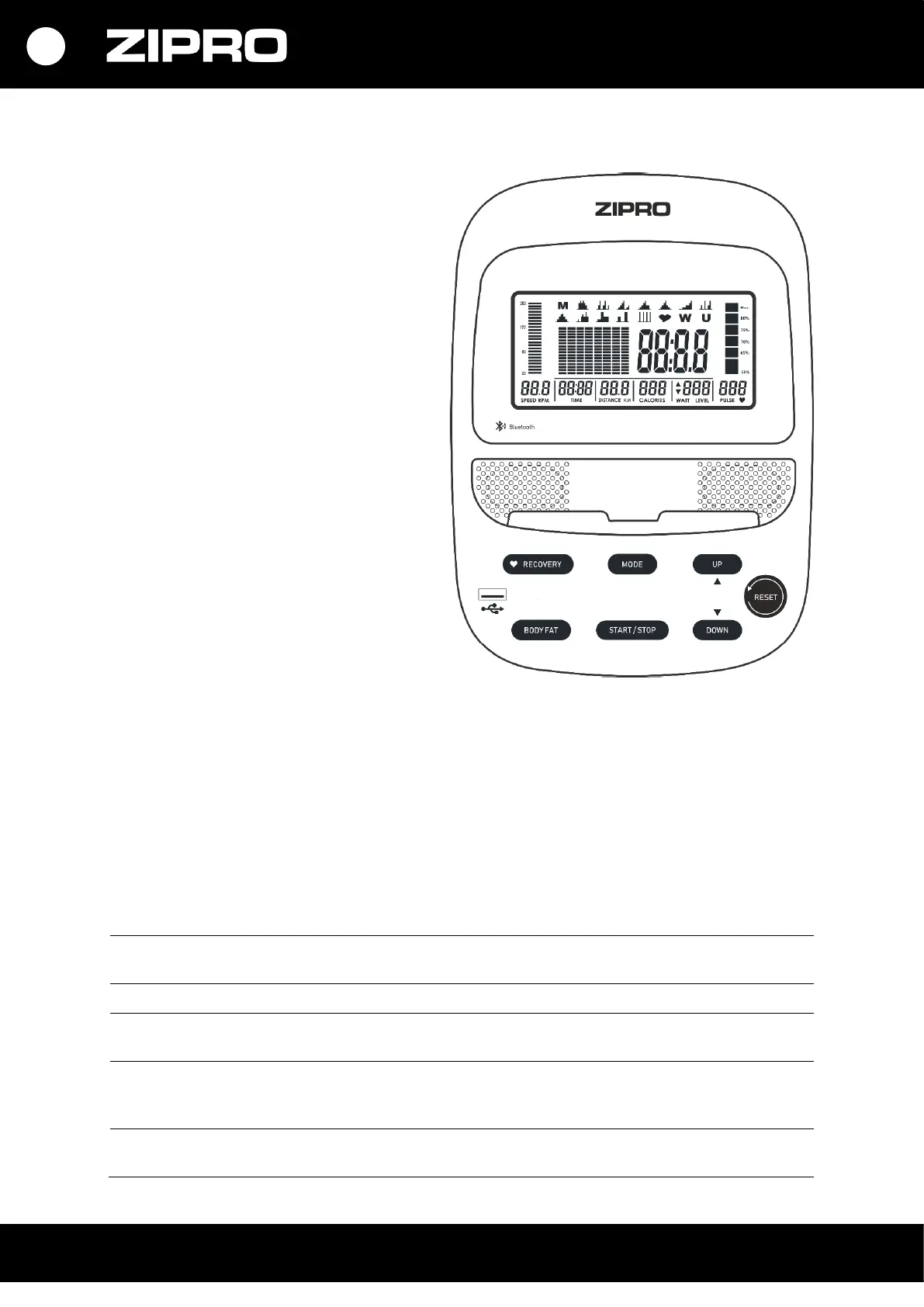
BUTTONS
• UP – it is used to select and increase values.
• DOWN – it is used to select and decrease values.
• MODE – it is used to confirm choices.
• RESET – it is used to return to the main menu when setting a training or during a programme. To reset,
press it for 2 seconds.
• START/STOP – it is used to start or end training.
• RECOVERY– it is used to check your fitness and physical condition based on the heart rate drop after
you stop exercising.
• BODY FAT – it measures the fat tissue content in the body.
FUNCTIONS (SPECIFICATION)
Total calories burnt from the start to the end of the exercise.
(The measurement is an approximation for comparing training
sessions. Do not use for medical purposes).
Displays cadence (revolutions per minute).
Visualisation – the column on the left-hand side of the screen.


 To Next Page