EasyManua.ls Logo

Zipro Rook Gold - User Manual

Zipro Rook Gold
198 pages
Go to English
Print Icon
To Next Page IconTo Next Page
Loading...
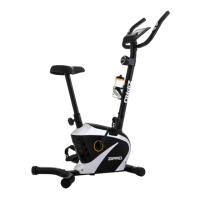
Rook Gold
PL Rower elektryczno-magnetyczny
EN Electric-magnetic bike
DE Elektromagnetisches Fahrrad
RU Электромагнитный велосипед
RO Bicicletă electrică-magnetică
LT Elektrinis-magnetinis dviratis treniruoklis
CZ Elektricko-magnetický rotoped
SK Elektricko-magnetický rotopéd
FR Vélo d’appartement élecrique et magnétique
IT Cyclette elettriche e magnetiche
ES Bicicleta electro-magnéticos
PL Producent - Morele.net sp. z o.o. ul. Fabryczna 20 A, 31-553 Kraków, Poland
EN Manufacturer - Morele.net sp. z o.o. ul. Fabryczna 20 A, 31-553 Kraków, Poland
DE Hersteller - Morele.net sp. z o.o. ul. Fabryczna 20 A, 31-553 Kraków, Poland
RU Производитель - ООО Morele.net, ул. Фабрычна, 20A, 31-553 Краков, Польша
RO Producător - Morele.net sp. z o.o. ul. Fabryczna 20 A, 31-553 Kraków, Poland
LT Gamintojas - Morele.net sp. z o.o. ul. Fabryczna 20 A, 31-553 Kraków, Lenkija
CZ Výrobce - Morele.net sp. z o.o. ul. Fabryczna 20 A, 31 553 Krakov, Polsko
SK Výrobca - Morele.net sp. z o.o. ul. Fabryczna 20 A, 31-553 Kraków, Poľsko
FR Fabricant : Morele.net sp. z o.o. ul. Fabryczna 20A, 31-553 Cracovie, Pologne
IT Fabbricante Morele.net sp. z o.o. ul. Fabryczna 20 A, 31-553 Cracovia, Polonia
ES Fabricante - Morele.net sp. z o.o. (S.L) c/ Fabryczna 20 A, 31-553 Cracovia, Polonia

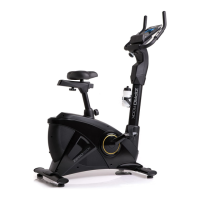
Table of Contents

Questions and Answers

  • H
    Heidi MiddletonAug 2, 2025
    What to do if my Zipro Rook Gold Fitness Equipment shows error 'E-1'?
    • T
      tstevensAug 2, 2025
      To resolve the 'E-1' error on your Zipro Fitness Equipment, ensure that you maintain contact with both hands on the pulse sensors throughout the body fat measurement process. This ensures the device receives the necessary input to complete the measurement.
  • T
    tina30Aug 7, 2025
    How to connect Zipro Fitness Equipment via Bluetooth?
    • N
      ntranAug 7, 2025
      To establish a Bluetooth connection with your Zipro Fitness Equipment, first, enable Bluetooth on your mobile device. Then, proceed to pair your mobile device directly with the ZIPRO equipment. This should resolve most Bluetooth connectivity issues.
  • A
    andreponceAug 11, 2025
    What does error 'E-4' mean on Zipro Fitness Equipment and how to fix it?
    • E
      estesthomasAug 11, 2025
      If your Zipro Fitness Equipment is displaying 'E-4', it means that the age, height, or weight data you entered exceeds the acceptable range. To fix this, re-enter the user data ensuring that all values are within the specified limits.
  • A
    anne06Aug 15, 2025
    Why does my Zipro Rook Gold rock to the sides?
    • T
      Tyler EatonAug 15, 2025
      If your Zipro Fitness Equipment is rocking from side to side, it may be due to a few reasons. First, check if the device is placed on an uneven surface or if there's an object underneath disrupting its balance; if so, place the device on an even surface and remove any obstructions. Also, ensure that the bases are assembled correctly and that the caps on the rear base are properly installed and leveled.
  • A
    andre82Aug 19, 2025
    What does 'E-7' error mean on Zipro Rook Gold, and how can I fix it?
    • D
      debrapruittSep 12, 2025
      If you encounter an 'E-7' error on your Zipro Fitness Equipment, it indicates that the cables connecting the console to the bike may be disconnected or improperly connected. To resolve this, first, disconnect the power source, then disconnect all the cables. Reattach the cables securely and reconnect the power source. If the error persists, repeat the process.
  • L
    Larry HarrisAug 25, 2025
    Why is there a lack of resistance during training on my Zipro Fitness Equipment?
    • E
      Eric HillAug 25, 2025
      If you are experiencing a lack of appropriate resistance during your training on the Zipro Fitness Equipment, it could be due to a few reasons. Start by checking the resistance adjustment cable to ensure it is correctly connected as per the assembly manual. If the cable is properly connected and the issue persists, contact the manufacturer’s service.
  • K
    Katie CrawfordAug 28, 2025
    Why do the saddle and handlebar sway on my Zipro Fitness Equipment?
    • C
      cbyrdAug 28, 2025
      If the saddle or handlebar on your Zipro Fitness Equipment sways during use, it is likely that the bolts and knobs of the saddle post or handlebar post have not been properly tightened. Ensure these are securely tightened to prevent swaying.

Summary

Technical Data

Power Supply Unit

Specifications of the power supply unit.

Device Specifications

Weight, temperatures, user limits, speed.

Product Standards and Use

Applicable standards and intended use.

Safety Precautions

General Safety Guidelines

Key safety guidelines for device usage.

Electrical Device Safety

Safety measures for electrical components.

Electrical Safety

Ground Connection and Mains

Importance of grounding and safe connection to mains.

User Safety and Risk

Health Advisory and Warnings

Consult doctor, stop if faint, follow recommendations.

Residual Risk Overview

Information on potential risks and mitigation.

Transport and Handling

Packaging Handling Marks

Symbols and instructions for safe transport.

Operation and Assembly Basics

Pre-Operation Checks

Ensure correct assembly and readiness before use.

Assembly Recommendation

Advised to assemble with another person.

Assembly Process

Safety During Assembly

Keep surroundings clear and children away.

Assembly Steps and Tips

Follow manual, tighten connections later.

Environmental Responsibility

Disposal of Packaging and Batteries

Proper disposal of packaging and batteries.

E-Waste Recycling Guidelines

Guidelines for recycling electrical equipment.

Parts Identification

Component List

Detailed list of all parts and quantities.

Assembly Manual - Section 1

Step 1: Base Assembly

Attaching front and rear bases to the main frame.

Step 2: Saddle Assembly

Installing the saddle and saddle post.

Assembly Manual - Section 2

Step 3: Pedal Installation

Attaching pedals to the cranks.

Step 4: Handlebar Setup

Installing handlebar post, covers, and adjustment knob.

Step 5: Computer Connection

Mounting and connecting the computer console.

Assembly Manual - Section 3

Step 6: Final Assembly

Attaching final covers and connecting cables.

Step 7: Water Bottle Holder

Mounting the water bottle holder.

Step 8: Power Connection

Plugging in the power supply unit.

Adjustments and Maintenance

User Adjustments Guide

How to adjust handlebar, saddle height, and position.

Maintenance Procedures

Recommended maintenance tasks and frequency.

Training and Exercise Guidelines

Training Phases Explained

Explains warm-up, exercise, and relaxation phases.

Warm-up and Stretching

Importance of warm-up and specific stretching exercises.

Computer Console Operation

Power On;Off and Display

How the computer powers on/off and screen display.

Button Functions

Detailed description of each button's purpose.

Data Metrics Overview

Overview of measured data like time, speed, calories.

Training Programme Selection

Choosing a Programme

How to select between Manual, Beginner, Advanced, Sporty.

Manual Programme Setup

Steps to set up and start manual training.

Preset Programme Setup

Steps for Beginner, Advanced, and Sporty modes.

Advanced Training Modes

Cardio Heart Rate Control

Setting up HRC training based on heart rate.

Watt Control Training

Setting up training with target Watt levels.

Post-Exercise Features

Recovery Test Procedure

How to perform and interpret the recovery test.

Body Fat Measurement Guide

Procedure and interpretation of body fat analysis.

Health Monitoring and Connectivity

Pulse Rate Measurement

How to correctly measure heart rate during exercise.

Countdown Timer Settings

Setting countdowns for time, distance, or calories.

Mobile App Integration

Bluetooth Pairing Instructions

Instructions for connecting to the iConsole+ Training app.

Troubleshooting Common Issues

Stability, Noise, and Operation

Resolving rocking, swaying, or operational noises.

Performance and Connectivity Problems

Troubleshooting resistance and Bluetooth issues.

Error Code Solutions

Meaning and solutions for common error codes.

Product Warranty Information

Warranty Terms and Exclusions

Details of warranty coverage, claims, and exclusions.

How to Submit a Warranty Claim

Procedure for submitting a warranty claim.

Warranty Card and Compliance

Warranty Card Information Fields

Information to be filled on the warranty card.

Product Compliance and Contacts

Certifications, usage restrictions, and contact details.

Zipro Rook Gold Specifications

General IconGeneral
BrandZipro
ModelRook Gold
CategoryFitness Equipment
LanguageEnglish

Related product manuals