http://www.zketech.com
EBC-A40L User Manual
Copyright (C) 2006-2017 ZKETECH
4.2 Testing interface
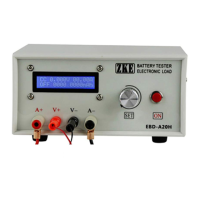
The first line shows mode (CC-constant current), voltage, and current.
The second line shows working process, working time (in minute) and capacity (automatic
switch between 0000mAh and 00.00Ah).
Working process reads OFF when the test stops and DSC or CHG in testing. It shows AT1 if
you choose automatic charging/discharging and 1 means the step 1 of current testing.
A short press on the “SET” button and the display changes to power and energy.
In auto test of “charge-discharge-charge”, you can check test results of each step by spin the
“SET” knob.
Press the “ON” button to start discharging test (shows DSC) and one more press to stop (shows
OFF).
You can open setting interface by press on the “SET” button for 2 seconds in the stop state
(This function is invalid when the tester being connected with the PC software).
4.3 Setting interface
The cursor default is on mode setting. Press “SET” button to move it to the value you want to
set up. Spin the “SET” knob to change parameters selected by the cursor. It will go back to the
limit value if your setting exceeds the allowed range. Press “ON” button then move to the next
item.
1) DSC-CC (Constant current discharge)
First line: mode and current setting.
Second line: cut-off voltage (testing automatically stops when voltage reaches below this value)
and the maximum testing time setting (no time limit if being set 0).
2) DSC-CP (constant power discharge)


 To Next Page