Summary
* Different user access
modes available on the
unit
2. Introduction of Device
2.1 Overview of Device Functions
As an integrated access control device, our product can be connected with either an
electronic lock or an access controller. This device features simple and fl exible opera-
tions and supports the use of management cards. The screen displays will guide you
through the operations. It supports access control function for a security management.
It supports multiple communication modes.
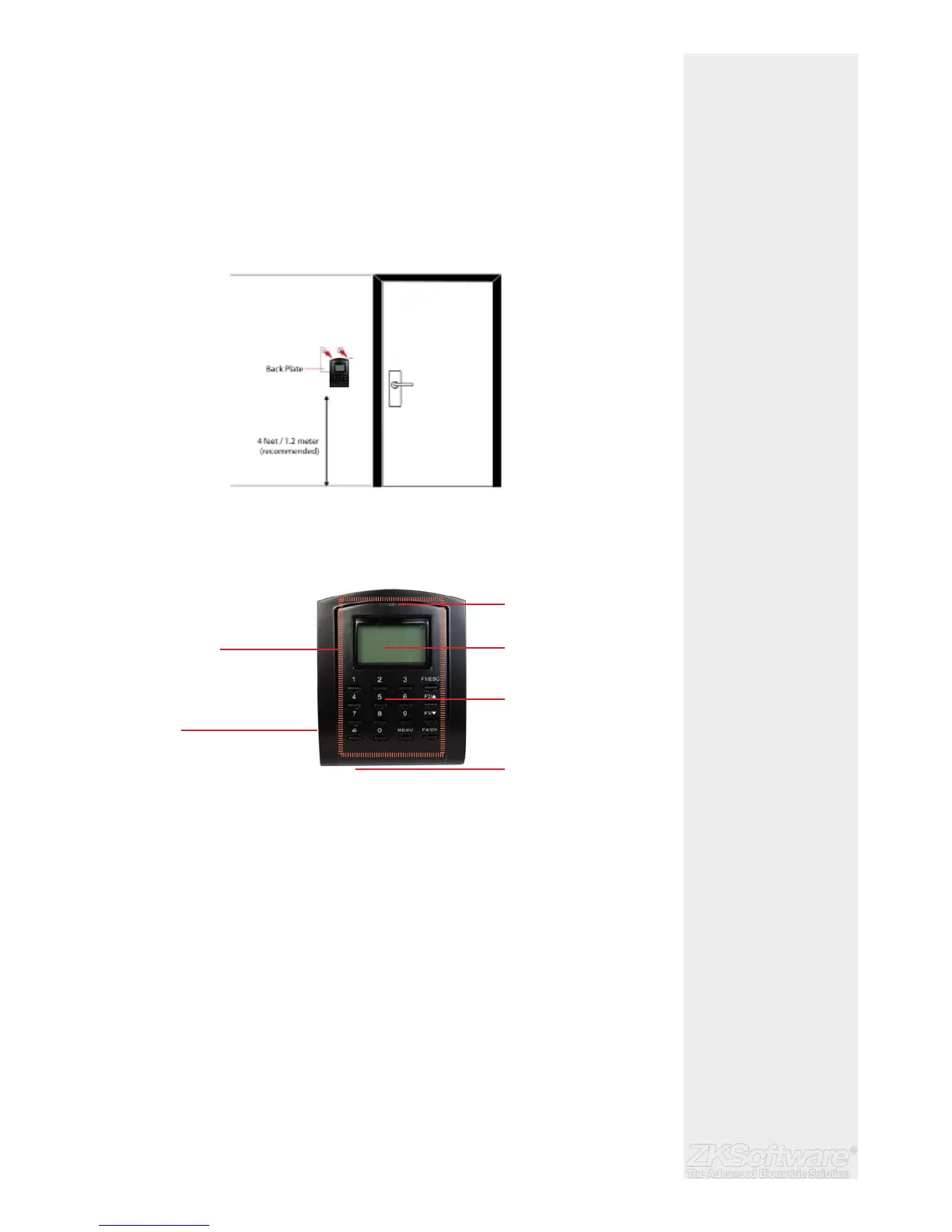
Attached the back plate on the wall securely and attach the terminal to the back
plate when mounting it on the wall.
2.2 Product Appearance
Front view:
• LCD Screen Displaying status of terminal, day, date and time.
• LED Display
• Green LED – The terminal is working fi ne and it is in standby mode.
• Red LED – There is an error at the terminal that requires checking. For
fi rst time use, the terminals need to be charged fully to avoid having
the red light blinking.
• Keypad To input instructions into the terminal and to allow confi guration.
• RFID Card scan Area. Area that reads RFID cards.
• Speaker For terminal voice emission.
* Install with back plate
* Recommended height
from the fl oor - 1.2m
4
LED indicator
LCD Display
Keypad
Speaker
RFID scan area
USB Port


 To Next Page