Need help?
Do you have a question about the Zksoftware IN01 and is the answer not in the manual?
How to place a finger on the sensor for optimal verification.
How to use the RFID card reader module for verification.
Warnings and recommendations for device operation and environment.
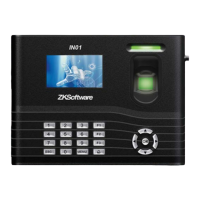
Describes the device's capabilities as a fingerprint and access control system.
Critical safety and operational guidelines for the device.
Guidance on effective terminal usage and initial fingerprint enrollment.
Steps to set the correct date and time on the terminal.
Process for enrolling administrators and regular users on the terminal.
How to enroll users using a password as an alternative to fingerprint.
Steps for enrolling users via RFID card.
Process for verifying identity using fingerprint, password, or card.
How to search, edit, and delete user information on the terminal.
Explains user accessibility settings and Time Zones.
Steps for assigning users to specific time zones for access control.
Configure holiday time zones and access control groups.
Set up combination locks and control parameters.
Configure duress alarms and assign duress fingerprints.
Configuring the device's network connection using TCP/IP.
Setting up serial communication interfaces RS232 and RS485.
Managing device password and administrator access.
Configuring Wiegand communication for external readers or turnstiles.
General configuration settings for the terminal.
Instructions for updating the device firmware via USB.
Customizing the keypad functions for shortcuts.
Adjusting display settings like match retry times and picture delay.
Options for resetting device configurations to default settings.
Configuring sleep time, power button, and other minor settings.
Using USB drives for uploading and downloading user data.
Performing automated tests to verify device functions.
Querying and viewing transaction logs and usage data.
Viewing the count of users with password-based verification.
Checking the number of verification attempts recorded by the scanner.
Displaying the available storage space on the terminal.
Accessing detailed hardware and firmware information of the device.
 General
| Brand | Zksoftware |
|---|---|
| Model | IN01 |
| Category | Gateway |
| Language | English |

 To Next Page