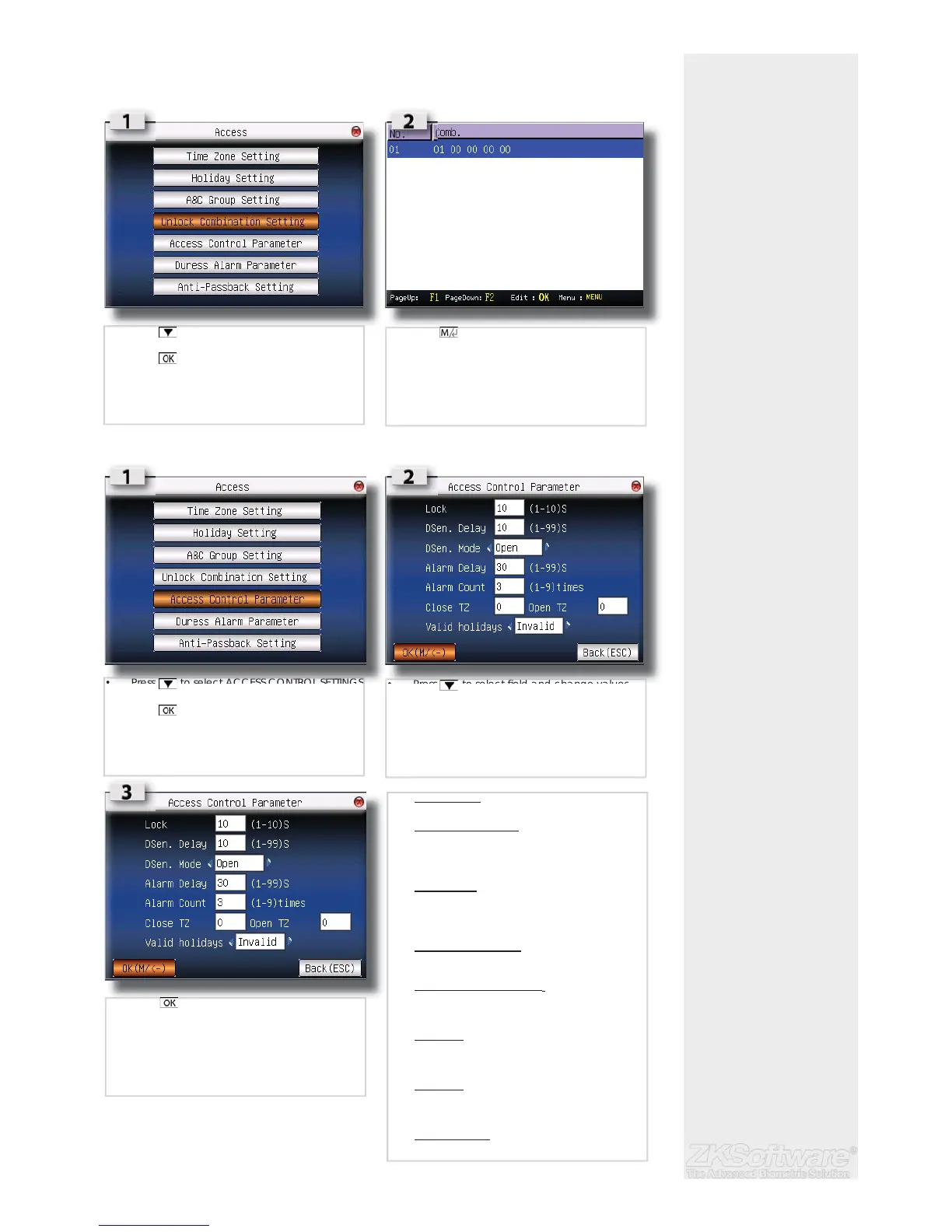
3.2.4 Unlocking Combination settings
Combo settings are for extra added security, where more than ons user need to sign in
before access is granted.
3.2.5 Change Access Control Parameters settings
Summary
* Combo settings for
added security
* 2 or more user verifi ca-
tion needed before access
allowed
* Parameter settings is to
change the control of the
unit
13
• Press to select UNLOCK COMB SETTINGS
• Press
• Press (menu) for NEW / EDIT / DELETE op-
tions
• Press to select ACCESS CONTROL SETTINGS
• Press
• Press to select fi eld and change values
• Lock (1-10s) :
To adjust the unlocking time after verifi cation.
• Dsen. Delay (1-99s) :
To delay door sensor from triggering alarm
system when door is not closing. This function
only works when a door sensor is attached to
the reader.
• Dsen Mode :
To choose the type of door sensor attached to
the reader. There are NO (normally opened)
and NC (normally closed) available. Choose
NONE if no door sensor is attached.
• Alarm Delay (1-99s) :
To delay the reader from triggering alarm
system.
• Alarm count (1-9 ti mes ) :
To adjust the maximum verifi cation failures of
users. When the maximum is reached, reader
will trigger alarm system.
• Close TZ :
Door is always locked during the predefi ned
time period, so users cannot gain access after
verifi cation.
• Open TZ :
Door is always unlocked during the predefi ned
time period, so users do not need to verify their
identities but can gain access.
• Valid holidays :
Choose Valid to enable the holiday settings.
Choose Invalid to disable the holiday settings.
• Press to save.


 To Next Page