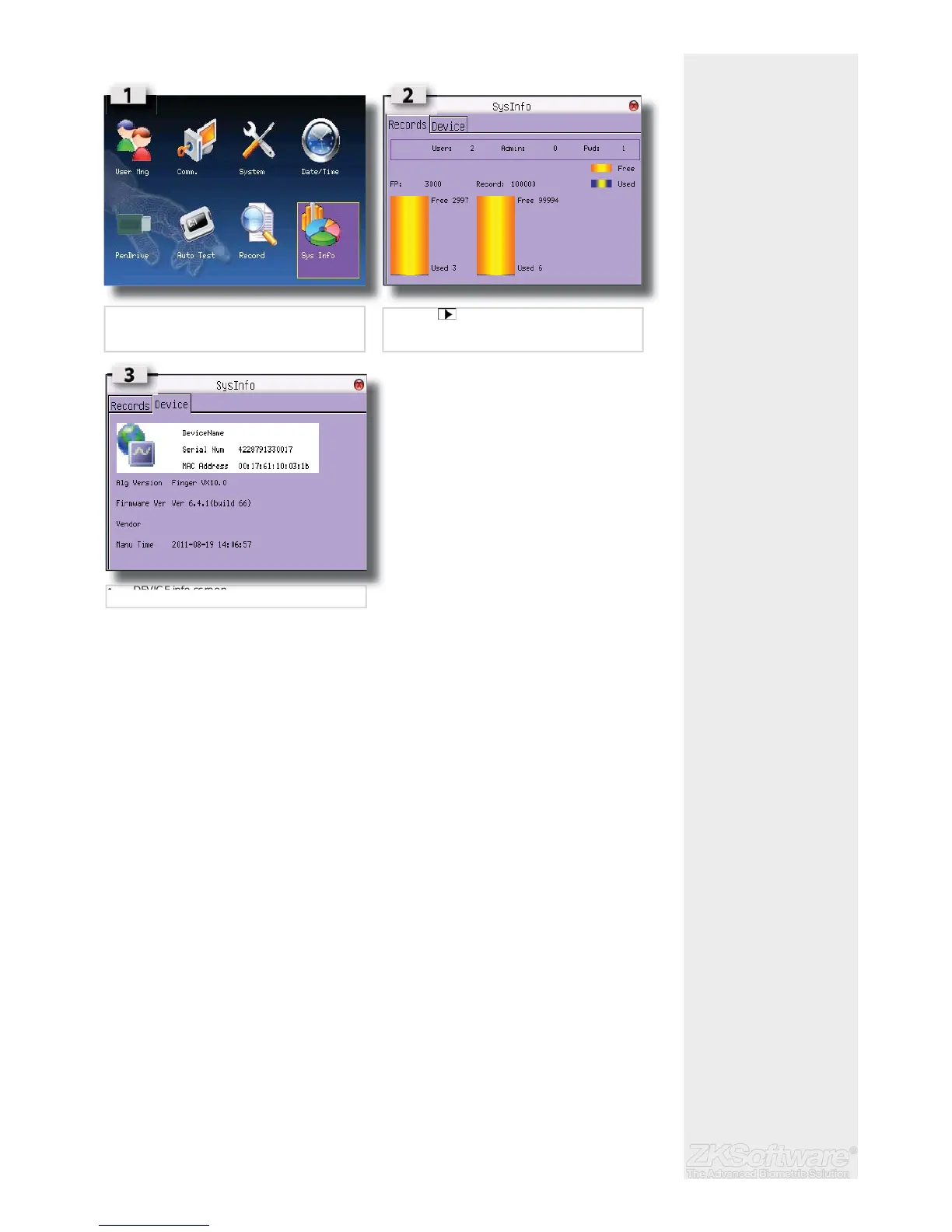
Summary5.10 System Information
5.10.1 Number of Password Users Available in the Terminal (Password User)
Users can do verifi cation using PIN password and a combination of fi ngerprint and pass-
word. To fi nd out how many users are using password:
• Press Menu > Sys Info > Password User > View the number
5.10.2 Number of Time Scanners Have Been Used for Verifi cation (S Logs)
S logs stands for scanner logs, which means the number of times the scanner has been
used for verifi cation, regardless of whether it is successful or not. To view the scanner
logs:
• Press Menu > Sys Info > Record > Amount of transactions USED / FREE
5.10.3 Free Space Information (Free Space)
Find out the information about availability of space in your terminal through this func-
tion.
• Press Menu > Sys Info > Free Space > Free = number available
5.10.4 Device Information (Dev Info)
Find out the information about your terminal through this function. Press Menu > Sys Info
> Dev Info > View the info
22
• Select SYS INFO on the MAIN MENU
• Press to select desired info page
• RECORD screen
• DEVICE info screen


 To Next Page