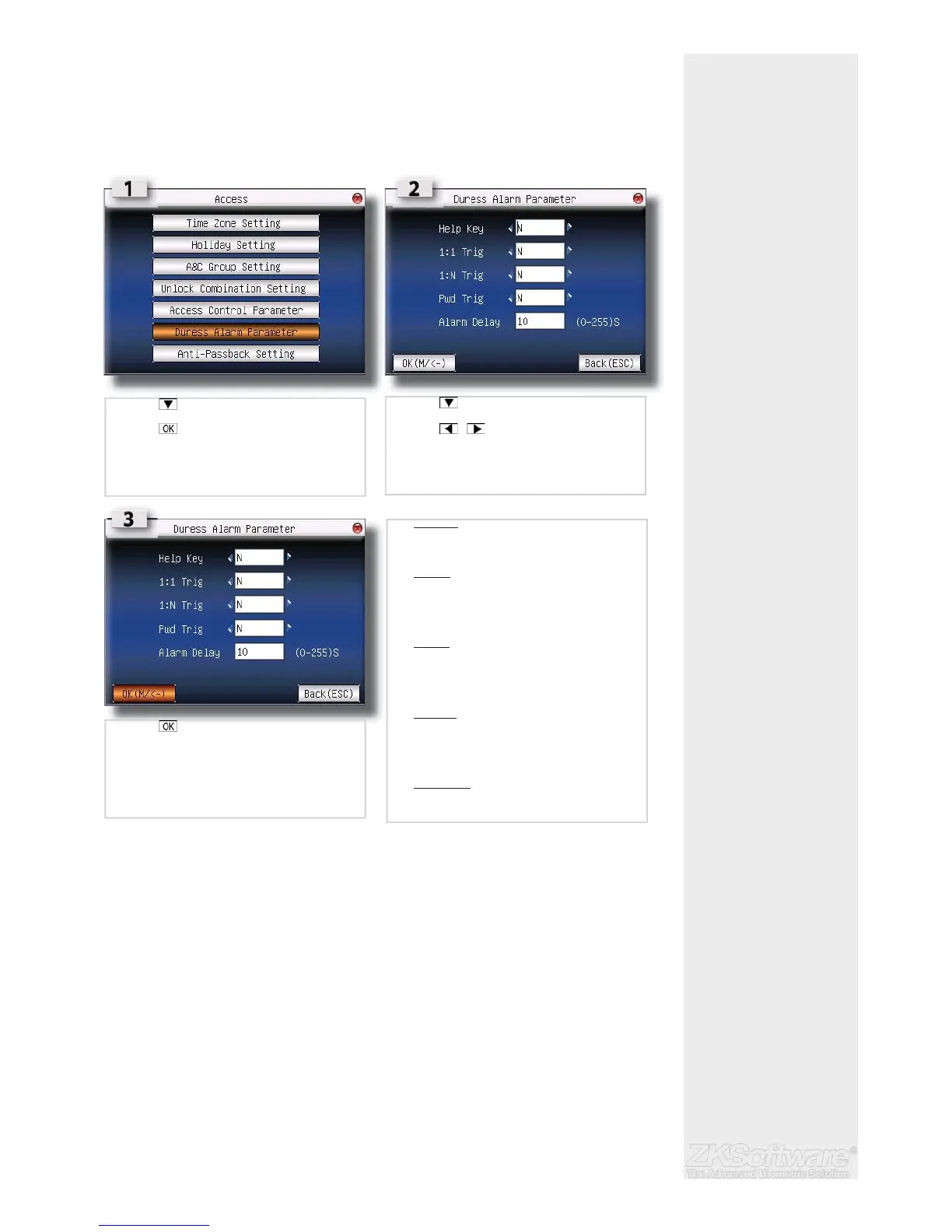
3.2.6 Duress Alarm Parameters
The fi ngerprint reader will trigger alarm system after a duress fi ngerprint is verifi ed sucess-
fully. It is advisable :
• 1 to use different fi ngers to do daily clocking mechanism and to trigger duress alarm
• 2 to use different verifi cation to do daily clocking mechanism and to trigger duress
alarm.
3.2.7 Defi ne a Duress Finger
If users would like to use different fi ngers for daily clocking and to trigger duress alarm,
users must enrol with more than 1 fi ngerprint (2 or above).
• Example : index fi nger for daily clocking activities and thumb as duress fi nger.
When duress fi nger is used for verifi cation, it will trigger alarm system as well. Administra-
tor does not need to enable any of the verifi cation methods in Duress Alarm Param-
eters.
Follow the steps on the next page to defi ne duress fi nger.
Summary
* Duress fi nger enrolment
for added security, espe-
cially in high risk areas.
* Enrol 2x or more fi nger-
prints to assign a fi ngerprint.
* Assign index fi nger for
daily clocking, and thumb
for duress fi nger.
14
• Press to select DURESS ALARM SETTINGS
• Press
• Press to select value fi eld
• Press to change options
• Help key :
Select [Yes] to enable. Hold the for 3 second followed
by the fi ngerprint verifi cation. Successful verifi cation
will trigger alarm system.
• 1:1 Trig :
Select [Yes] to enable. Enter user ID followed by
fi ngerprint verifi cation to trigger alarm system. During
daily clocking mechanism, all users use 1:N fi ngerprint
verifi cation. All 1: N fi ngerprint verifi cation process will
trigger alarm system.
• 1:N Trig :
Select [Yes] to enable. Place fi nger on scanner for
fi ngerprint verifi cation to trigger alarm system. During
daily clocking mechanism, all users use 1:1 fi ngerprint
verifi cation. All 1:N fi ngerprint verifi cation process will
trigger alarm system.
• Pwd Trig :
Select [Yes] to enable. Enter user ID and password for
verifi cation to trigger alarm system. During daily clock-
ing mechanism, all users use fi ngerprint verifi cation.
Any password verifi cation process will trigger alarm
system.
• Alarm delay :
To delay the reader to trigger alarm system after
verifi cation.
• Press to save


 To Next Page