EasyManua.ls Logo

Zojirushi Neuro Fuzzy NS-ZCC10 - Timer Cooking Guide; Setting the Cooking Timer

Zojirushi Neuro Fuzzy NS-ZCC10
26 pages
To Next Page IconTo Next Page
To Previous Page IconTo Previous Page
Loading...
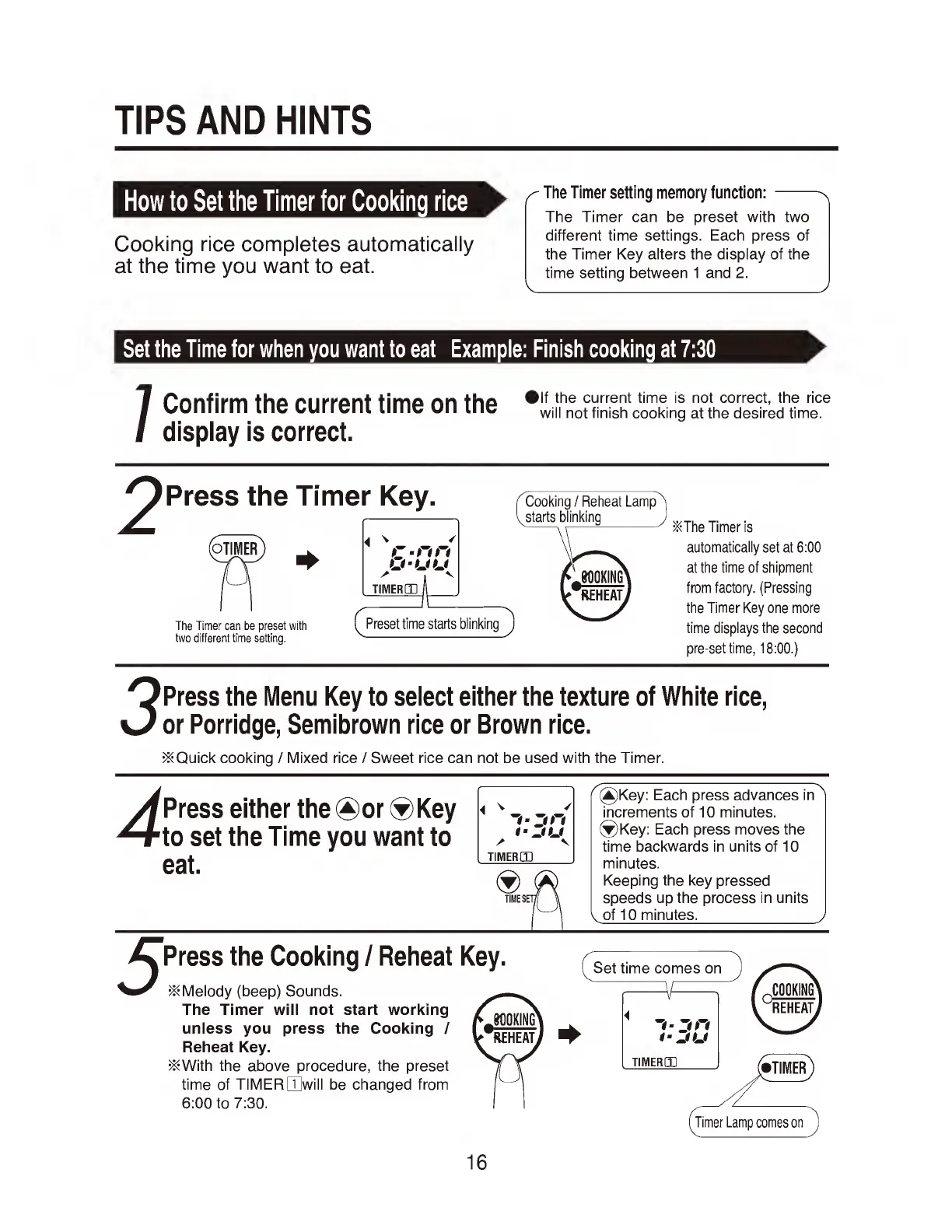
TIPS
AND
HINTS
How
to
Set
the
Timer
for
Cooking
rice
Cooking
rice
completes
automatically
at
the
time
you
want
to
eat.
C
The
Timer
setting
memory
function:-
n
The
Timer
can
be
preset
with
two
different
time
settings.
Each
press
of
the
Timer
Key
alters
the
display
of
the
time
setting
between
1
and
2.
v___/
Set
the
Time
for
when
you
want
to
eat
Example:
Finish
cooking
at
7:30
Confirm
thp
rnrrpnt
timp
nn
thp
®
l
f
the
current
time
is
not
correct,
the
rice
VsUlllirm
me
UUlieill
llllie
Ull
me
Will
not
finish
cooking
at
the
desired
time.
display
is
correct.
^
The
Timer
is
automatically
set
at
6:00
at
the
time
of
shipment
from
factory.
(Pressing
the
Timer
Key
one
more
time
displays
the
second
pre-set
time,
18:00.)
Press
the
Menu
Key
to
select
either
the
texture
of
White
rice,
or
Porridge,
Semibrown
rice
or
Brown
rice.
>&Quick
cooking
/
Mixed
rice
/
Sweet
rice
can
not
be
used
with
the
Timer.
Press
either
the
®or
®Key
to
set
the
Time
you
want
to
eat.
(2)Key:
Each
press
advancesin'
increments
of
10
minutes.
®Key:
Each
press
moves
the
time
backwards
in
units
of
10
minutes.
Keeping
the
key
pressed
speeds
up
the
process
in
units
^
of
10
minutes
.J
5
Press
the
Cooking
/
Reheat
Key.
Melody
(beep)
Sounds.
The
Timer
will
not
start
working
unless
you
press
the
Cooking
/
Reheat
Key.
j&With
the
above
procedure,
the
preset
time
of
TIMER
[TJwill
be
changed
from
6:00
to
7:30.
16

Related product manuals