V4™
Installation/User Guide
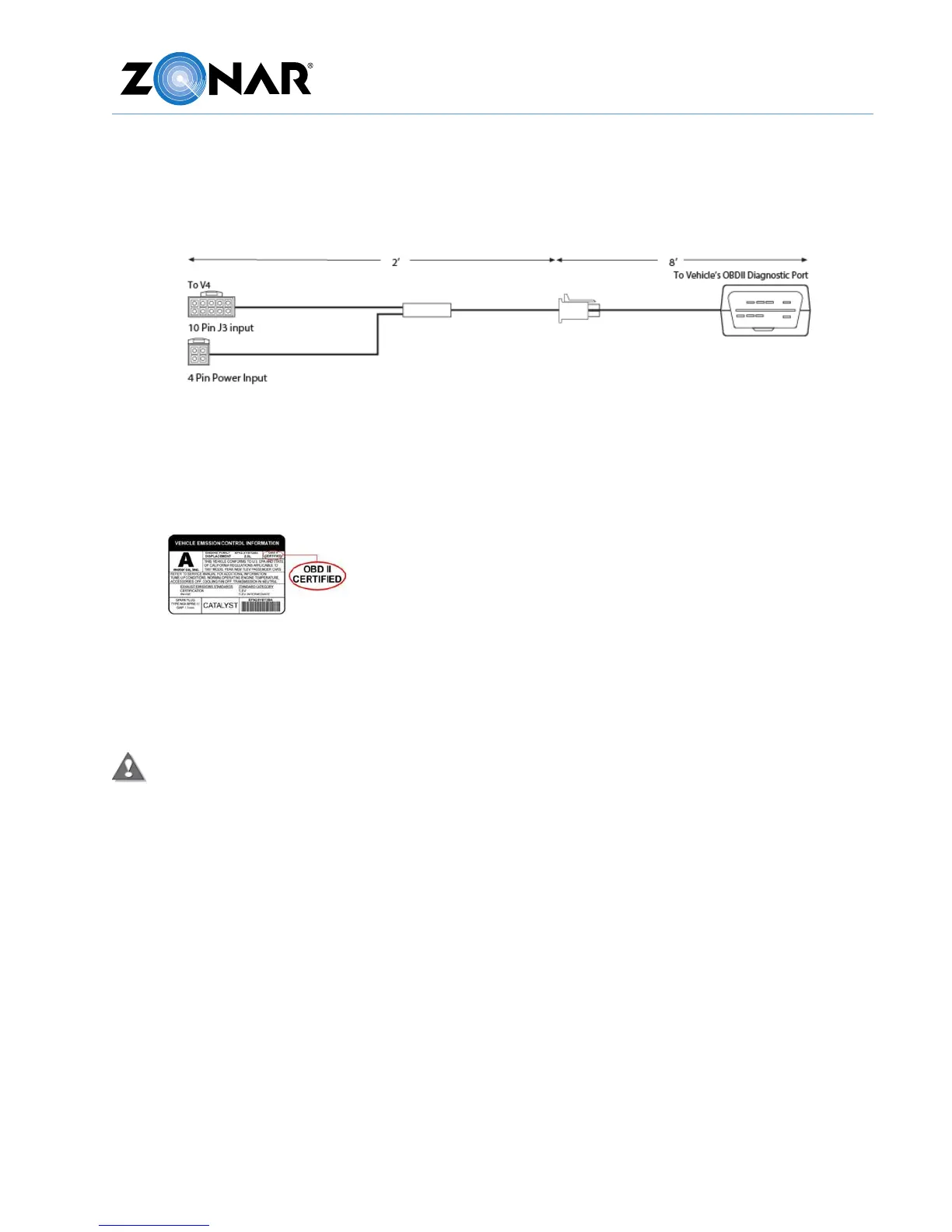
Light Duty Power/Data Cable
Use this cable for light duty vehicles that are equipped with the OBDII Diagnostic Port.
This cable has the following requirements:
• The vehicle should have a sticker or plate under the hood explicitly stating “OBDII
compliant” or “OBDII Certified,” for example:
• Do not use on hybrid vehicles.
• Do not install on vehicles that already have third-party aftermarket equipment
installed on the OBDII network (for example, wheel chair lift transmission lockout,
boom truck transmission lockout, fuel monitoring devices, etc.)
Failure to comply with these requirements may cause interference with the safe and
normal operation of the vehicle.
To install the light duty cable:
1. Connect to the OBDII diagnostic port with the engine running. Failure to perform this
step may trigger a false check engine light on the dash on first engine start after
installation. This will require the fault to be manually cleared.
2. Required. Move the vehicle at least 5 MPH for at least 100 feet to properly complete
new installation checkout. If this step is not performed the GPS and discrete IO data
will not be present in Ground Traffic Control™ until those thresholds are met.



 To Next Page