
EasyManua.ls Logo

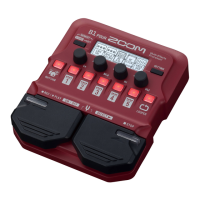
Zoom B1 FOUR - User Manual

Zoom B1 FOUR
74 pages
Print Icon
To Next Page IconTo Next Page
Loading...
User Manual of Product 1:
Zoom B1 FOUR Bass Multi-Effects Processor Pedal, With 60+
Built-in effects, Amp Modeling, Looper, Rhythm Section, Tuner,
Battery Powered
User Manual of Product 2:
Zoom G1X FOUR Guitar Multi-Effects Processor with
Expression Pedal, With 70+ Built-in Effects, Amp Modeling,
Looper, Rhythm Section, Tuner, Battery Powered

Questions and Answers

  • J
    Julie BauerJul 26, 2025
    Why do the batteries in my Zoom Recording Equipment lose charge so fast?
    • S
      Stephanie WrightJul 26, 2025
      If the batteries in your Zoom Recording Equipment are draining quickly, ensure you're not using manganese batteries. Alkaline batteries should last around 18 hours with continuous use. Also, verify the battery setting is correct to accurately display the remaining charge. Note that batteries discharge faster in low-temperature environments due to their characteristics.
  • M
    Miranda ReynoldsAug 3, 2025
    How to reduce noise in my Zoom Recording Equipment?
    • J
      Joseph BrownAug 3, 2025
      If you're experiencing excessive noise with your Zoom Recording Equipment, first, confirm that a shielded cable isn't causing the issue. If not, try using a genuine ZOOM AC adapter.
  • D
    Darlene ThomasAug 11, 2025
    What to do if the effects are not working on my Zoom Recording Equipment?
    • J
      joshualopezAug 11, 2025
      If the effects on your Zoom Recording Equipment aren't working, it might be due to exceeding the effect processing power. If “PROCESS OVERFLOW” appears on the display for an effect, it will be automatically bypassed.
  • B
    Brian CrawfordAug 18, 2025
    What to do if there is no sound from my Zoom Recording Equipment?
    • G
      gutierrezjamesAug 18, 2025
      If you're experiencing very quiet or no sound output from your Zoom Recording Equipment, there are a few things to check. First, look at adjusting the overall audio character and output level. If you're using an expression pedal to control volume, make sure to adjust the pedal position for a suitable level. Also, confirm that the tuner output is not set to “MUTE”.

Summary

Memory Management and Operation Modes

Operation Modes

Details the three primary operational modes: MEMORY, STOMP, and EDIT.

Device Components and Setup

Loading Batteries

Instructions for installing batteries to power the device.

Connecting the Device

Guides on how to connect the device to amplifiers, computers, and audio sources.

Sound Adjustment and Patch Operations

Using Patches (MEMORY Mode)

How to select and use preset sound configurations (patches) in MEMORY mode.

Effect Management and Editing

Turning Effects ON;OFF (STOMP Mode)

How to enable or disable individual effects using footswitches in STOMP mode.

Editing Effects (EDIT Mode)

Instructions for activating EDIT mode and selecting effects for modification.

Adjusting Effect Parameters

Guides on modifying the specific settings of selected effects.

Utilizing Built-in Tools: Tuner, Rhythms, and Looper

Using the Tuner

Guides on activating and using the built-in chromatic and bass tuners.

Troubleshooting and Specifications

Troubleshooting Common Issues

Lists common problems and their solutions for device operation.

Zoom B1 FOUR Specifications

General IconGeneral
Simultaneous Effects5
Sampling Frequency44.1 kHz
TunerYes
A/D Conversion24-bit
D/A Conversion24-bit
Frequency Response20 Hz - 20 kHz
DisplayLCD
Input1/4" phone jack
Output1/4" phone jack
Expression PedalYes
Inputs1 x 1/4" (Instrument)
Outputs1 x 1/4" (Headphones), 1 x 1/4" (Line Out)
Patches50

Related product manuals
