22
ZOOM B9.1ut
Using the Tuner (Bypass/Mute Mode)
)(::/a
¼w:[Y
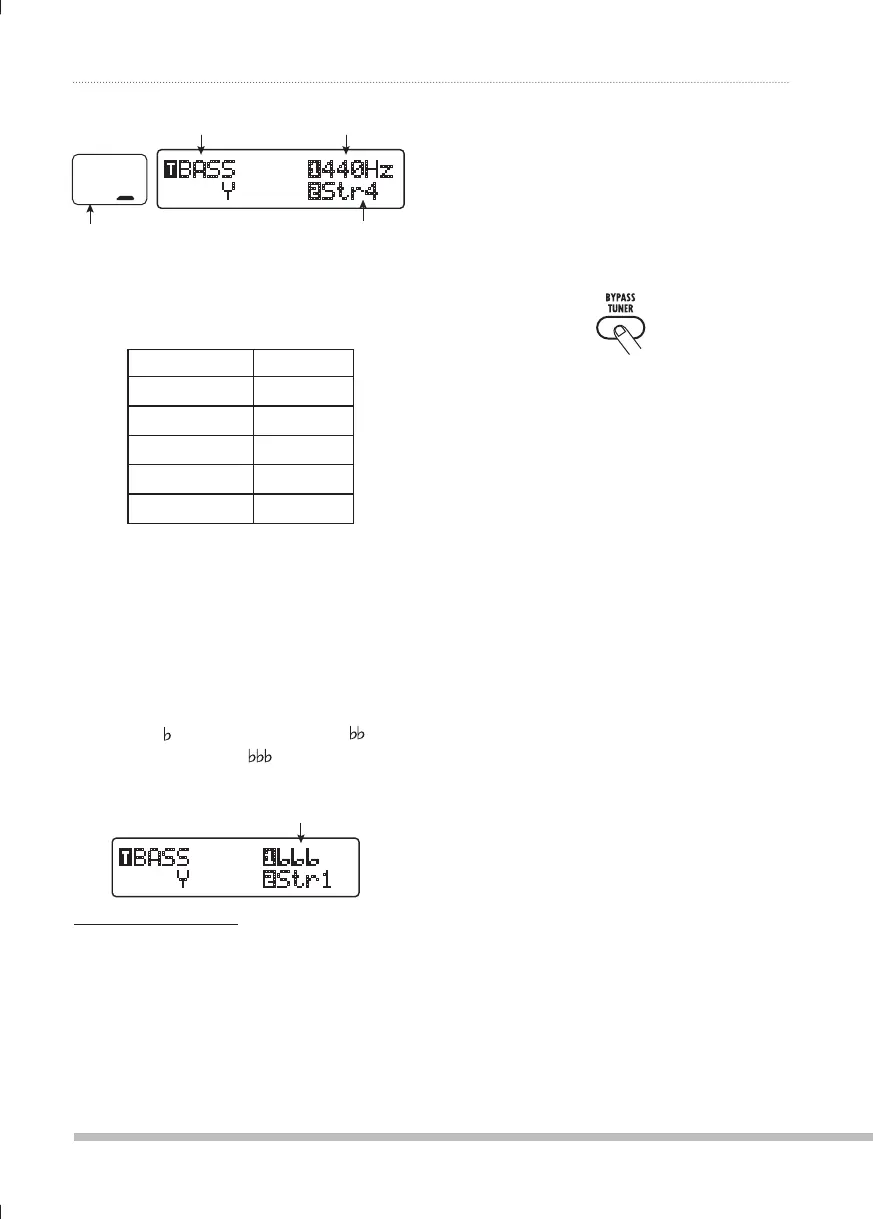
Tuner type Reference pitch
String number
Correct note for
selected string
The note names for each string are shown in the
table below.
String number Note name
Str1
C
Str2
D
Str3
A
Str4
E
Str5
B
If necessary, turn parameter knob
3.
1 to change the reference pitch of
the tuner.
The setting range is center A = 435 – 445 Hz, in
1-Hz steps.
If "BASS" has been selected as tuner
type, turning parameter knob 1 further
counterclockwise from the "435" setting selects
the setting "
" (one semitone lower), " " (two
semitones lower), and "
" (three semitones
lower).
)(::
¼w:[Y
Optional tuning to 1 – 3 semitones lower
HINT
When the B9.1ut is turned off and on again, the
reference pitch will be reset to 440 Hz. You can
change the default frequency that will be used
after a reset (→ p. 59).
Play the open string of the
4.
indicated number and adjust the
pitch.
Turn parameter knob 2 to change
5.
the string number.
Tune other strings in the same
6.
way.
When tuning is completed, press
7.
the [BYPASS/TUNER] key.
The B9.1ut returns to manual mode or play
mode.
0804B9E.indb220804B9E.indb22 08.4.2510:57:45AM08.4.2510:57:45AM



 To Next Page