29
ZOOM B9.1ut
Storing Patches and Banks (Store Mode)
mode with the store/swap target bank being
selected.
By pressing the [EXIT] key instead of the
[STORE/SWAP] key, you can cancel the process
and return to the previous mode.
Returning patches to
factory default
condition
Even if you have made changes to the user
group patches, you can return all patches to the
factory default condition at any time. To do this,
proceed as follows.
NOTE
When you perform the All Initialize function,
all patches stored in the user area will be
overwritten. Proceed with care.
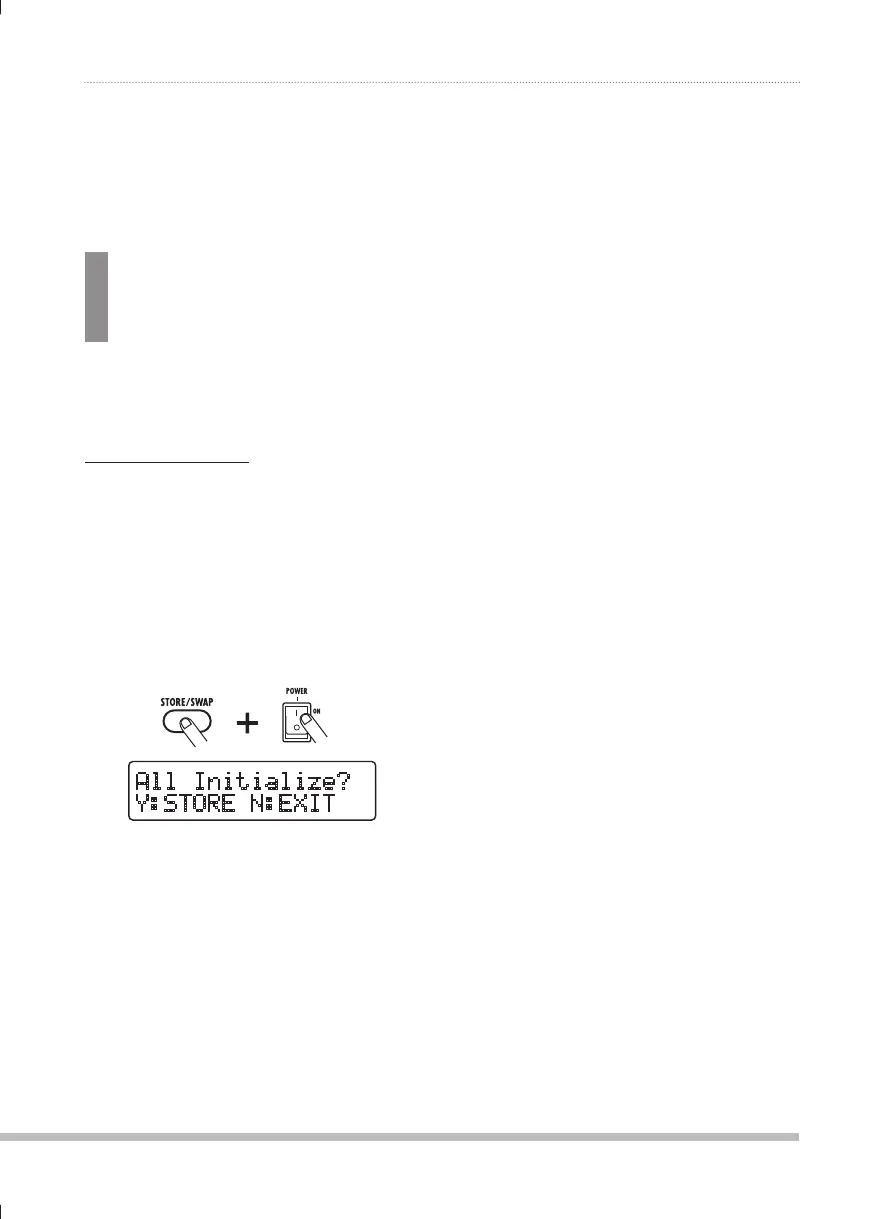
Turn power to the B9.1ut on while
1.
holding down the [STORE/SWAP]
key.
The indication "All Initialize?" appears on the
display.
(SS0UP[PHSPaL&
@!:;69,5!,?0;
Press the [STORE/SWAP] key once
2.
more.
All patches are returned to the factory default
condition. The B9.1ut then switches to manual
mode. By pressing the [EXIT] key before
performing step 2, you can cancel the process.
0804B9E.indb290804B9E.indb29 08.4.2510:57:58AM08.4.2510:57:58AM



 To Next Page