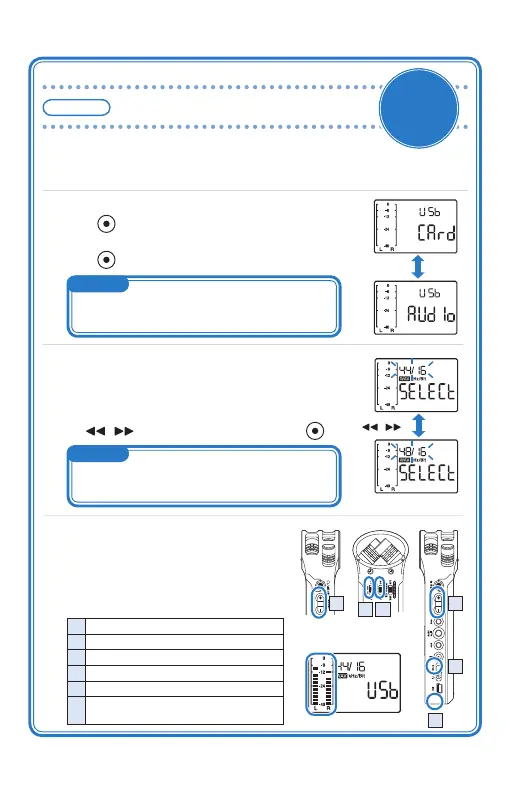
Connecting with a computer <Supplement>
New
function
in Ver.2
Connect
2.
<To use as a MicroSD card reader>
Press while “CArd” is displayed.
<To use as an audio interface>
Press while “AUdIo” is displayed.
1.
With the power off, connect this unit to a Windows PC or a Macintosh us-
ing a USB cable.
3.
<When “CArd” is selected>
It starts working as a MicroSD card reader.
<When “AUdIo” is selected>
When the screen to select the sampling frequency appears,
use / to select the frequency and press
.
4.
It starts working as an audio interface.
This unit’s input signal is sent to the com-
puter, and you can use this unit to moni-
tor the playback signal on the computer.
Displayed alternately at
one-second interval
/
Input/output level
4
1 Adjusts the output level
2 Switches on/off the LO CUT function
3 Switches on/off the AUTO level function
4 Adjusts the input level
5 Disables the keys
6 The playback signal of the computer can be monitored
when line/headphone output jack is not used.
5
6
2 3
1
Blink
Blink
MEMO
If no action is performed for 10 seconds, it will automatically
start working as a MicroSD card reader.
MEMO
The sampling frequency should be set to the same value
as the recording software and playback files.



 To Next Page