1
PC
6WLU[OLA664^LIZP[LVUHJVTW\[LYHUKKV^USVHK[OLTVZ[
YLJLU[Z`Z[LTZVM[^HYLO[[W!^^^aVVTJVQW
2
3
USB
PC H4nPro
*VW`[OLKV^USVHKLKZ`Z[LTZVM[^HYL[V[OL
YVV[KPYLJ[VY`VM[OL:+JHYKPU[OL/U7YV
4
PC H4nPro
+PZJVUULJ[[OL7*HUK/U7YV
5
+
135
6WLYH[PVUZ<[PSP[PLZ!=,9:065<7
<[PSP[PLZ!=,9:065<7
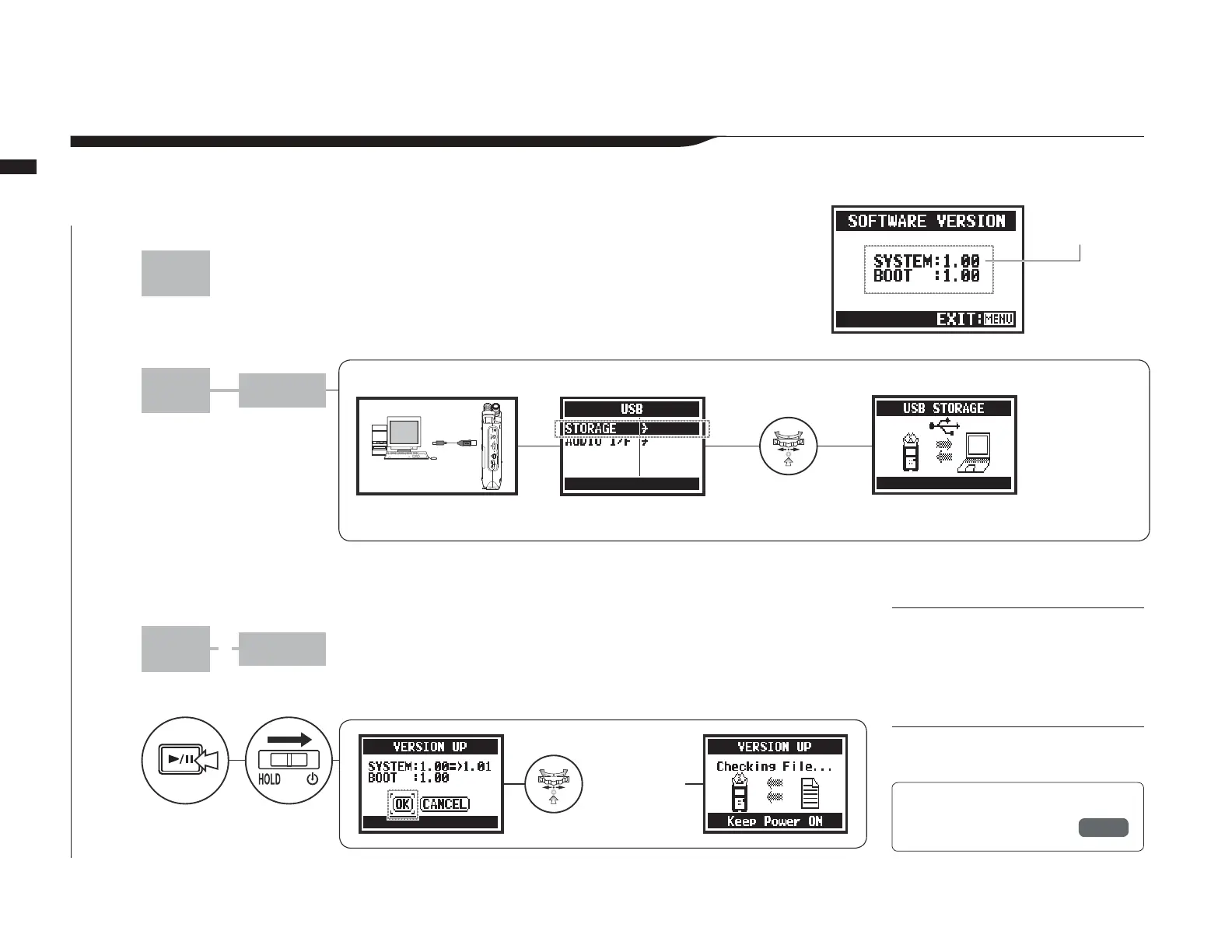
If the H4n Pro (with an SD card) is connected to a computer (PC) that has access to the internet,
you can download H4n Pro software upgrades.
*VUULJ[[OL/U7YVHUK
JVTW\[LY^P[OH<:)
JHISL
;\YUVU^OPSLOVSKPUNKV^U
[OL73(@7(<:,I\[[VU
Main system
version
You can work with
data on the SD card
in the H4n Pro from
the computer.
Connect the H4n Pro to a
computer with a USB cable.
:LSLJ[:;69(.,
HUKWYLZZ
:LSLJ[
62HUK
WYLZZ
You can check the H4n Pro
version on the SYSTEM
(SOFTWARE) VERSION
screen.
Connect to a computer and select
STORAGE. The H4n Pro will be
recognized as an SD card reader
and can be used as one.
Follow the computer procedures to
disconnect from it.
9LM
SYSTEM (VERSION)
P.131
Use a USB cable to connect the H4n Pro and a computer.


 To Next Page