038
4VKLZJYLLUZ:;,9,6HUK:;(405(TVKLZ
4VKLZJYLLUZ!:;,9,6HUK:;(405(TVKLZ
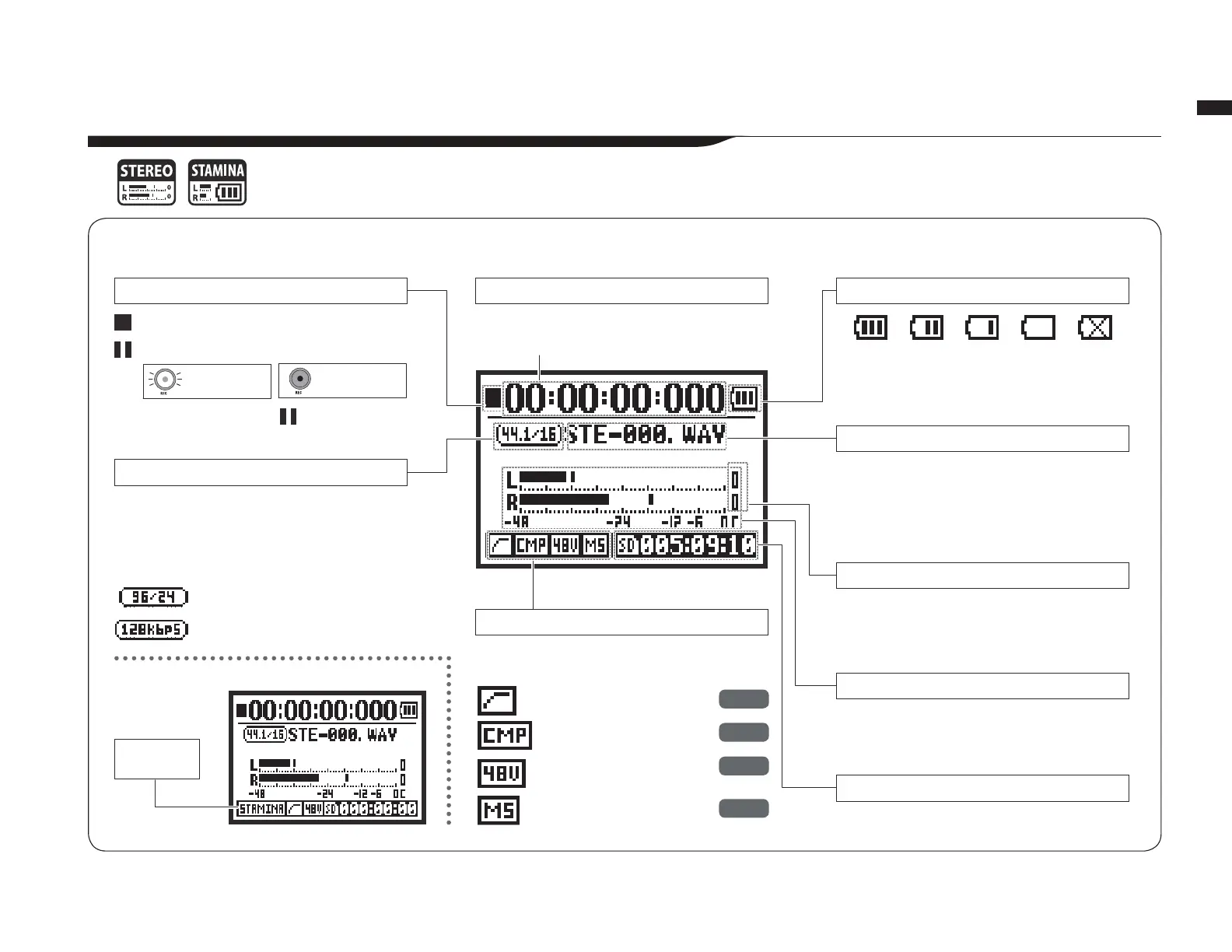
,_WSHUH[PVUVM[OL[VWZJYLLU
Recorder status
-PSLMVYTH[
9LTHPUPUNIH[[LY`SPML^OLUIH[[LY`\ZLK
Optional setting indicators
-PSLUHTLZ
*SPWWPUNPUKPJH[VYZ
3L]LSTL[LYZ
9LTHPUPUNYLJVYKPUN[PTL
Remaining possible recording time on SD card
Recording and playback levels
The clip indicators “light” if the recording or play-
IHJRSL]LSYLHJOLZK)HUKYLTHPUSP[\U[PS[OLÄSL
ends or the stop button is pressed.
1DPH RI ÀOH VHOHFWHG EHLQJ UHFRUGHG RU
playing back
0M[OLYLPZUVÄSLPUHU`MVSKLY¸5V+H[H¹HWWLHYZ
These icons appear on the display when
optional functions are ON.
Elapsed recording or playback time
(hours): (minutes): (seconds): (milliseconds)
-VYTH[VMÄSLZLSLJ[LKILPUNYLJVYKLK
VYWSH`PUNIHJR
>(=ÄSL!R/aIP[
47ÄSL!IP[YH[L
:;(405(46+,
:[HTPUH
icon
If “Low Battery” appears on the display, it is time
to change the batteries.
Counter
:[VWWLK
9LJVYKPUNZ[HUKI`
Blinks
Blinks
REC button
blinks
REC button
lights
7SH`PUN
9LJVYKPUN
Paused
R/aIP[>(=PUKPJH[VY
RIWZ47PUKPJH[VY
36*<;M\UJ[PVU
*6473040;M\UJ[PVU
Phantom power (48V/24V)
4:Z[LYLVTH[YP_
P.066
P.067
P.030
P.073



 To Next Page