Functions of parts
Front/back
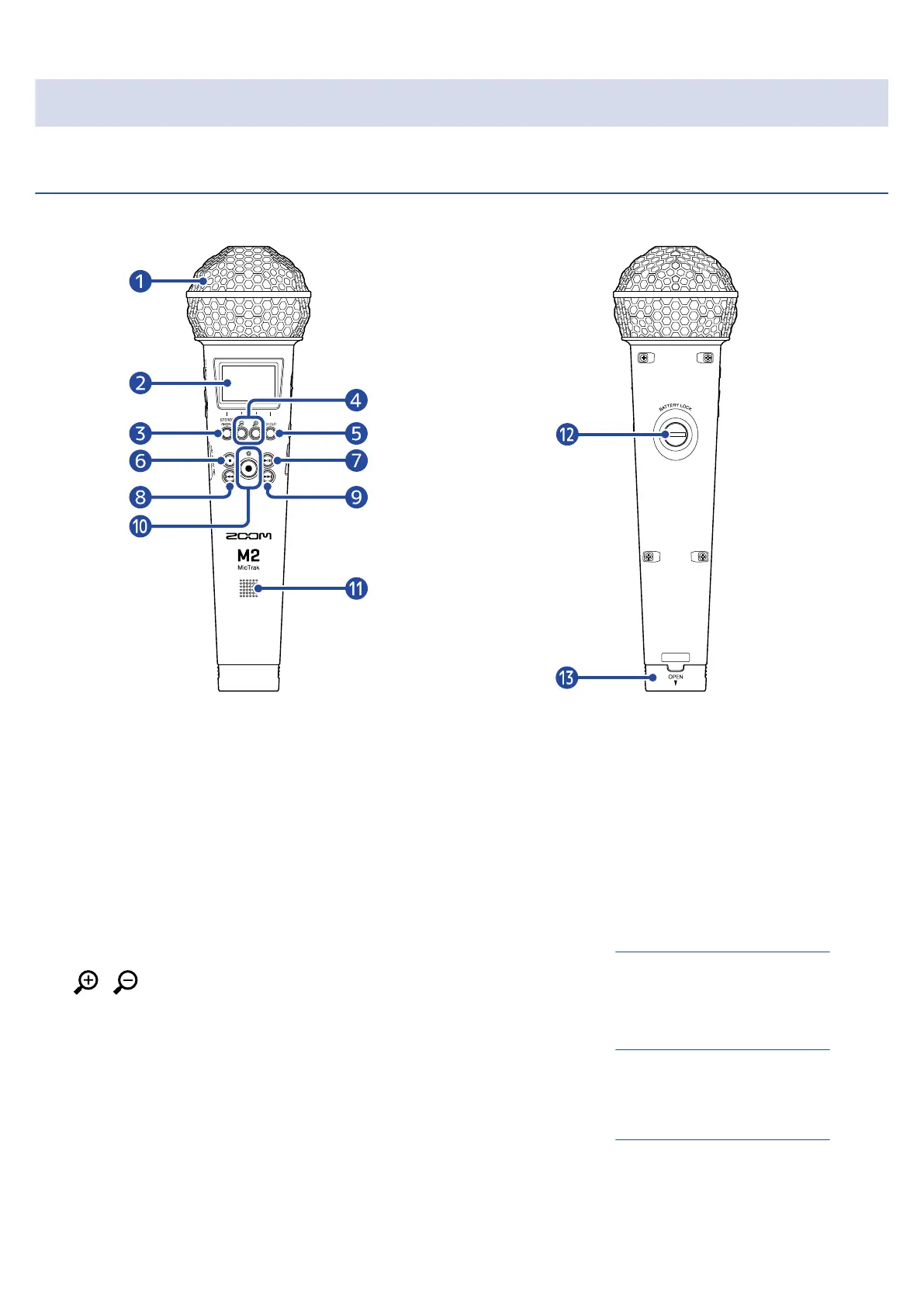
■ Front ■ Back
❶
Built-in XY mic
This stereo mic has two crossing directional mics. This mic can record three-dimensional sound with
natural depth and width.
❷
Display
This shows various types of information.
❸
STEREO/MONO/operation button
Home Screen: Switch the recording audio format between stereo and mono.
Other screens: Use operation shown by icon at bottom of screen. (→Operation button overview)
❹
/ /Operation buttons
Home Screen: Change volume amplification on the display
Other screens: Use operation shown by icon at bottom of screen. (→Operation button overview)
❺
LO CUT/operation button
Home Screen: Change LO CUT setting
Other screens: Use operation shown by icon at bottom of screen. (→Operation button overview)
❻
STOP button
This stops recording and playback.
9



 To Next Page