14
Using Instruments and Mics
Recording
Using Instruments and Mics
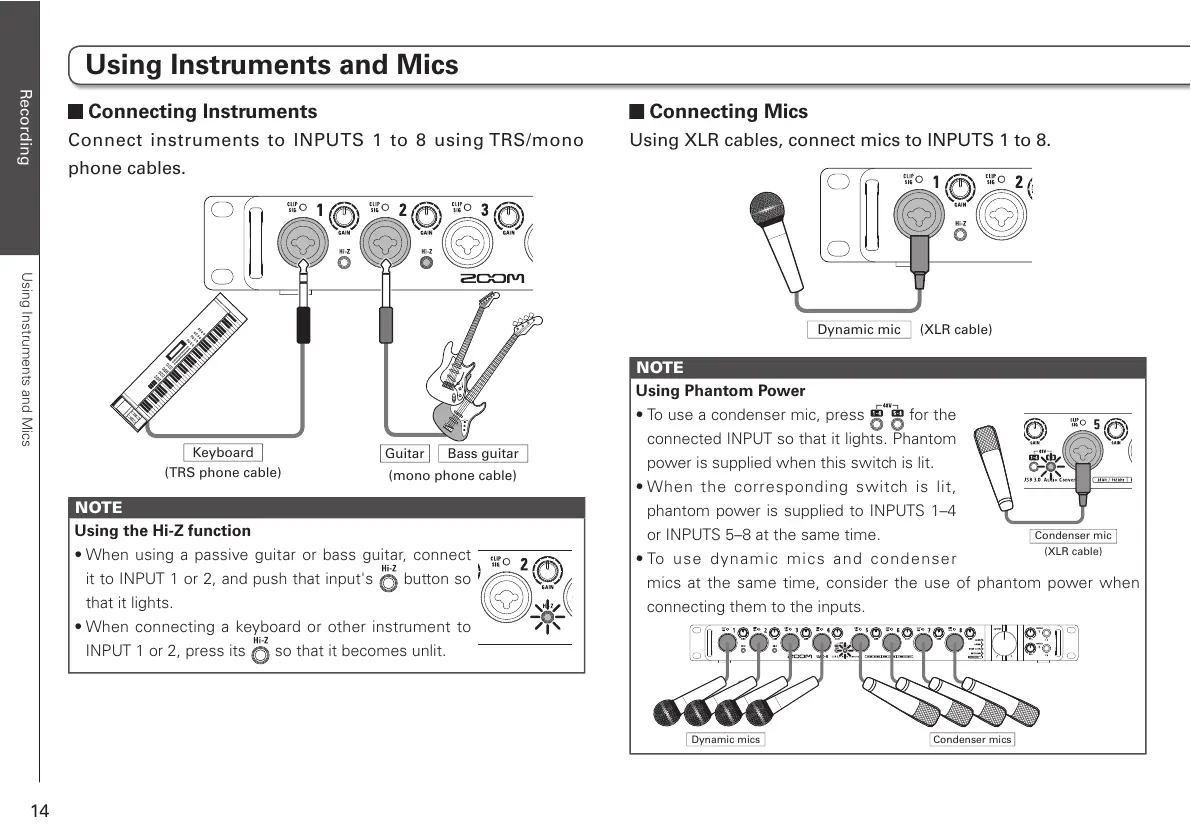
Connecting Instruments
Connect instruments to INPUTS 1 to 8 using TRS/mono
phone cables.
Bass guitar
(TRS phone cable)
(mono phone cable)
Keyboard
Guitar
NOTE
Using the Hi-Z function
t8IFOVTJOH BQBTTJWFHVJUBSPSCBTT HVJUBS DPOOFDU
it to INPUT 1 or 2, and push that input's
button so
that it lights.
t8IFODPOOFDUJOH BLFZCPBSEPSPUIFS JOTUSVNFOUUP
INPUT 1 or 2, press its so that it becomes unlit.
Connecting Mics
Using XLR cables, connect mics to INPUTS 1 to 8.
NOTE
Using Phantom Power
t5PVTFBDPOEFOTFSNJDQSFTT
for the
connected INPUT so that it lights. Phantom
power is supplied when this switch is lit.
t8IFO UIF DPSSFTQPOEJOH TXJUDI JT MJU
phantom power is supplied to INPUTS 1–4
or INPUTS 5–8 at the same time.
t5P VTF EZOBNJD NJDT BOE DPOEFOTFS
mics at the same time, consider the use of phantom power when
connecting them to the inputs.
Dynamic mics Condenser mics



 To Next Page