19
Using Digital Audio Equipment
►Outputting an ADAT Optical signal from the
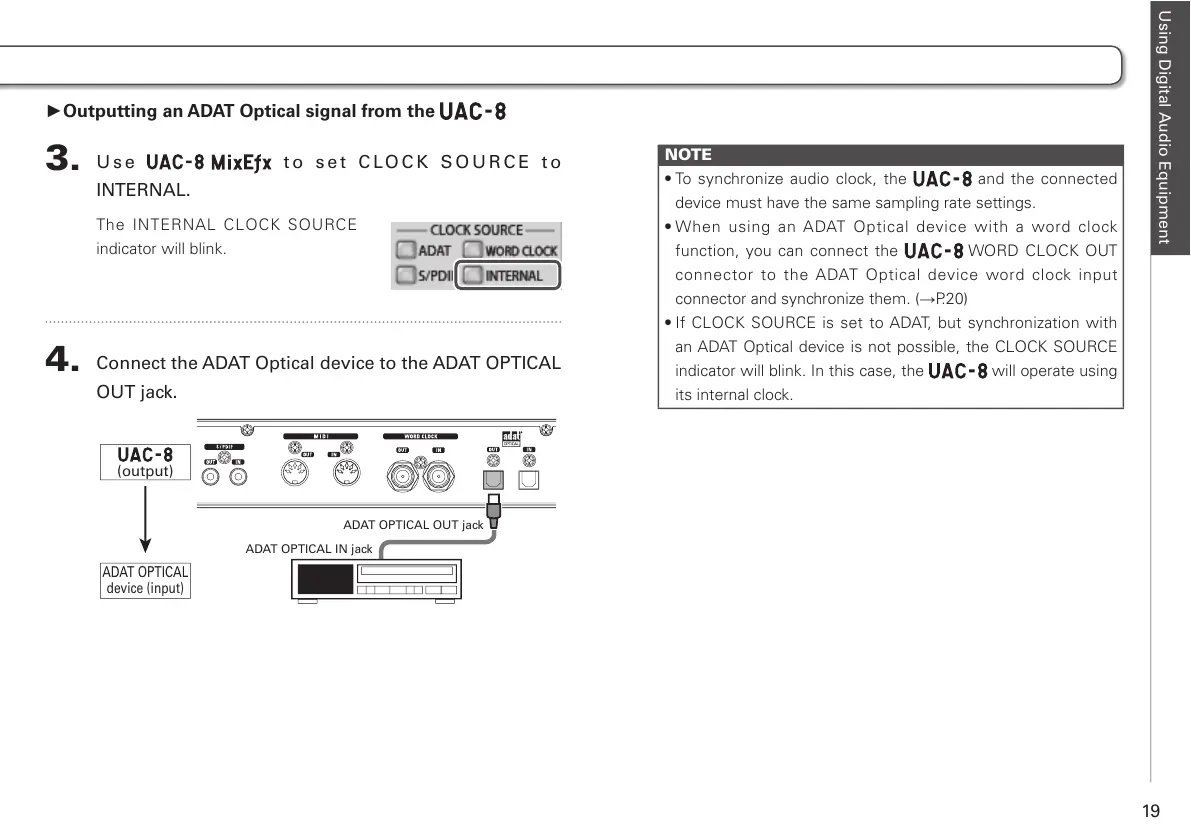
3.
Use t o s e t C LO C K S O U R C E t o
INTERNAL.
The INTERNAL CLOCK SOURCE
indicator will blink.
4.
Connect the ADAT Optical device to the ADAT OPTICAL
OUT jack.
NOTE
t5PTZODISPOJ[FBVEJPDMPDLUIF
and the connected
device must have the same sampling rate settings.
t8IFO VTJOH BO "%"5 0QUJDBM EFWJDF XJUI B XPSE DMPDL
function, you can connect the WORD CLOCK OUT
connector to the ADAT Optical device word clock input
connector and synchronize them. (→P.20)
t*G $-0$,4063$&JTTFUUP"%"5 CVUTZODISPOJ[BUJPOXJUI
an ADAT Optical device is not possible, the CLOCK SOURCE
indicator will blink. In this case, the will operate using
its internal clock.



 To Next Page