EasyManua.ls Logo

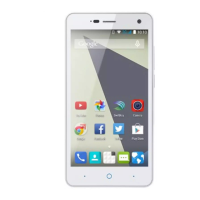
Zte Blade S6 - User Manual

Zte Blade S6
159 pages
Print Icon
To Next Page IconTo Next Page
Loading...
1
ZTE Blade S6
User Manual
Search ‘ZTE Australia’ on Facebook, Google+ and
Twitter to find out more…
http://www.ztemobiles.com.au

Table of Contents

Other manuals for Zte Blade S6

Questions and Answers

  • I
    imooreSep 6, 2025
    Why does my Zte Cell Phone have shortened standby time?
    • N
      Nathan FosterSep 6, 2025
      The standby time on your Zte Cell Phone can be shortened due to several factors. Your service provider system configuration can affect standby time. If you're in an area with a weak signal, temporarily power off the phone. A depleted battery or high temperature environments can also shorten battery life, so try using a new battery. If the phone struggles to connect to the network, it will continuously search for a base station, consuming battery power. Change your location to improve network accessibility, or temporarily turn off your phone.
  • S
    Stephen YuAug 22, 2025
    Why does my Zte Cell Phone crash, reboot, freeze, or not power on?
    • C
      Chelsea SalazarAug 22, 2025
      Your Zte Cell Phone might crash, reboot, freeze, or fail to power on due to incompatible third-party software. In this case, reset the phone to factory status. Also enter safety mode and uninstall the software that may cause the problem. Another solution is to upgrade the phone software.
  • D
    Dustin RodriguezSep 3, 2025
    Why can't I select certain features on my Zte Cell Phone?
    • D
      Debbie BowmanSep 3, 2025
      If you cannot select certain features on your Zte Cell Phone, your service provider may not support these features, or you have not applied for services that provide these features. Contact your service provider.
  • T
    Tricia RivasSep 2, 2025
    Why am I unable to enter information into the phonebook on my Zte Cell Phone?
    • M
      Michelle WilliamsSep 2, 2025
      If you are unable to enter information into the phonebook on your Zte Cell Phone, the phonebook’s memory is likely full. Delete unnecessary data from the contacts.
  • J
    Jill DavidSep 1, 2025
    What to do if my Zte Blade S6's PIN code is blocked?
    • J
      Joshua EllisSep 1, 2025
      If your Zte Cell Phone's PIN code is blocked, it is because you have entered an incorrect PIN code three consecutive times. Contact your service provider. If the service provider provides the nano-SIM card’s PUK code, use the PUK code to unlock the nano-SIM card.
  • A
    Amanda SchmidtAug 30, 2025
    What does it mean if my Zte Cell Phone displays a nano-SIM card error?
    • L
      Lynn HowardAug 30, 2025
      A nano-SIM card error on your Zte Cell Phone could indicate a malfunction or damage to the card. Take the nano-SIM card to your service provider for testing. The nano-SIM card may also be inserted improperly, so ensure it is correctly placed. Finally, debris on the nano-SIM card contacts can cause errors, so use a soft, dry cloth to clean the contacts.
  • M
    Mariah WashingtonAug 29, 2025
    Why can't my Zte Blade S6 connect to the network?
    • D
      Debra FitzpatrickAug 29, 2025
      Your Zte Cell Phone might be unable to connect to the network because the nano-SIM card is invalid. In this case, contact your service provider. It could also be that you are outside of the network’s service area, so check with your provider. A poor signal could also be the culprit. Try moving to an open space or closer to a window.
  • L
    Lori TateAug 27, 2025
    What to do if my Zte Blade S6 has poor reception?
    • G
      gcookAug 27, 2025
      If your Zte Cell Phone has poor reception, it might be due to a weak network signal in your current location. This can happen in basements or near tall buildings. Try moving to a location where the network signal can be properly received. Alternatively, the network might be busy. Avoid using the phone during peak times, or try again after a short wait.
  • G
    Garrett GarciaAug 27, 2025
    Why can't I answer incoming calls on my Zte Cell Phone?
    • J
      Jody JohnsonAug 27, 2025
      If you cannot answer incoming calls on your Zte Cell Phone, you may have activated the Call barring feature. To disable it, go to Home Key > > > Settings > Call Settings > Call Barring Settings.
  • M
    Melvin CrawfordAug 25, 2025
    What to do if my Zte Blade S6 crashes, reboots, freezes, or cannot be powered on?
    • K
      Karl KnightAug 25, 2025
      If your Zte Cell Phone crashes, reboots, freezes, or won't power on, it could be due to incompatible third-party software. Try resetting the phone to factory status. You can also try entering safety mode and uninstalling the software that may be causing the problem. Another solution is to upgrade the phone software.

Summary

Getting Started with Your ZTE Blade S6

Connectivity and Communication

Mobile Networks and SIM Card Management

Managing SIM cards, selecting network operators, and connecting to mobile data.

Wi-Fi and Bluetooth Connectivity

Connecting to Wi-Fi networks and pairing Bluetooth devices.

Phone Calls and Messaging

Placing, receiving, and managing calls, SMS, and MMS.

Email and Gmail Usage

Setting up and using email and Gmail accounts.

Applications and Features

Browser and Internet Navigation

Browsing the web, searching, and downloading files.

Maps and Location Services

Using maps for navigation and finding locations.

System Settings and Maintenance

Zte Blade S6 Specifications

General IconGeneral
BrandZte
ModelBlade S6
CategoryCell Phone
LanguageEnglish

Related product manuals