2 EASY
COMMON DOOR STATION SETTING
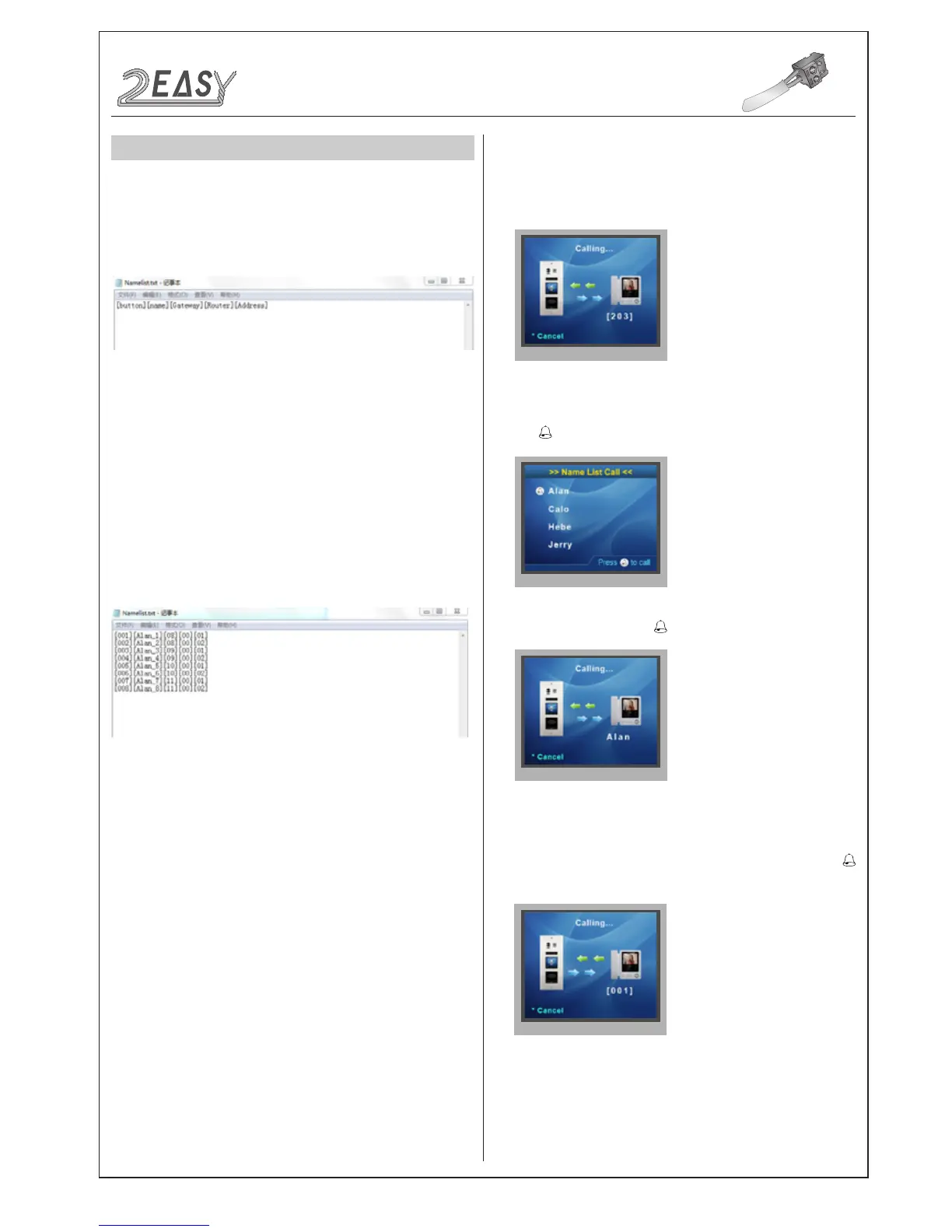
i) Create a TXT le, and named Namelist.
ii) Open the Namelist.txt le, and input 5 [ ] symbols. Each [ ] symbol
has its meaning, see the following picture.
iii) Edit Namelist.txt le. For example, as the following picture.
Button: DMR21 button which you need to set.
Name: It will be displayed on TFT module.
Gateway: Set the Gateway mode recording to BDU address. [08~15]
means BDU address 01~08
Router: Set the Router mode recording to BDU address.[01~08]
means BDU address 01~08
Address: Set the monitor address you want to call.
[001][Alan_1][08][00][01]
Press the rst button, it would call the monitor 01 in BDU 1, and it is
displayed Alan_1 on TFT module.
This section is reserved
For more details please refer to the following section of Namelist
Update By SD Card
Description:
Denition:
• Calling By Buttons
• Calling By Namelist
• Calling By Keypad Module
Press the call button to call corresponding monitors
i) Press touch sensor button to show the name list
ii) Select the name,then press touch sensor button to call
Input the Aprt number on keypad (with keypad module) and press
touch sensor button to call the corresponding monitor
DMR21 Technical Manual -19-
CONFIGURATION
1.Namelist.txtleSetting:
4.Calling
2.Work Mode Setting:
3.Namelist Update:



 To Next Page