1-14
Task Remarks
Opening an SSH connection with publickey
authentication
Required for publickey authentication;
unnecessary for password authentication
z For putty, it is recommended to use PuTTY release 0.53; PuTTY release 0.58 is also supported.
For OpenSSH, it is recommended to use OpenSSH_3.1p1; OpenSSH_4.2p1 is also supported.
Any other version or other client, please be careful to use.
z Selecting the protocol for remote connection as SSH. Usually, a client can use a variety of remote
connection protocols, such as Telnet, Rlogin, and SSH. To establish an SSH connection, you must
select SSH
z Selecting the SSH version. Since the device supports only SSH2.0 now, select 2.0 for the client.
z Specifying the private key file. On the server, if public key authentication is enabled for an SSH
user and a public key is set for the user, the private key file corresponding to the public key must be
specified on the client. RSA key pairs are generated by a tool of the client software.
The following takes the client software of PuTTY Version 0.58 as an example to illustrate how to
configure the SSH client:
Generating a client key
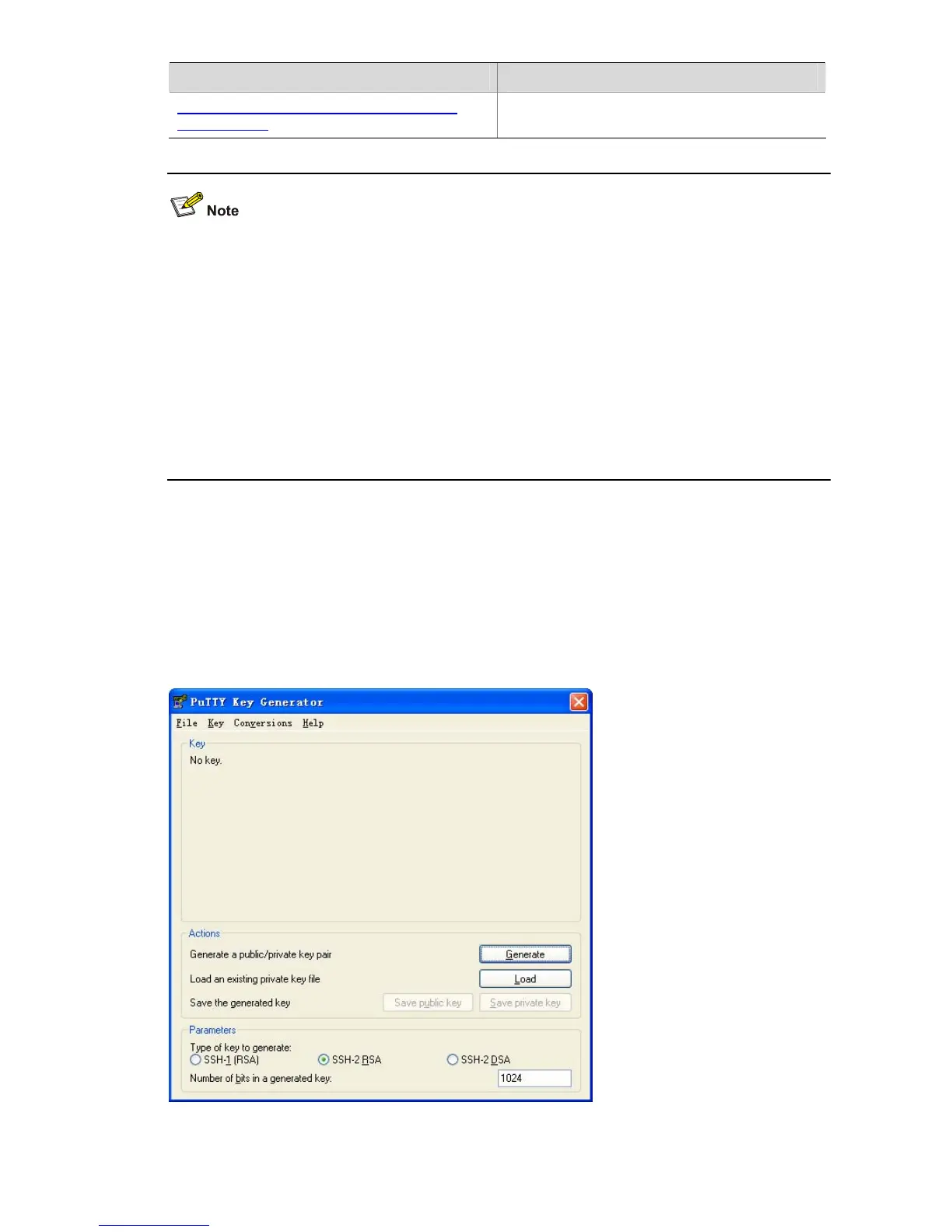
To generate a client key, run PuTTYGen.exe, and select from the Parameters area the type of key you
want to generate, either SSH-2 RSA , then click Generate.
Figure 1-3 Generate a client key (1)










 To Next Page