34 © 3M 2008. All Rights Reserved.
User Controls 3M™ Digital Projector
For example: Use Microsoft Internet Explorer (IE) web browser
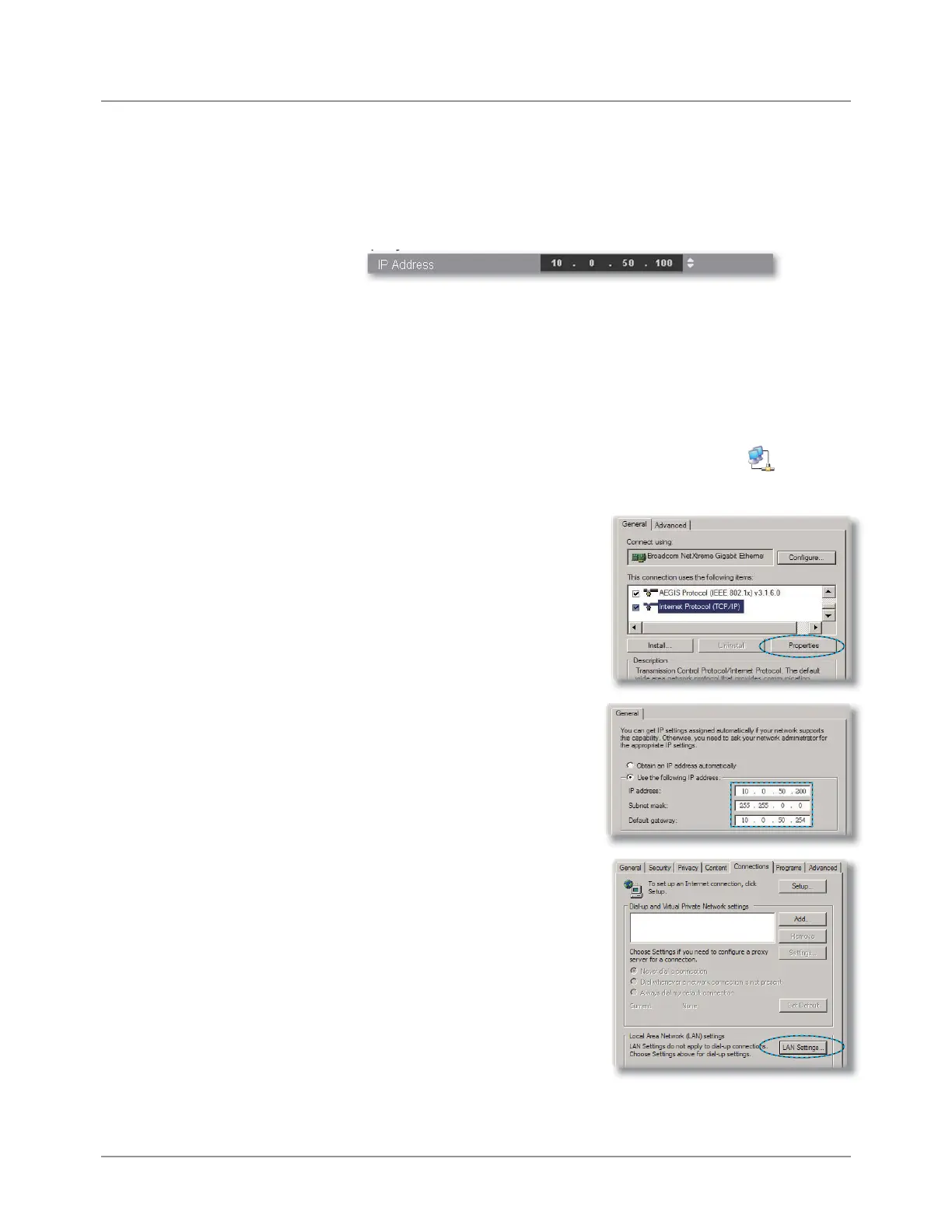
to control the projector , the IP address is http: //
10.0.50.100.
Step 1: Find an IP Address (10.0.50.100) from LAN function of
projector.
Step 2: Select apply and press “Enter” button to submit function or
press
“menu” key to exit.
Step 3: To open Network Connections, click Start, click Control
Panel, click Network and Internet Connections, and then
click Network Connections. Click the connection you want
WRFRQ¿JXUHDQGWKHQXQGHUNetwork Tasks
, click
Change settings of this connection.
Step 4: On the General tab, under
This connection uses the
following items, click In-
ternet Protocol (TCP/IP),
and then click
“Properties.”
Step 5: Click Use the following
IP address, and type in as
below:
1) IP address: 10.0.50.XXX
2) Subnet mask: 255.255.0.0
3) Default gateway:
10.0.50.254
Step 6: To open Internet Options,
click IE web browser, click
Internet Options, click the
Connections tab and click
“LAN Settings...”



 To Next Page