4.3.7 Adding times to a week program
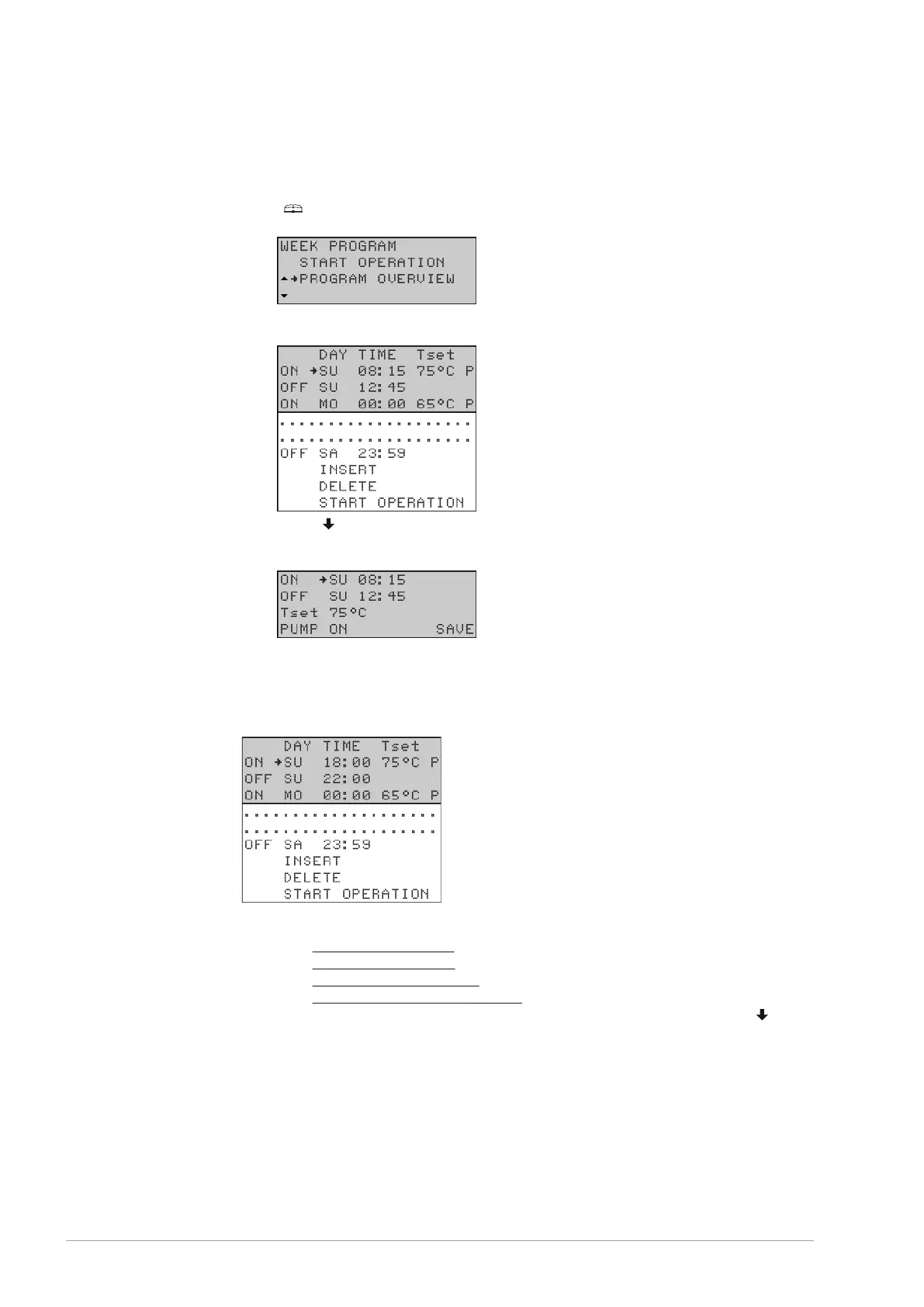
Call up the menu to INSERT switch-on and switch-off times into a week program as
follows:
[
]: WEEK PROGRAM | PROGRAM OVERVIEW.
Confirm with [ENTER].
The display shows the menu for the week program. The cursor points to the active
period.
Scroll [ ] to INSERT.
Confirm with [ENTER].
The submenu for adding a period will appear.
Example
As an example, we will program an extra period in which the switch-on time is set to
18:00 and the corresponding switch-off time to 22:00. The water temperature will be set
to 75ºC and the pump will run continuously.
Proceed as follows:
Set the switch-on time (see section 4.3.6.1).
Set the switch-off time (see section 4.3.6.2).
Set the water temperature (see section 4.3.6.3).
Set the program-controlled pump (see section 4.3.6.4).
To activate the week program with the new period added, scroll down with [
] to
START OPERATION and confirm with [ENTER].
1.
2.
3.
a.
b.
c.
d.
4.
34 User part









 To Next Page