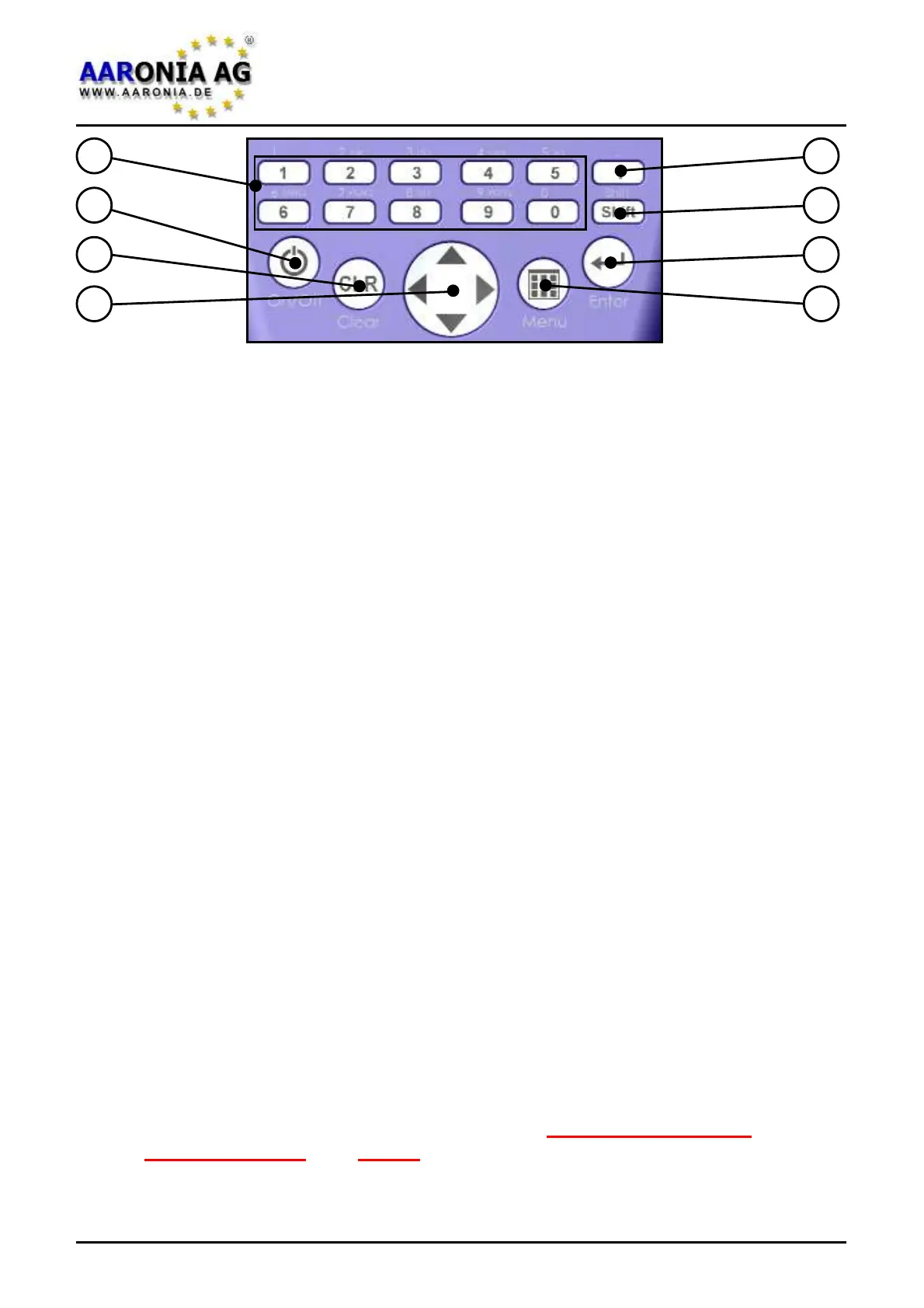
(1) Numeric block (hotkeys)
1 = RAIL (traction power) 15-30Hz
2 = POWER (mains frequency 50Hz or 60Hz) 45-65Hz
3 = HARMON (50Hz/60Hz harmonic) 90-500Hz
4 = TCO 1 (shortend TCO frequency range 1) 500Hz-2kHz
5 = TCO 2 (TCO frequency range 2) 2kHz-400kHz
6 = SENSOR (sensor type and axis: Mag, Msta, E-Fld, Analog)
7 = DIM (H-field measurement dimension: 1D, 2D or 3D)
8 = RBW (resolution bandwidth)
9 = SPTIME (sample time in mS or S)
0 = ATTEN (attenuator: auto, 0dB, 10dB, 20dB, 30dB, 40dB)
(2) On-/Off key
Turn the unit on/off
(3) Clear-/Reset key
1.)
Resets the settings to default incl. 0dB attenuator.
2.) When in main menu: clear entry
(4) Arrow keys
1.) With activated menus: selection of menu entries
2.) In Spectrum analysis mode:
Right/left key: move frequency range by one SPAN.
Up/down key: move reference level by 10dB.
3.) In Exposure limits mode:
Right/left key: select exposure limit.
4.) In Audio mode:
Right/left key: move center frequency by one RBW.
Up/down key: decrease/increase RBW (bandwidth).
(5) Dot key
1.) Modes Spectrum analysis / Exposure limits: HOLD on/off.
2.) Mode Audio: Switch between AM and FM.
(6) Shift key
Mode Spectrum analysis & Exposure limits: Detector RMS/MinMax.
(7) Enter key
1.) Switch between the three main modes Spectrum analysis,
Exposure limits and Audio.
2.) While navigating menus: confirm selection or entry (usual enter key).
(8) Menu key
Call up / dismiss main menu for changing various settings.
1
2
3
4
8
7
6
5
4.0 Key layout
Firmware V 1.0 / © 2005-2013 by Aaronia AG, D-54597 Euscheid, www.aaronia.com
8


 To Next Page