35
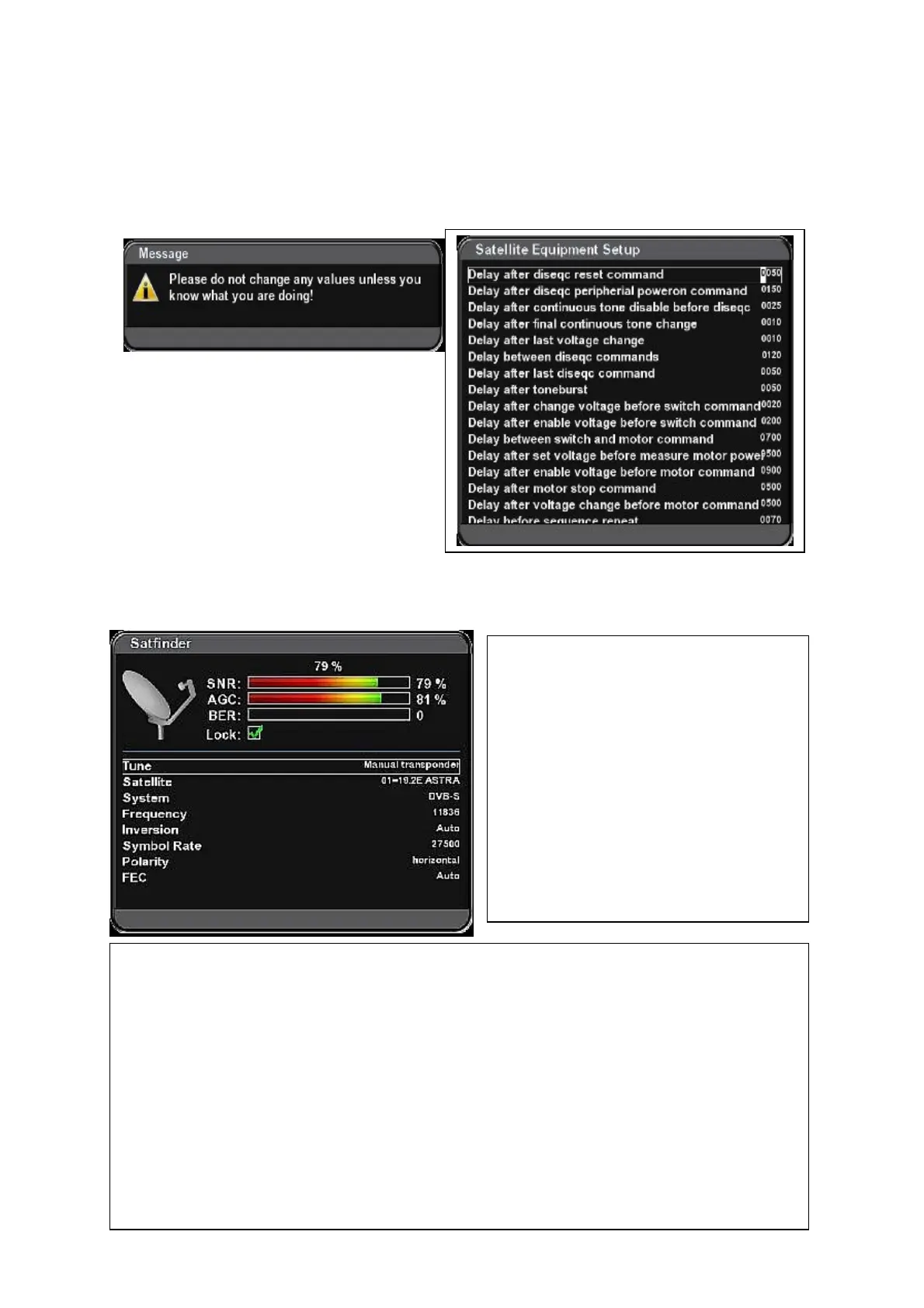
Satellite Equipment setup
(Menu – Setup – Service Searching – Satellite Equipment setup)
We strongly recommend not changing the parameters in this menu if you are not an
expert!
Satfinder
(Menu – Setup – Satfinder)
Satfinder menu is used to help to adjust
alingment of your antenna dish.
SNR = Signal/Noise Ratio – quality of the
signal.
AGC= Automatic Gain Control – strength
of the signal (including noise and
interference)
BER= Bit Error Rate
To achieve the best quality reception try
to reach maximum SNR value and zero
BER.
Tune – Manual transponder = use cursor and numerical buttons on RC to set up parameters
manualy:
Satellite – select corresponding satellite.
System, Fre
quency, Symbol rate, Polarity and FEC – set up m
a
nualy
according to parameters
of transponde
r on witch
you are going
to check quality of the signal.
or:
Tune – Prese
t transponder = It sets up default (preset) transponder with all its parameters.
Adjust the dish position very slowly. If the signal quality is sufficient for searching the channels,
marker is displayed in Lock window.



 To Next Page