34
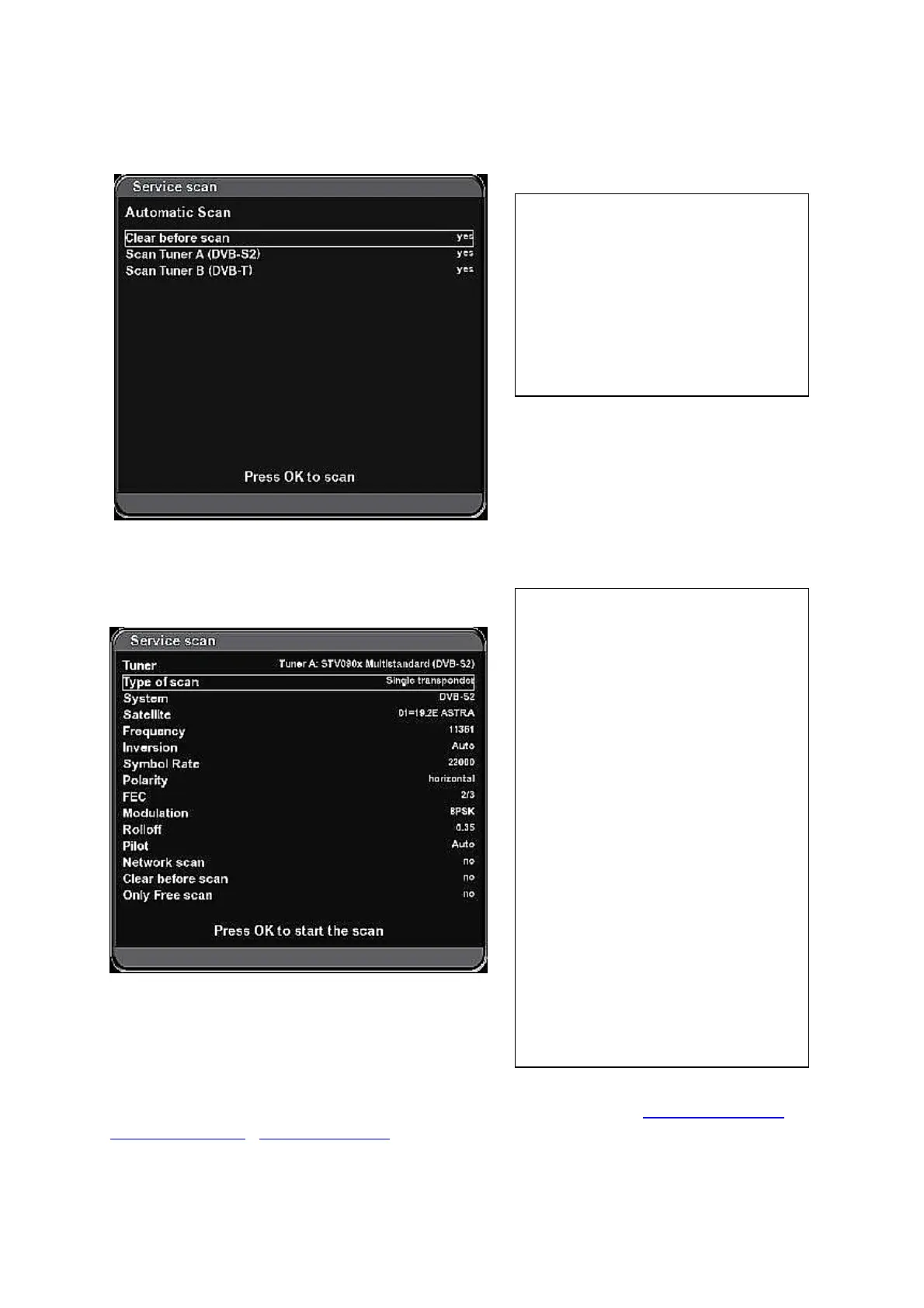
Automatic Scan
(Menu – Setup – Service searching – Automatic Scan)
Manual scan
Press
OK to start searching.
You can find specific parameters of satellites and transponders e.g. on: http://kingofsat.net ,
http://lyngsat.com
, www.parabola.cz and other web pages.
Clear before scan – „yes“:
Removes all channels searched before.
Scan Tuner A (DVB-S2)-„yes“:
Runs searching on all available
satellites according to setting of the
tuner (if you use a motor it can last
several tens of minutes).
Tuner A or B
Type of scan:
Single satellite – select one sigle
satellite to be searched on and press
OK for starting the searching.
Single transponder - insert
parameters for one particular
transponder and press OK:
System – DVB-S or DVB-S2 .
Satellite – name of satellite.
Frequency – frequency of TP.
Symbol rate
Polarity
FEC – set the right value or set „Auto“
Modulation: QPSK – 8PSK
Network scan – if set to „yes“ it
searches on all TPs of corresponding
provider (if the service is supported by
the provider).
Only Free scan – searching only for
FTA channels.



 To Next Page