BDM interface for CodeWarrior™ Debugger, BDI2000 (MPC5xx/8xx) User Manual 16
© Copyright 1992-2001 by ABATRON AG V 1.02
4 BDI working modes
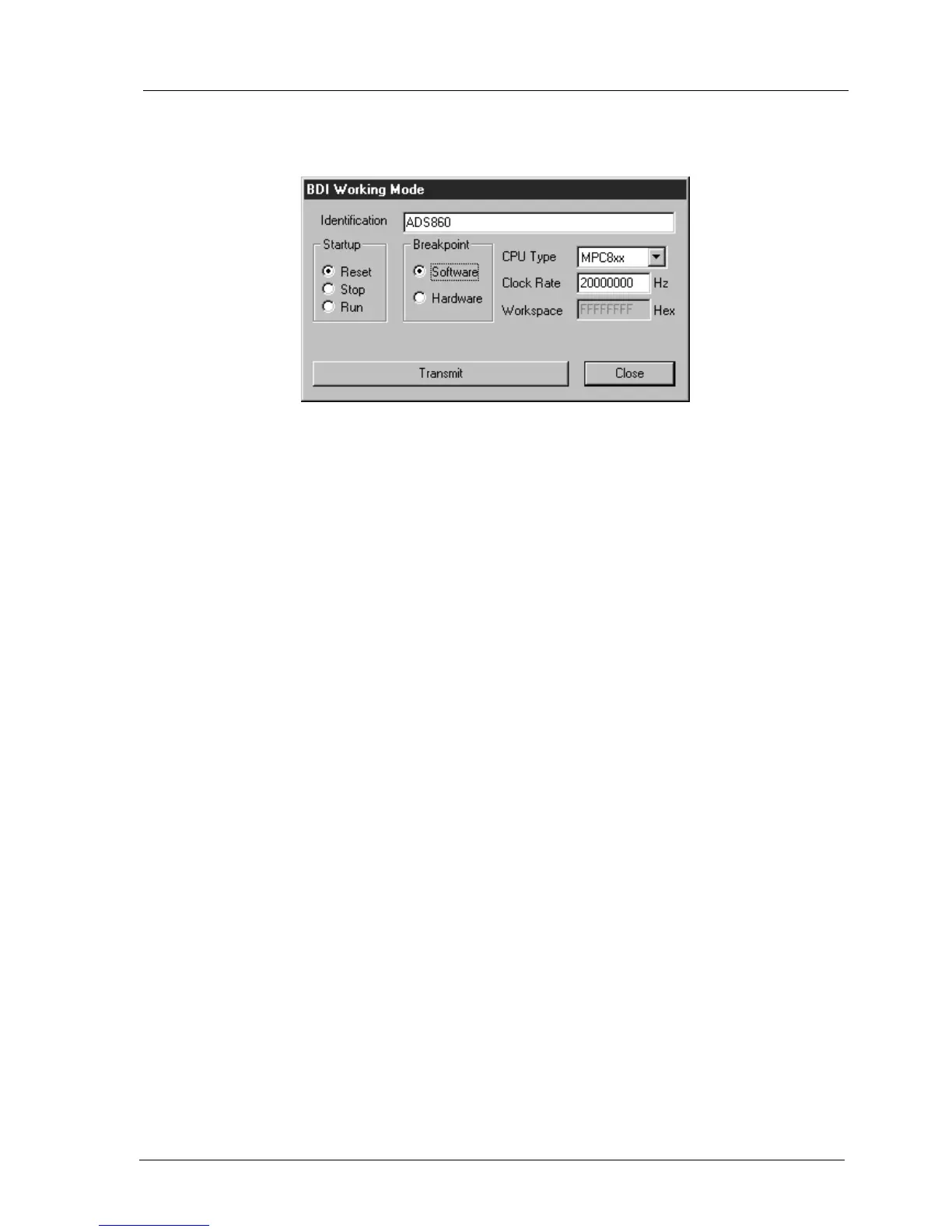
dialog box «BDI Working Mode»
With this dialog box you can define how the BDI interacts with the target system.
Identification Enter a text to identify this setup. This text can be read by the debugger
with the appropriate Command.
Startup Startup mode defines how the BDI interacts with the target processor after
reset or power up. The options RESET, STOP or RUN can be selected.
Breakpoint Breakpoint mode defines how instruction breakpoints are implemented.
When Software is selected (default), instruction breakpoints are set as re-
quested by the debugger (Software or Hardware breakpoints). When
Hardware is selected, the BDI uses always hardware breakpoints. This is
useful when the attached debugger does not support hardware break-
points on instruction access. For CodeWarrior, select always Software.
CPU Type Select the CPU type of the target system.
Clock Rate Enter the clock rate the target CPU runs after BDI has worked through the
init list. BDI selects the BDM communication speed based on this param-
eter. If this parameter selects a CPU clock rate that is higher than the real
clock rate, BDM communication may fail. When selecting a clock rate
slower than possible, BDM communication still works but not as fast as
possible.
Workspace In order to access the floating-point registers of a MPC5xx microproces-
sor, the BDI needs a workspace of 8 bytes in target RAM. Enter the base
address of this RAM area. This memory is used, when a floating-point reg-
ister is accessed. If there is no RAM space available for the BDI, you may
enter 0xFFFFFFFF as the workspace address but then, accessing float-
ing-point registers is not possible.
Transmit Click on this button to send the initialization list and the working mode to
the BDI. This is normally the last step done before the BDI can be used
with the debugging system.


 To Next Page