BDM interface for CodeWarrior™ Debugger, BDI2000 (MPC5xx/8xx) User Manual 18
© Copyright 1992-2001 by ABATRON AG V 1.02
5 Working with CodeWarrior
5.1 Setup
Use the CodeWarrior "IDE Preferences" dialog box, section "Debugger -> Remote Connections", and
setup the appropriate communication parameters for the "Abatron TCP/IP" and "Abatron Serial" con-
nection.
Use the CodeWarrior "your project Settings" dialog box, section "Debugger -> Remote Debugging"
and select either "Abatron TCP/IP" or "Abatron Serial".
5.2 EPPC Exceptions
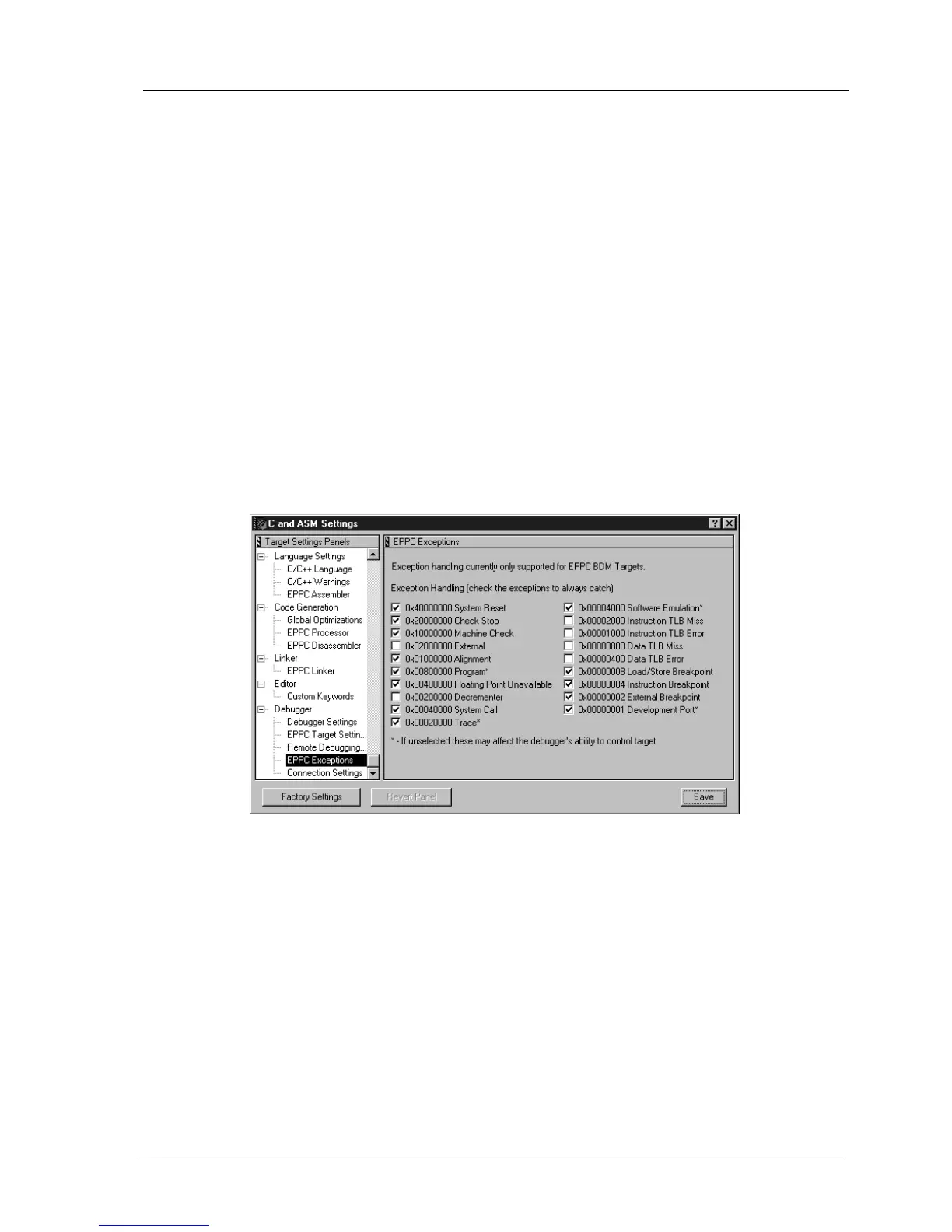
From the CodeWarrior menu "Edit" open "your project Settings...".
Select "Debugger - EPPC Exceptions". This opens the "EPPC Exceptions" dialog box.
Here it is possible to define which EPPC exceptions causes an entry into debug mode. Do not check
exceptions which should be handled by application code (typically External Interrupt and Decrement-
er Interrupt). Never disable Development Port and External Breakpoint. For normal debugging you
should also not disable Program, Trace, Software Emulation, Load/Store Breakpoint and Instruction
Breakpoint.


 To Next Page