
 Need help?
Do you have a question about the ABB Cylon MATRIX-2 Series and is the answer not in the manual?
Overview of the MATRIX-2's capabilities as an IoT controller for building automation systems.
Instructions for applying power, including essential wiring and grounding precautions for the MATRIX-2.
Steps for connecting the MATRIX-2 to an IP network and information on its integrated Ethernet switch.
Guidance on connecting to BACnet MS/TP, network termination, and RS-485 wiring.
Details on wiring RS-485 communication wires to the MS/TP subnet port.
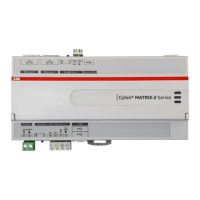
Details concerning the physical dimensions and layout of the MATRIX-2 hardware.
Explanation of wiring diagrams and terminal assignments for device connectivity.
Information on LED indicators, push buttons, USB ports, and their operational functions.
Requirements for setup, connecting to the device, and the initial login process.
Navigating the Control Panel and managing user accounts and group permissions.
Procedures for managing the SQLite database and applying device licenses.
Settings for various communication protocols like BACnet, BBMD, and Modbus.
Configuring system-wide settings, LDAP, and managing device services.
Monitoring system health, resource usage, and accessing diagnostic information.
Tracking project performance metrics and performing system firmware upgrades.
Procedures for backing up configurations, restoring data, and managing system files.
Managing deployed projects, including removal and downloading project source files.
Configuring Ethernet IP settings, network diagnostics, and time synchronization.
Setting up web server parameters and accessing system logs for monitoring and troubleshooting.
Reviewing Aspect Control Engine logs, throttled messages, diagnostic buffers, and remote logging.
Examining comprehensive system logs and the history of operating system updates.
The Cylon® MATRIX-2 Series is an Internet of Things (IoT) embedded ASPECT® Control Engine designed for flexible site control in medium to large-scale building automation systems. It integrates network management and supports various communication protocols, making it a versatile solution for connecting with different field-level controllers and devices.
The MATRIX-2 Series serves as a central control unit, capable of supervisory-based control functions. This includes energy management routines, custom sequencing, alarm and event annunciation, historical alarming and trending, and master control scheduling. It supports serial communication protocols such as BACnet®, AAM PUP, and Modbus®. Additionally, it facilitates TCP/IP communications using FT/Net, BACnet, Modbus, and Cylon's Unitron protocols via its RJ-45 connection.
The device is designed to connect with Cylon CB Series and AAM NB Series of BACnet® MS/TP field-level controllers, allowing for comprehensive building automation. Its capacity-based licensing model ensures scalability for various building sizes, including campus environments, especially when combined with the ASPECT-Enterprise server software.
The embedded ASPECT Runtime Engine enables the MATRIX-2 to stream live connected data, which is displayed through rich HTML5 graphics using a web browser, providing an intuitive user interface.
The MATRIX-2 Series offers a secure web interface for user interaction, enhancing the experience through common internet applications for alarm annunciation and scheduling. Users can receive alarms directly from the integrated alarm console or through e-mail clients and Twitter®. Scheduling building equipment is made easy with an integrated scheduler or by using common scheduling platforms like Microsoft® Outlook®, Apple iCal, and Google Calendar™.
For initial setup, the device requires a 24 V AC/DC power supply from an external transformer, with one conductor grounded to earth to prevent damage. Network connectivity is established by connecting an Ethernet cable from the network's switch to one of the two Ethernet ports on the MATRIX-2. The device comes with a default IP address (192.168.1.251) and subnet mask (255.255.255.0) on its primary Ethernet Port, requiring the user's PC network card to be configured to access this IP network.
The MATRIX-2 includes an integrated Ethernet Switch with two ports, enabling it to forward IP packets between ports. This allows for a daisy-chain topology with other MATRIX-2, FBXi, FBVi, and CBXi devices. For MS/TP fieldbus integration, the device connects to BACnet MS/TP networks, with termination switches available for the first or last device in the RS-485 network. The shield (screen) of the RS-485 network must be continuous and grounded at one point.
The Control Panel, accessible after successful login, features a Navigation Tree for selecting different configuration areas. The User Manager allows for adding, editing, and deleting users and groups within the ASPECT control instance. The Database Management section provides access to SQLite Maintenance for managing database files.
The Licensing page displays the current license status and allows for uploading/downloading license files. The Communication Setup area enables administrators to configure manual Out of Service entries, SDP Network Properties, BACnet IP Router, BBMD, Modbus Network Properties, and Time Synchronization settings. The Out Of Service Manager (OSS) allows devices to be manually marked out of service. BACnet Settings facilitate configuration of read/write retries, port settings, and router settings for BACnet/IP. BBMD Settings are used for BACnet/IP Broadcast Management Device table setup. Modbus Network Properties configure Modbus communications, and Time Sync Settings manage BACnet network time synchronizations.
System Administration provides access to various system settings, including LDAP Configuration for Active Directory authentication, System Services for controlling key services (e.g., restarting Ethernet, Aspect Control Engine, or TLS/SSL Server), System Status for viewing uptime, memory utilization, disk space, and revision levels, Process Status for monitoring running processes, Project Performance for viewing Threads, Maps, and Ports, System Updates for firmware upgrades, Backup/Restore for device configuration and SQLite database backups, Project Removal for removing deployed projects, and Project Source for downloading password-protected project copies.
The MATRIX-2 Series offers several maintenance features, including restarting, resetting, and upgrading the controller. Two buttons (SW1 and SW2) on the front panel, along with LEDs (L1 and L2), indicate the progress of these operations.
To reset Ethernet settings (IP address only), SW1 is pressed for 1 second while the controller is running. This returns all Ethernet settings to factory defaults (192.168.1.251/24) while keeping user groups and passwords intact.
For a full factory reset, SW1 is pressed and held for at least 10 seconds while the controller is running. This restores all Ethernet settings to factory defaults and resets user groups and passwords.
To restart the controller without power cycling, SW2 is pressed for 1 second while the controller is running. The LEDs indicate the reboot progress, with the Red LED remaining on, Green LED staying off until reboot is complete, and then flashing, while the Yellow LED remains off unless there is a problem.
The WebUI login can be reset to factory defaults (username: aamuser, password: default, IP address: 192.168.1.251) by pressing SW1 for 1 second.
System Logs provide comprehensive information for troubleshooting, including the Aspect Control Engine log for debugging deployed projects, Aspect Throttled Logs for repeated messages, Diagnostic Buffer for kernel operating system output, Remote Logging for centralized syslog messaging, and System Log for sub-level operating system information. The Update Log tracks all recent operating system updates.
The Persistence Manager allows for managing and deleting persisted data, which is localized data stored from Persisted Elements within an ASPECT project. This helps maintain data integrity and system performance.
 General
| Product Type | HVAC Controller |
|---|---|
| Series | MATRIX-2 Series |
| Supply Voltage | 24V AC/DC |
| Enclosure Rating | IP20 |
| Communication Protocol | BACnet, Modbus |
| Communication Interface | Ethernet, RS-485 |
| Storage Temperature Range | -20°C to 70°C |
| Relative Humidity | 5 to 95% RH, non-condensing |
| Protocol Support | BACnet MS/TP, Modbus RTU |



 To Next Page