Need help?
Do you have a question about the ABB M4M and is the answer not in the manual?
Configure Modbus RTU communication parameters for M4M devices.
Configure Modbus TCP/IP communication parameters for M4M devices.
Configure scanning via Modbus RTU for firmware update.
Configure scanning via Modbus TCP/IP for firmware update.
The M4M device is a network analyzer designed for monitoring and managing electrical parameters in various applications. It serves as a crucial component in power systems, providing detailed insights into energy consumption, power quality, and overall system performance. The device is available in several variants, including Modbus RTU and Ethernet versions, catering to different communication needs and network architectures.
At its core, the M4M functions as a sophisticated power meter, capable of measuring and displaying a wide array of electrical quantities. These include, but are not limited to, currents (IL1, IL2, IL3), voltages, active energy (kWh), and power quality parameters such as Total Harmonic Distortion (THD) for both voltage and current. The device's primary role is to collect this data, process it, and make it accessible for analysis and decision-making.
The M4M supports various communication protocols, making it versatile for integration into existing systems. The Modbus RTU variants (M4M 20 Modbus, M4M 20 I/O, M4M 20 Rogowski, M4M 30 Modbus, M4M 30 I/O, M4M 30 Rogowski) are designed for serial communication over RS485 networks. This is particularly useful in industrial environments where robust and reliable data exchange is essential. The Ethernet variants (M4M 20 Ethernet, M4M 30 Ethernet) utilize Modbus TCP/IP, enabling network-based communication, which is ideal for larger, more distributed systems and integration with cloud platforms.
One of the key functions of the M4M is its ability to provide real-time measurements. This allows users to continuously monitor the state of their electrical system, identify anomalies, and react promptly to potential issues. The device's internal data logging capabilities ensure that historical data is retained, enabling trend analysis and long-term performance evaluation. This historical data is crucial for optimizing energy usage, predicting maintenance needs, and ensuring compliance with energy efficiency standards.
The M4M also plays a significant role in power quality monitoring. By measuring THD for voltage and current, it helps identify potential issues that could affect the performance and lifespan of connected equipment. Poor power quality can lead to increased energy losses, equipment malfunctions, and reduced operational efficiency. The M4M's ability to detect and report these issues allows for timely corrective actions, thereby improving the overall reliability and stability of the electrical network.
Furthermore, the device can be integrated into broader energy management systems, such as ABB's EPiC desktop software. This integration enhances its functionality by providing a centralized platform for data visualization, configuration, and firmware updates. Through EPiC desktop, users can access dashboards that present key performance indicators, review historical data, and manage device settings remotely.
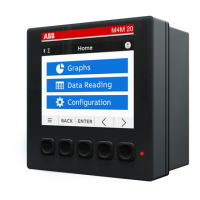
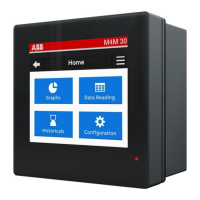
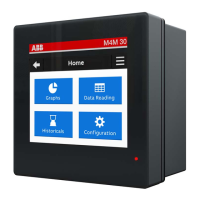
The M4M is designed with user-friendliness in mind, offering intuitive navigation and clear data presentation. The device features a local display that allows users to access various menus and settings directly. The "HOME" screen serves as the central hub, from which users can navigate to "Configuration," "Communication," "Graphs," "Data Reading," and "Historicals."
For communication setup, the M4M provides dedicated sections for both Modbus RTU and Modbus TCP/IP. In the Modbus RTU settings, users can configure parameters such as the device address, baud rate, and parity. The flexibility to select different baud rates (e.g., 9600, 19200, 38400, 57600, 115200) allows for optimization of communication speed, with higher baud rates significantly reducing the time required for operations like firmware updates. The "Parity" setting (Even, Odd, None) ensures data integrity during transmission.
For Modbus TCP/IP communication, the M4M allows configuration of DHCP, IP address, Subnet mask, Gateway, and TCP port. The option to enable or disable DHCP provides flexibility for network integration, allowing the device to either obtain an IP address automatically or be assigned a static IP. This is particularly important when integrating the M4M with cloud access points, where specific IP ranges and TCP ports (e.g., default 502) might be required.
The M4M's integration with EPiC desktop software significantly enhances its usability. EPiC desktop provides a graphical interface for managing and interacting with the device. Users can scan for connected M4M devices using various communication channels, including serial port (Modbus RTU) and Ethernet (Modbus TCP/IP). The software allows for detailed configuration of scan parameters, such as baud rates, parities, and slave addresses for Modbus RTU, and IP addresses or IP address ranges for Modbus TCP/IP.
Once connected, EPiC desktop offers a "Dashboard" view that visualizes real-time measurements and key information about the M4M, including its firmware version. This centralized view simplifies monitoring and troubleshooting. The "Classic View" provides access to product-related pages and Modbus map reading, offering deeper insights into the device's operational data.
The M4M's ability to display graphs and historical data directly on the device or through EPiC desktop is a powerful usage feature. This allows users to visualize trends over time, identify peak loads, and understand energy consumption patterns without needing external tools. The "Data Reading" and "Historicals" sections provide access to stored measurements, which can be invaluable for energy auditing and performance optimization.
Maintaining the M4M device primarily revolves around ensuring its software is up-to-date and its communication settings are correctly configured. Firmware updates are a critical aspect of maintenance, as they introduce new features, improve performance, and address any known issues. The M4M supports firmware updates via the EPiC desktop software, making the process streamlined and user-friendly.
The firmware update procedure involves several steps, starting with ensuring a MyABB account is active and opening EPiC desktop. Users then configure the scanning via the appropriate communication protocol (Modbus RTU or Modbus TCP/IP). For Modbus RTU, this includes selecting the correct port name, baud rate, parity, and slave addresses. For Modbus TCP/IP, it involves inputting the IP address or range of the M4M Ethernet device.
A crucial maintenance tip during firmware updates is to disable any Modbus master devices (e.g., PLCs) in an RS-485 architecture to prevent communication conflicts. This ensures that the M4M can communicate exclusively with EPiC desktop during the update process, minimizing the risk of errors.
Once the device is scanned and recognized by EPiC desktop, users can navigate to the "Tools" section and select "Firmware Update." The software allows users to upload the firmware file (typically an .enc file extracted from a downloaded .zip package) from their computer. EPiC desktop guides the user through the selection of the module to be updated and initiates the update process.
During the firmware update, a loading bar indicates the progress. It is essential to ensure that no other software or devices are actively communicating with the M4M to guarantee a successful update. The process typically involves the M4M rebooting and checking the new firmware, during which the screen may turn black, and red LED lights might be on. A critical instruction is to not unplug the M4M's auxiliary power supply during this operation, as power interruption could corrupt the firmware and render the device inoperable.
Upon successful completion of the firmware update, EPiC desktop displays a confirmation banner. This clear feedback ensures that users are aware of the update status. Regular firmware updates are vital for the long-term reliability and optimal performance of the M4M, ensuring it remains compatible with evolving system requirements and benefits from the latest enhancements.
In summary, the M4M is a robust and versatile network analyzer designed for comprehensive electrical parameter monitoring. Its intuitive usage features, coupled with straightforward maintenance procedures, make it an indispensable tool for energy management and power quality analysis in a wide range of applications.
 General
| Display | LCD |
|---|---|
| Mounting | DIN rail |
| Measurement Category | CAT III |
| Communication Protocols | Modbus RTU |
| Product Name | M4M |
| Protection Class | IP20 |

 To Next Page