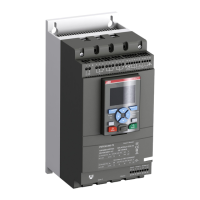
To Next Page


S
Steven GalvanSep 23, 2025
What does 'Faulty usage' mean on my ABB Controller?
- KKimberly ClaySep 23, 2025
Do not use jog forward, jog backward, heat motor, or stand-still break functions with an Inside delta motor connection.

What does 'Faulty usage' mean on my ABB Controller?
Do not use jog forward, jog backward, heat motor, or stand-still break functions with an Inside delta motor connection.
What does it mean when my ABB Controller displays 'Ground fault'?
A ground fault indicates that the sum of the instantaneous line currents in your 3-phase system differs more than the specified value. Examine the motor cables and the motor itself for any issues.
What should I do if my ABB Controller displays 'Locked rotor'?
Examine the bearings of the motor and the load to ensure they run easily. A damaged bearing or a load stock could be the cause.
What does it mean when my ABB Controller displays 'Overvoltage'?
An overvoltage error indicates that the main voltage is too high. Perform a check of the main voltage.
What does it mean when my ABB PSTX210 displays 'Under voltage'?
An undervoltage error indicates that the main voltage is too low. Perform a check of the main voltage.
What does 'High current' mean on my ABB Controller?
A high current fault indicates that a fault current, higher than 8 times the softstarter's rated current, has occurred. Check the circuits and the motor for an insulation fault between phases or a ground fault.
What does 'Voltage imbalance' mean on my ABB PSTX210?
Voltage imbalance indicates that there is a voltage imbalance between the phases. Check the main voltage and restart the motor.
Why does my ABB PSTX210 Controller display 'Too long start time'?
This indicates that the time taken to soft start the motor is longer than the set value. Check the starting conditions and current limit.
How do I fix an ABB Controller that shows a blank screen and no LED is active?
First, ensure that the supply voltage is properly connected, referring to the circuit diagram. Also check that the RJ45 plug is connected between the HMI and the softstarter, and that the RJ45 network cable is not damaged.
What to do if my ABB PSTX210 Controller motor is humming or starts without a given start signal?
This issue could be due to a few reasons. If it's a PSTX30...170 model, a bypass relay might be closed due to inaccurate handling. To resolve this, disconnect the operation voltage and the control supply voltage, remove the USB cable if connected, and then reconnect the voltage in the following sequence: first, the control supply voltage on terminals 1 and 2 (refer to chapter 5.1.2), wait 4 seconds, and then connect the operation voltage on terminals L1, L2, and L3. Alternatively, the bypass contactor/relay could be stuck in a closed position, or there might be a shorted thyristor. In either of these cases, it is best to speak to your ABB Sales Office.
Explains safety symbols, caution, warning, information, and graphics symbols used in the manual.
Covers the primary electrical connections for the main circuit and explains 'In Line' and 'Inside Delta' configurations.
Guides through the first start-up process and the use of the Assistant menu for initial configuration.
Lists common events and their descriptions, covering overload, rotor, phase issues, and more.
Details various fault types such as high current, phase loss, heat sink overtemperature, and thyristor issues.
 General
| Brand | ABB |
|---|---|
| Model | PSTX210 |
| Category | Controller |
| Language | English |